Fugeth
Established Members
-
Joined
-
Last visited
-
I believe I have found an answer to my problem. I created a Maintenance window from 8:00 AM - 4:00 PM Daily and applied it to my Endpoint Protection group. Once this was done the clients started updating as soon as they are placed in the group. I believe that they were defaulting to my other maintenance window which kicks off at 11:00 PM nightly. Hence if I left a test machine on over night it would get the deployment at 11:00 PM. I'm not sure why it wouldn't then get the deployment when the machine came online the next day however. Cheers!
-
I have SCEP setup and if I have a computer with no AV installed the SCEP client installs right away. However if I have an existing machine with Trend Micro installed it waits until 11:00 PM then installs, but only if the machine is online. Does anyone have a suggestion on how I can change this time to be something like every couple hours? We are going to migrate from Trend to SCEP. Thanks!
-
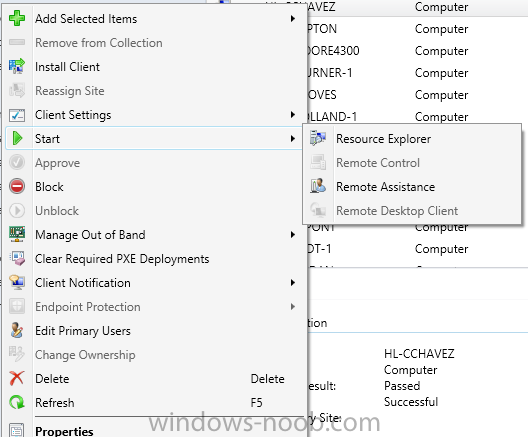
Here is a screen shot.
-
I have remote control enabled for all devices, and up till the last couple of days haven't had any trouble. Yesterday I noticed a computer that remote control was greyed out on for some reason. Today I have more in different areas. Any ideas? Thanks!
-
I have a similar situations. We have mostly mobile users so shutting machines down at night at a certain time doesn't work well. What I have done is created a maintenance window that starts an hour before the end of the day. This way the updates gets pushed out, but the users aren't forced to reboot during the middle of their days. Any machines that get left on will be rebooted as required by the updates, and any machine that get missed will hit the wall and will be forced.when they hit the deadline.