mandy78
Established Members
-
Joined
-
Last visited
Everything posted by mandy78
-
-
Hello Everyone, I am doing PC OS Refresh (Win7-Win7) from OSD task sequence advertised as Optional in the Software Center, As a first step of task sequence, it launches a HTA which will prompt user consent to continue with re-imaginh. I am facing challenge in HTA appearing on top of all windows. I referred may articles bu helped partially. I don't want to use third party utility becasue of IT policies. I want to minimise the all the application if not at least Software center so that HTA is displayed on top. My HTA is created using VB Script. I have used ModalHTA option bu it gives option to close the HTA without answering the HTA user conset ( ACCEPT/CANCEL). Need breakthrough to solve this. Thanks in Advance.
-
-
-
Hello, I am looking for USMT Hardlink guide using MDT Task sequence having below components installed SCCM 2012 R2 MDT 2013 Client: Windows 7 ENT SP1 I want to create MDT task sequence using USMT Hard Link to capture and restore domain user data. I am unable to search any guide using MDT task sequence for USMt Hard link. Any help for direction is greatly appreciated........ Thanks Mandy
-
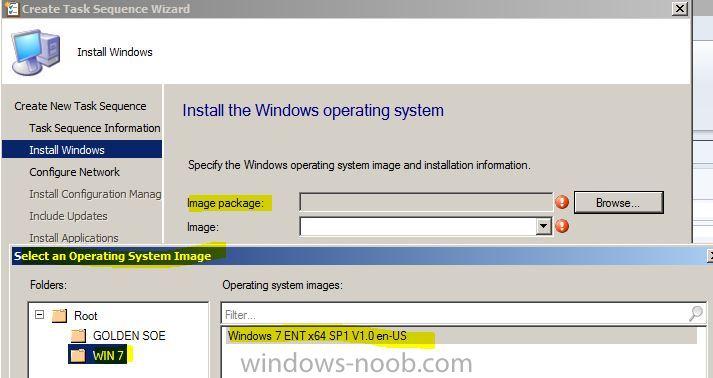
Hi Team, Great work..I am following your guide line to line....... I am facing strange issue in OS deployment Task Sequence.. I I have imported extracted OS ISO contents as mentioned in guide under "Operating System Installer" node. But when I create Task Sequence using " Build and Capture a eference operating system image" to my surprise I could not findthe imported Operating System Installer files to select for. Refer below attachment which only shows Images imported under "Operating System Images" and NOT under "Operating System Installers" which is standard practice for Build and Capture TS. My finding is if I import the OS content under "Operating System Images" as shown above then only it appears in TS. Any step I am missing from "SCCM 2012 RC Part 7 - Build and Capture Windows 7 x64" step guide ? Thanks again for the great guide.