jfletcher
Established Members
-
Joined
-
Last visited
Everything posted by jfletcher
-
I am really not sure where to look for software center stuff in the reg but I have checked to ensure that there is nothing leftover to indicate that anything is still installed on the machine.
-
-
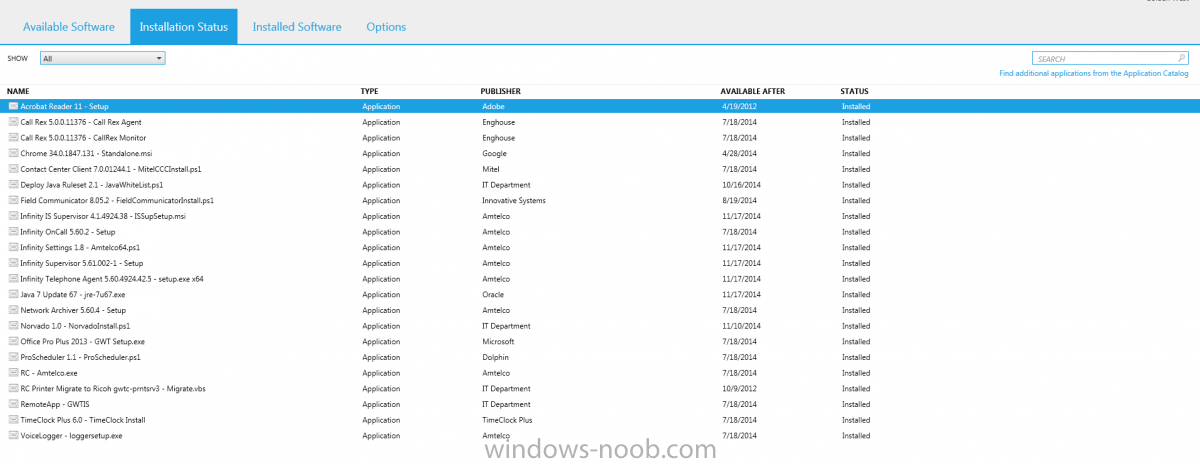
I have a client machine that is running Windows 7 Professional Build 7601 Service Pack 1. We are running System Center 2012 R2, version 5.0.7958.1000. I attached an image of software center on the client machine. The problem: None of the software in that picture that says "Status: Installed" is actually installed. I have tried removing the machine from the deployment collection and rerunning all policies under the action tab in configuration manager on the machine. Once it was added back to the deployment grouo (becuase I need to redeploy this software to test silent/automatic deployment) all of the software came back as being installed. I have cleared the SCCM cache on the local machine... I don't really know where else to go.