




JakesSA
Established Members
-
Joined
-
Last visited
Everything posted by JakesSA
-
Set smsClient = GetObject("winmgmts://127.0.0.1/root/ccm:SMS_Client") Thank you Peter33 The line in red why would the loopback address be used?
-
C00 is my main site code
-
Hi All, I've notice my SCCM clients not responing to my main server. So I started looking and notice the following in our login script. I'm not a expert in scripting but please explain to me what will the following do to my SCCM clients ================== Sub SMSSite() Dim smsClient, inParam, result If Site <> "DurbanPlessey" OR Site <> "Killarney" Then "This will only exclude these sites" Set smsClient = GetObject("winmgmts://127.0.0.1/root/ccm:SMS_Client") Set inParam = smsClient.Methods_.Item("SetAssignedSite").inParameters.SpawnInstance_() inParam.sSiteCode = "C00" Set result = smsClient.ExecMethod_("SetAssignedSite", inParam) End If End Sub ================== Advice will really be appreciated. Thank you Jakes
-
Hi All, I've notice my SCCM clients not responing to my main server. So I started looking and notice the following in our login script. I'm not a expert in scripting but please explain to me what will the following do to my SCCM clients ================== Sub SMSSite() Dim smsClient, inParam, result If Site <> "DurbanPlessey" OR Site <> "Killarney" Then "This will only exclude these sites" Set smsClient = GetObject("winmgmts://127.0.0.1/root/ccm:SMS_Client") Set inParam = smsClient.Methods_.Item("SetAssignedSite").inParameters.SpawnInstance_() inParam.sSiteCode = "C00" Set result = smsClient.ExecMethod_("SetAssignedSite", inParam) End If End Sub ================== Advice will really be appreciated. Thank you Jakes
-
Hi, I've setup a site server. Then I setup a server share. When I go to a package and tries to push the package to this share it doesn't show. If I go to site status it doesn't show any errors and it doesn't show the server share in site status. Thank you Jakes
-
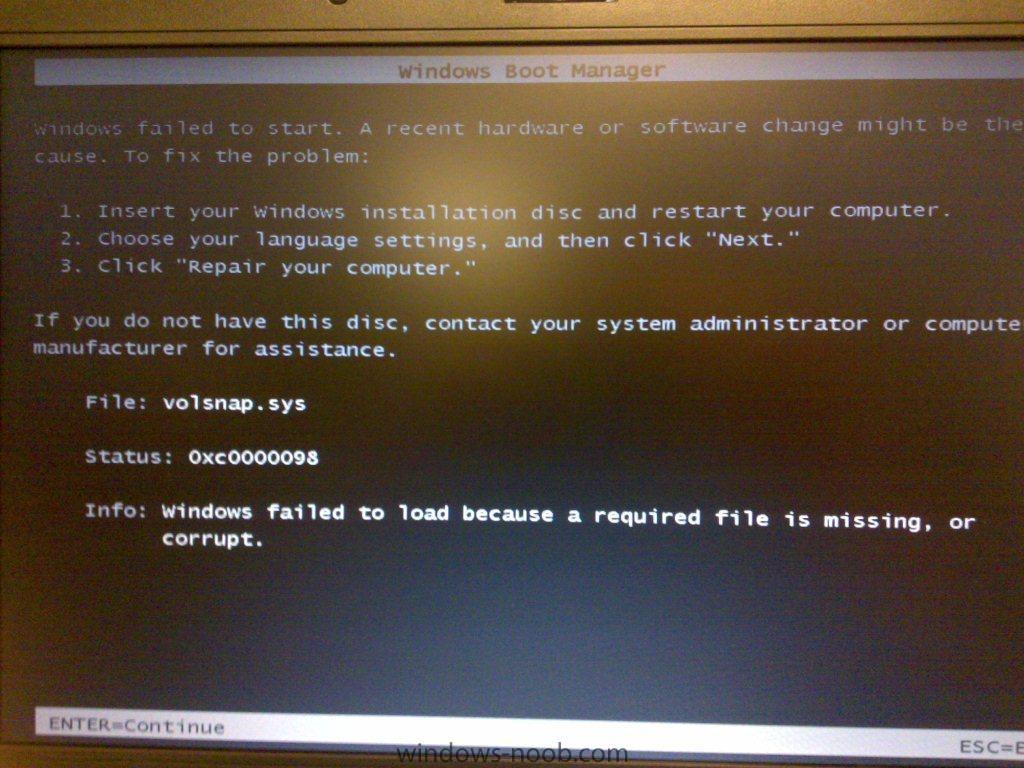
When the pc boots up I get the following errors.
-
No drivers import in the TS. I only added NIC and Disk drivers to the boot image
-
I get the following errors Error: Boot image to update: Microsoft Windows PE (x86) Error: Actions to perform: Add ConfigMgr binaries Enable Windows PE command line support Add drivers Success: Drivers that will be included: Intel® 82852/82855 GM/GME/PM/GMV to Processor I/O Controller - 3580 Disk drive Disk drive Generic volume PCMCIA IDE/ATAPI Controller Microsoft iSCSI Initiator Realtek RTL8139/810x Family Fast Ethernet NIC PCMCIA IDE/ATAPI Controller PCMCIA IDE/ATAPI Controller Error: Failed to import the following drivers: PCMCIA IDE/ATAPI Controller - Failed to inject a ConfigMgr driver into the mounted WIM file Error: The wizard detected the following problems when updating the boot image. Failed to inject a ConfigMgr driver into the mounted WIM file Failed to inject a ConfigMgr driver into the mounted WIM file Failed to inject a ConfigMgr driver into the mounted WIM file Failed to inject a ConfigMgr driver into the mounted WIM file Failed to inject a ConfigMgr driver into the mounted WIM file Failed to inject a ConfigMgr driver into the mounted WIM file Failed to inject a ConfigMgr driver into the mounted WIM file Failed to inject a ConfigMgr driver into the mounted WIM file Failed to inject a ConfigMgr driver into the mounted WIM file Failed to inject a ConfigMgr driver into the mounted WIM file Failed to inject a ConfigMgr driver into the mounted WIM file Failed to inject a ConfigMgr driver into the mounted WIM file Failed to inject a ConfigMgr driver into the mounted WIM file Failed to inject a ConfigMgr driver into the mounted WIM file Failed to inject a ConfigMgr driver into the mounted WIM file Failed to inject a ConfigMgr driver into the mounted WIM file Failed to inject a ConfigMgr driver into the mounted WIM file Failed to inject a ConfigMgr driver into the mounted WIM file The ConfigMgr Provider reported an error.: ConfigMgr Error Object: instance of SMS_ExtendedStatus { Description = "Failed to insert OSD binaries into the WIM file"; ErrorCode = 2152205056; File = "e:\\nts_sms_fre\\sms\\siteserver\\sdk_provider\\smsprov\\sspbootimagepackage.cpp"; Line = 4262; ObjectInfo = "CSspBootImagePackage::PreRefreshPkgSrcHook"; Operation = "ExecMethod"; ParameterInfo = "SMS_BootImagePackage.PackageID=\"C0000030\""; ProviderName = "WinMgmt"; StatusCode = 2147749889; };
-
1. I loaded a box with Vista 2. Then load sp1 3. Then load sp2 4. The ran the capture disk 5. Successfully captured a wim file 6. Then load the wim file into sccm in operating system images 7. Send it to a distribution point 8. Created a TS 9. Created a bootable media 10. Ran the bootable media from the PC 11. TS finished and pc rebooted When the box boots up I get an error
-
Good day, I'm busy deploying Windows Vista SP2 with SCCM SP2. Every time the TS finish and the PC boots it comes up with an error. File missing please run your setup disk to fix it. I get the same sort of error when deploying windows 7. When I deploy Windows XP SP3 and just Vista it works 100% Thank you Jakes

