davidwsteele
Established Members
-
Joined
-
Last visited
-
I'm trying to copy a folder from the Deployment root to my destination machine using an MDT task sequence but I'm getting errors. What is the best way to copy a folder and it's contents to the C:\ drive of the destination machine using MDT.
-
Did all of that, still no success.
-
Applies the image but errors out when it tries to perform sysprep, cannot find the deply.cab file. Anyone seen this before?
-
During the Readiness Check at the beginning of the install process, I'm told to update my Exchange 2012 to SP3, sounds easy......, but I don't have an Exchange server in the environment. Here is what I have running: Windows 2012 R2 DC SCCM 2012 R2, SCOM 2012 R2, MDT 2013, and VMM 2012 R2, all running on Windows 2012 R2. I've gone through ADSI, AD UC, DHCP, DNS, and GPO looking for this server, can't find it anywhere but I'm still told it's there by the install process. Where is this Exchange 2010 coming from? Also nothing in Sites and Services nor Trusts.
-
I'm using DPM 2012 R2 to backup 2012 and 2012 R2 clusters. During the process VMs will shutdown because the CSV goes offline. I did find a hotfix but it was only for 2012 servers, not 2012 R2. Has anyone else seen this issue?
-
At the Pre-Application (update phase) I get this error <![LOG[Microsoft Deployment Toolkit version: 6.1.2373.0]LOG]!><time="13:53:06.000+000" date="03-08-2013" component="ZTIWindowsUpdate" context="" type="1" thread="" file="ZTIWindowsUpdate"> <![LOG[The task sequencer log is located at C:\Users\ADMINI~1\AppData\Local\Temp\SMSTSLog\SMSTS.LOG. For task sequence failures, please consult this log.]LOG]!><time="13:53:06.000+000" date="03-08-2013" component="ZTIWindowsUpdate" context="" type="1" thread="" file="ZTIWindowsUpdate"> <![LOG[begin Windows Update. Reboot=[] Retry=[] Count = 0]LOG]!><time="13:53:06.000+000" date="03-08-2013" component="ZTIWindowsUpdate" context="" type="1" thread="" file="ZTIWindowsUpdate"> <![LOG[Property MSIT_WU_Count is now = 1]LOG]!><time="13:53:06.000+000" date="03-08-2013" component="ZTIWindowsUpdate" context="" type="1" thread="" file="ZTIWindowsUpdate"> <![LOG[Configuring client to use WSUS server http://PHI-MDT-01]LOG]!><time="13:53:06.000+000" date="03-08-2013" component="ZTIWindowsUpdate" context="" type="1" thread="" file="ZTIWindowsUpdate"> <![LOG[Configuring Windows Update settings (manual update, use server)]LOG]!><time="13:53:06.000+000" date="03-08-2013" component="ZTIWindowsUpdate" context="" type="1" thread="" file="ZTIWindowsUpdate"> <![LOG[Archive NoAUtoUpdate State: Was [<empty>].]LOG]!><time="13:53:06.000+000" date="03-08-2013" component="ZTIWindowsUpdate" context="" type="1" thread="" file="ZTIWindowsUpdate"> <![LOG[Property NoAutoUpdate_Previous is now = <empty>]LOG]!><time="13:53:06.000+000" date="03-08-2013" component="ZTIWindowsUpdate" context="" type="1" thread="" file="ZTIWindowsUpdate"> <![LOG[Windows Update Agent verion 8 found, OK to continue]LOG]!><time="13:53:13.000+000" date="03-08-2013" component="ZTIWindowsUpdate" context="" type="1" thread="" file="ZTIWindowsUpdate"> <![LOG[Ready to Opt-In to Microsoft Update: WUA Version: 7.8.9200.16465]LOG]!><time="13:53:13.000+000" date="03-08-2013" component="ZTIWindowsUpdate" context="" type="1" thread="" file="ZTIWindowsUpdate"> <![LOG[Microsoft Update Service: Enabled = False]LOG]!><time="13:53:13.000+000" date="03-08-2013" component="ZTIWindowsUpdate" context="" type="1" thread="" file="ZTIWindowsUpdate"> <![LOG[Command Line Procesed Query=False Registered=False UpdateCommand=[isInstalled = 0 and IsHidden = 0]]LOG]!><time="13:53:13.000+000" date="03-08-2013" component="ZTIWindowsUpdate" context="" type="1" thread="" file="ZTIWindowsUpdate"> <![LOG[start Search...]LOG]!><time="13:53:14.000+000" date="03-08-2013" component="ZTIWindowsUpdate" context="" type="1" thread="" file="ZTIWindowsUpdate"> <![LOG[FAILURE (Err): -2145107943 0x80244019: Windows Update, search for updates. -]LOG]!><time="13:53:14.000+000" date="03-08-2013" component="ZTIWindowsUpdate" context="" type="2" thread="" file="ZTIWindowsUpdate"> <![LOG[Restore NoAutoUpdateKey to <empty>.]LOG]!><time="13:53:14.000+000" date="03-08-2013" component="ZTIWindowsUpdate" context="" type="1" thread="" file="ZTIWindowsUpdate"> <![LOG[ZTI ERROR - Non-zero return code by ZTIWindowsUpdate, rc = 1]LOG]!><time="13:53:14.000+000" date="03-08-2013" component="ZTIWindowsUpdate" context="" type="3" thread="" file="ZTIWindowsUpdate">
-
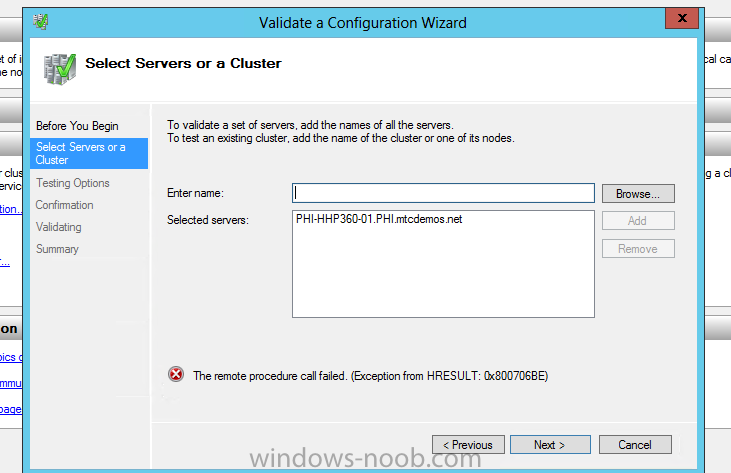
I'm trying to create a 3 node cluster, when I start to perform a validation, everytime I try to add a different host, I get this error. I can add Host 01 to the wizard but not 02 or 03. When I try to perform this on Host 02, I can't add 01 or 03.

-
I'm trying to do an in-place upgrade from 2008R2 to 2012, everytime I start the process I get a message saying that I don't have enough disk space. No matter how much space I free up, I keep getting the same message, "not enough disk space on drive C:" Has anyone else seen this message?
-
After I configured the Discovery Methods, I was unable to find the adsysdis.log file, do you know what step I might have missed? Also, I had to create my Default-First-Site-Name boundry, because CM2012 didn't create it. **** My bad, found it, nothing to see here ~.^
-
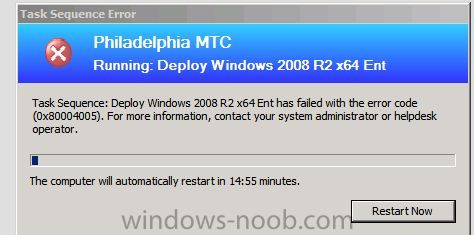
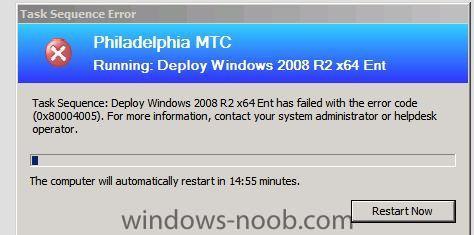
I followed your guide and created a Windows 2008 R2 image that I could deploy. I was able to build and capture the Image the server image just fine, no errors, but when I go to deploy the new image, I get a 0x80004005 error. Did I miss any thing?
-
I do plan on making my own changes, I just wanted to know why it's missing in the first place.
-
After Deploying a reference image that I just created, I noticed that my Default logon user icon is blank, any way to fix that?