Skip to content

hasan

Established Members
  • Joined

  • Last visited

Everything posted by hasan

  1. ok Grath, i wanna say thanks for your advice...i would try, to check my proxy setting
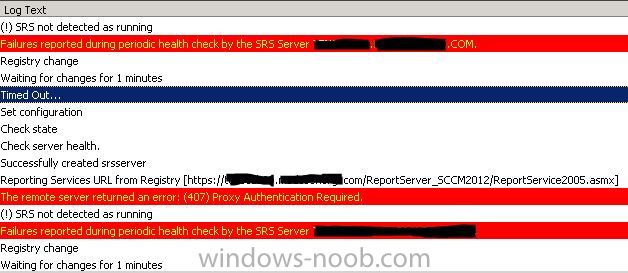
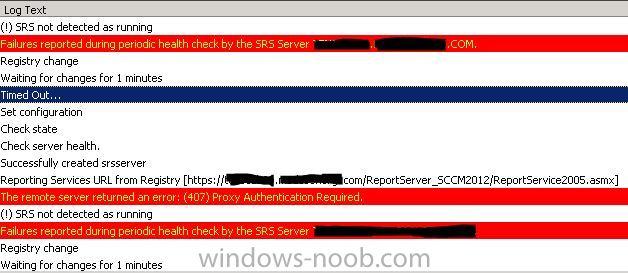
  2. I got some issue when install Reporting Service Point SCCM 2012 R2, i'm using 2 server, this one server for SCCM and other server for SQL server, my SQL server already have 2 intance, one for SCOM and one for my SCCM SCCM 2012 R2 = WINDOWS SERVER 2012 SQL SERVER 2008 R2 SP1 + CU 12 = WINDOWS SERVER 2008 this below is the log, i'm always try to looking for some workaround, but till now, i try to bypass connection between SCCM server and SQL server from proxy server, but still error. Anyone can help me ?
  3. yes u can deploy SCEP silently, after you push SCCM agent(in this contect your SCCM Agent successfully deploy in the client target). and u can create rule to auto update SCEP. U can find many tutorial explain about this, please try to search before you ask...Thanks
  4. hallo christensen143, maybe this link can solving your problem http://www.windows-noob.com/forums/index.php?/topic/7789-pxe-boot-failure-after-upgrading-to-system-center-2012-configuration-manager-service-pack-1/

Account

Navigation

Search

Search

Configure browser push notifications

Chrome (Android)
  1. Tap the lock icon next to the address bar.
  2. Tap Permissions → Notifications.
  3. Adjust your preference.
Chrome (Desktop)
  1. Click the padlock icon in the address bar.
  2. Select Site settings.
  3. Find Notifications and adjust your preference.