Chris Payne
-
Posts
3 -
Joined
-
Last visited
Everything posted by Chris Payne
-
Hello all, I hope everyone's new year is going well for them. In our environment we have one parent domain and two child domains. For example we have test.com, alpha.test.com and beta.test.com. We have separate defined prefixes for each domain and we have separate task sequences for each domain. I am trying to combine the task sequences into one. We have OSDCOMPUTERNAME set as a task sequence variable on the unknown computer collection so we have to name the computer at the start of the task sequence. For example a group called Join Test Domain, Join Alpha Domain, and Join Beta domain. Under each of the groups is the appropriate Apply Network Settings to get it to join the selected domain. I have tried using both WMI query and task sequence variables to filter the computers to the correct domain based off their prefix or their name. For the WMI query I have used "Select * from Win32_ComputerSystem where Name like "A%" and for task sequence variable I have used OSDCOMPUTERNAME Like "A*", neither of these two methods have worked because even thou we named the computer at the start of the TS the computer names are still showing in the log as MININT-XXXX. Any suggestions on how I would need to call on the OSDCOMPUTERNAME that we used at the beginning of TS? At the start of the TS I have tried to set the task sequence variable to OSDCOMPUTERNAME just like we have on the the Unknown computer collection but it is not prompting me to enter a computer name. I am grateful for any any help or advise, thanks.
-
I am having the same issue. When I run the log command all I get is the following "Because this distribution point is co-located with its site server, packages may correctly exist in the content library that are not distributed to the distribution point. Package deletion has been disabled.". We have one MECM server that also hosts the DP. Any suggestions would be great. Thanks
-
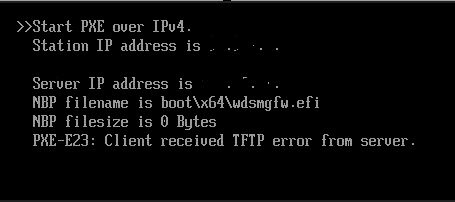
In our SCCM environment we use HTTPS only for communication. Two weeks ago I replaced our existing certificate for our IIS server with a new since the existing one was set to expire on 3/2. On Monday clients started getting the following error message when trying to PXE for an image: (See 1st image, I have removed the IP address information). When I looked at the SMSPXE.LOG I found the following: (See 2nd image) When I looked at the SMSPXE.LOG I found the following: I have verified that the HTTPS bindings for the default website is using the correct certificate and that certificate does not expire till 2026. The certificate was replaced before the old one was set to expire. I also did a NETSH HTTP SHOW SSLCERT IPPORT=0.0.0.0:443 and verified that the certificate hash matched the certificate thumbprint of the SSL certificate in the site binding. I have removed the old certificate and restarted the server but clients are still getting that error message and the same WINHTTP_CALLBACK_STATUS error message is still the same. I have spent the last two days reviewing different articles and suggestions regarding this error and I am not sure how to proceed. I would be very grateful for any suggestions. Thanks!