




sonikc
Established Members
-
Joined
-
Last visited
Everything posted by sonikc
-
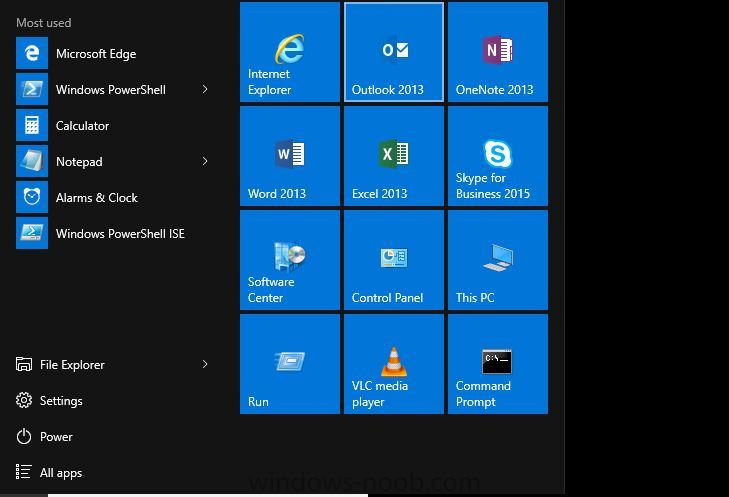
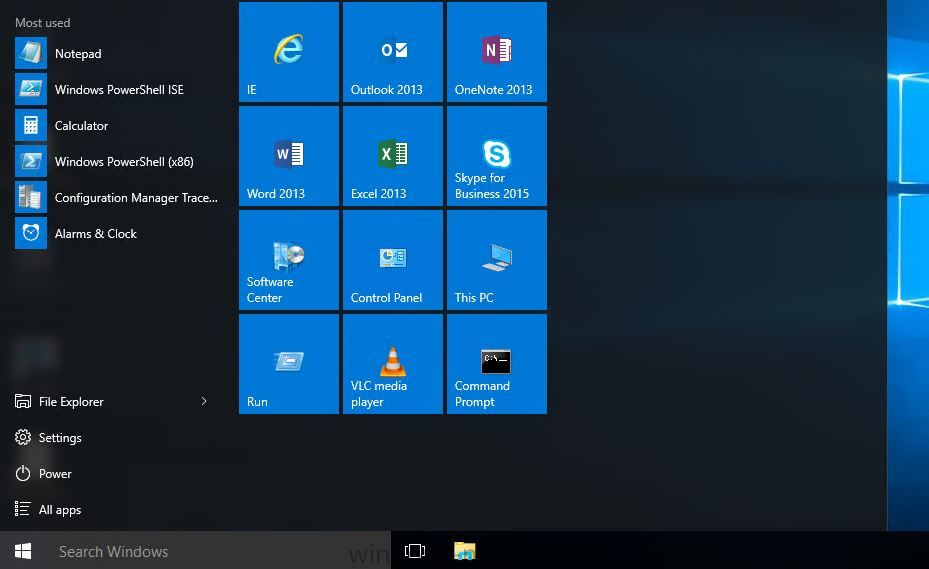
This is the xml structure of my start menu <LayoutModificationTemplate Version="1" xmlns="http://schemas.microsoft.com/Start/2014/LayoutModification"> <DefaultLayoutOverride> <StartLayoutCollection> <defaultlayout:StartLayout GroupCellWidth="6" xmlns:defaultlayout="http://schemas.microsoft.com/Start/2014/FullDefaultLayout"> <start:Group Name="" xmlns:start="http://schemas.microsoft.com/Start/2014/StartLayout"> <start:DesktopApplicationTile Size="2x2" Column="0" Row="2" DesktopApplicationID="{7C5A40EF-A0FB-4BFC-874A-C0F2E0B9FA8E}\Microsoft Office\Office15\WINWORD.EXE" /> <start:DesktopApplicationTile Size="2x2" Column="2" Row="0" DesktopApplicationID="Microsoft.Office.OUTLOOK.EXE.15" /> <start:DesktopApplicationTile Size="2x2" Column="4" Row="2" DesktopApplicationID="{7C5A40EF-A0FB-4BFC-874A-C0F2E0B9FA8E}\Microsoft Office\Office15\lync.exe" /> <start:DesktopApplicationTile Size="2x2" Column="2" Row="2" DesktopApplicationID="{7C5A40EF-A0FB-4BFC-874A-C0F2E0B9FA8E}\Microsoft Office\Office15\EXCEL.EXE" /> <start:DesktopApplicationTile Size="2x2" Column="0" Row="0" DesktopApplicationID="Microsoft.InternetExplorer.Default" /> <start:DesktopApplicationTile Size="2x2" Column="4" Row="4" DesktopApplicationID="Microsoft.Windows.Computer" /> <start:DesktopApplicationTile Size="2x2" Column="0" Row="4" DesktopApplicationID="Microsoft.SoftwareCenter.DesktopToasts" /> <start:DesktopApplicationTile Size="2x2" Column="2" Row="4" DesktopApplicationID="Microsoft.Windows.ControlPanel" /> <start:DesktopApplicationTile Size="2x2" Column="4" Row="0" DesktopApplicationID="{7C5A40EF-A0FB-4BFC-874A-C0F2E0B9FA8E}\Microsoft Office\Office15\ONENOTE.EXE" /> <start:DesktopApplicationTile Size="2x2" Column="0" Row="6" DesktopApplicationID="Microsoft.Windows.Shell.RunDialog" /> <start:DesktopApplicationTile Size="2x2" Column="2" Row="6" DesktopApplicationID="{7C5A40EF-A0FB-4BFC-874A-C0F2E0B9FA8E}\VideoLAN\VLC\vlc.exe" /> <start:DesktopApplicationTile Size="2x2" Column="4" Row="6" DesktopApplicationID="{1AC14E77-02E7-4E5D-B744-2EB1AE5198B7}\cmd.exe" /> </start:Group> </defaultlayout:StartLayout> </StartLayoutCollection> </DefaultLayoutOverride> </LayoutModificationTemplate> This is the source menu The result of the import give this menu I've read here: https://msdn.microsoft.com/en-us/library/windows/hardware/mt171092(v=vs.85).aspx That the default is 2 columns unless I specify a layout element such as <LayoutOptions StartTileGroupsColumnCount="1" ? Thanks for reviewing.
-
I've got this working well other than the width shows 12 columns when I customized and exported the xml with 6 columns so the items fitted exactly. It now shows a blank grey space next to the actual icons, has anyone else encountered this, is there a way to manually modify the xml to only show the required 6 columns.
