




lep86
Established Members
-
Joined
-
Last visited
-
Good day! Please help to implement the scenario. Need some query!!!! There are several organizations, each organization needs to make your address list. Let's say there are 3 organizations. ORG.A, ORG.B, ORG.C Conditions: 1) Members ORG.A can see the address list ORG.B, ORG.C and send emails to them but do not consist in ORG.B, ORG.C 2) Members ORG.B can see the address list ORG.A, ORG.C and send emails to them but do not consist in ORG.A, ORG.C 3) Members ORG.C can see the address list ORG.A, ORG.B and send emails to them but do not consist in ORG.A, ORG.B
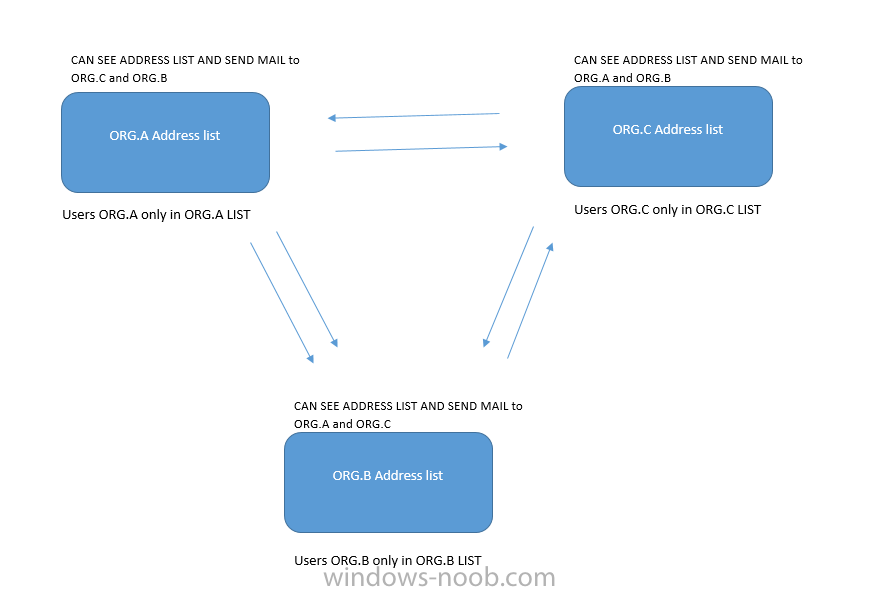
-
How i can get?
-
yes, its work
-
Good afternoon! I have a few policies that apply to the computer. I need to check the success of the application of policies to a computer.
-
Good day! I try to get domain groups my PC. I use that script $Compliance = 'Compliant' Get-ADComputer -Identity $env:COMPUTERNAME -Properties MemberOf | select -expand MemberOf | foreach {if ($_ -like '*All Coputers*') {$Compliance = 'Non-Compliant'}} $Compliance But the result always teaches compliant regardless of which group the computer is located. What i'm doing wrong?
-
And how i can use that in SCCM?
-
Good day! Need some help. How to check the use of Group Policy on the local computer in a domain?
