dmuro
New Members
-
Joined
-
Last visited
Everything posted by dmuro
-
I have Server 2008 Standard with SCCM 2012 SP1. V 5.00.7804.1000. I am trying to download 1606 Prereq files but it keeps failing at the end with the errors below. I am able to download them on my Windows 7 machine all the way thru, copy them to the server, but when I choose to use previous downloaded files, it gives me same error and deletes the file SQLSysClrTypes.msi. INFO: Verifying signature for file 'C:\Users\dmuro\Desktop\Prereq\SQLSysClrTypes.msi' $$<Configuration Manager Setup><02-28-2017 10:41:31.220+480><thread=9680 (0x25D0)> ERROR: Failed to verify 'C:\Users\dmuro\Desktop\Prereq\SQLSysClrTypes.msi' authenticode signature. $$<Configuration Manager Setup><02-28-2017 10:41:31.249+480><thread=9680 (0x25D0)> ERROR: File signature check failed for C:\Users\dmuro\Desktop\Prereq\SQLSysClrTypes.msi $$<Configuration Manager Setup><02-28-2017 10:41:31.266+480><thread=9680 (0x25D0)> INFO: Downloaded file 'C:\Users\dmuro\Desktop\Prereq\SQLSysClrTypes.msi' is not valid $$<Configuration Manager Setup><02-28-2017 10:41:31.282+480><thread=9680 (0x25D0)> ERROR: Failed to download required file $$<Configuration Manager Setup><02-28-2017 10:41:31.543+480><thread=9680 (0x25D0)> I have tried this, but still no go. Workaround: On the site server, modify the following registry key to match the following, and then either restart the SMS_Executive service, or wait up to 24 hours for the next automatic download cycle. Key to edit: HKEY_CURRENT_USER\Software\Microsoft\Windows\CurrentVersion\WinTrust\Trust Providers\Software Publishing Value for State: Set to 146944 Decimal or 0x00023e00 Hexadecimal
-
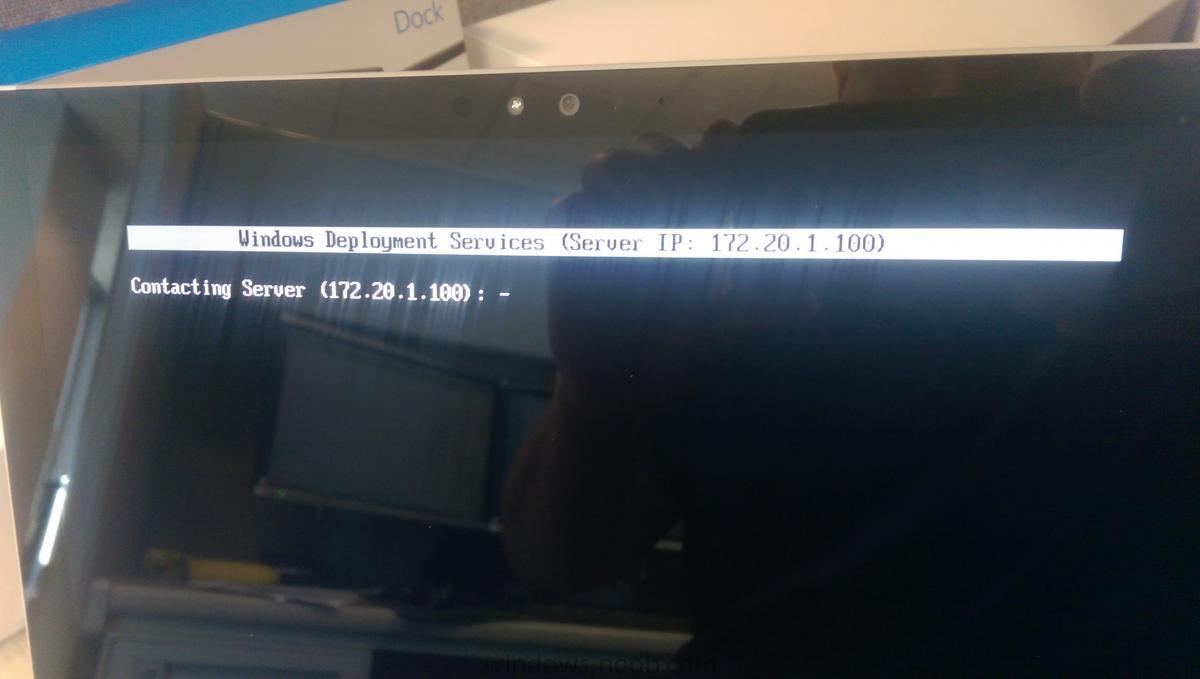
This is the first time I am trying to boot to a UEFI device. I have Server 2008 Standard with WDS, MDT 2013 Update 2, and WADK - Windows 10. DHCP is also setup on this server. IP Helper has been setup on the switch to this server also. After some research I see that I need to configure 067 Bootfile Name to SMSBoot\x64\wdsmgfw.efi. This file did not exist on my server. When I tried to PXE boot to the server by pressing the Vol - and Power buttons, it would download bootmgfw.efi and then just go to a blank blue screen. I then copied wdsmgfw.efi from a 2012 server from another department and renamed it bootmgfw.efi and put it in \RemoteInstall\Boot\x64 folder. Now when I PXE boot, it tries to connect to the WDS server but never continues (I attached picture). I also have 066 Boot Server Host Name pointing to the WDS server and 060 PXEClient configured. Can you please give me some suggestions?