kreienkaa
Established Members
-
Joined
-
Last visited
-
-
-
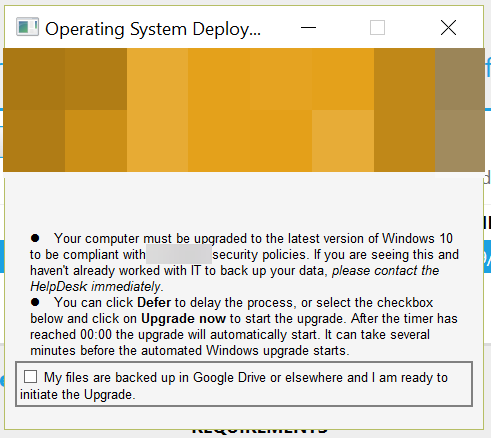
I really appreciate all the work you've put into this process--it worked perfectly in my testing environment. However, when I deployed it to machines with different resolutions and scaling levels, the popup gets completely hosed. This is at 1600x900, with Windows scaling at 150%: Notice that the "Upgrade now" and "Defer" boxes are unable to be checked, since they're outside the dialog box's edges. And it's even worse on 1920x1080 with 150% scaling, though I don't have a screenshot. This has successfully run on my test machines and one user's machine, so the process is fine--it's just the box that needs fixing. The only places I've modified the .hta are the parts with display text. I see the .hta has handling for different resolutions and DPI, but for whatever reason it's bombing when scaling gets involved. Is there anything you'd recommend to try? Thanks for any help you can provide! Andy