




psmiddleton
Established Members
-
Joined
-
Last visited
Everything posted by psmiddleton
-
I changed the media version to Ent and it worked thanks. i am getting an error now when trying to build that the device could not connect to the deployment share as a networking device did not have a diver installed. i tried injecting the nic drivers into the wim but still no joy any ideas? paul
-
Hi When replaced with Operating systems\Windows 8.1 x64\sources\install.WIM i get a error "object reference not set to an instance of an object" ??? Paul
-
Hi I have done this a few times now. Am i right in thinking once it has imported the OS and then tries to create the TS, the OS Name is what should be in the code line? As this then tells it where the wim is located. I.E. when i look in the work bench I see “Windows 8.1 Enterprise Evaluation in Windows 8.1 Enterprise Evaluation x64 install.wim” as operating system name. So the code should be: import-mdttasksequence -path "DS001:\Task Sequences\Windows 8.1 x64" -Name "Deploy Windows 8.1 x64 - Surface Pro 3" -Template "Client.xml" -Comments "© windows-noob.com" -ID "001" -Version "1.0" -OperatingSystemPath "DS001:\Operating Systems\Windows 8.1 x64\Windows 8.1 Enterprise Evaluation in Windows 8.1 Enterprise Evaluation x64 install.wim" -FullName "windows-noob" -OrgName "windows-noob.com" -HomePage "about:blank" -AdminPassword "Password" -Verbose
-
Hi yes i copied the OS files and downloaded all the other files as well, do i need to point to the WIM or just the folder? thanks Paul
-
Hi the task sequence does not get created with the following error Import-MDTTaskSequence : Cannot bind parameter 'OperatingSystemPath' to the target. Exception setting "OperatingSystemPath": "Cannot find path 'DS001:\Operating Systems\Windows 8.1 Enterprise x64\sources\install.wim' because it does not exist." thanks Paul
-
Hi I got the same problem as takim i have checked step three and modified the patch to the install.wim yet no joy. is there anything else that you could think of that would fix this?? thanks Paul
-
-
-
Hi what is the best way to do this. Is it simply install SCCM on a server and adding to current site, or do I create a new site? Thanks
-
Hi i change the path to "./*.*" and it worked thanks
-
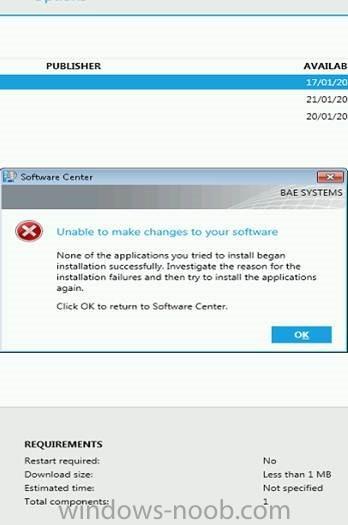
Hi i get they above message when trying to run a TS i have made available to users, screen shot blow, Any ideas?
-
I have a package with a BAT file that uses xcopy.exe to copy a file, the TS hangs after the file is copied, you can see that the xcopy.exe process is running and if you kill it the TS ends reporting Fail. Any ideas why the process will not complete
-
Hi sorry the question was not how to add the \DP role, it is when setting up the server for the remote site, ie installing SCCM, would each server be a standalone server with the same site info as the primary?
-
Hi and Thanks When i install SCCM on the server's i do i select standalone and just enter the same site info, then only select the DP role?
-
Hi i have a standalone primary site server and i will be adding 7 DP's to remote sites. Do i need to add a CAS or can i add them to the existing site? Paul
-
Hi I am using x86 boot image with no drivers, i didn't i needed them as it was booting to a VM. Thankls
-
Hi thanks for the reply and post link I have added a static IP to the unattend file this has moved on the TS, it starts ok and looks good, as in sysprep task starts but when it gets to the caputre task it booms with a 0x0000002 error
-
Hi My SCCM server is on a V-Lan with no DHCP, so i am having trouble getting my build and capture TS to work on a VM i have created. i can't PXE boot as no ip is given to the VM, i created boot media and gave the VM a static ip in PE, but the TS fails, i think it is because the VM can't connect back to SCCM when it boots into Win7 to do the capture. Any Ideas
-
I have found that when I add a specific package to my OSD task sequence the SCCM client certificate shows as “None” and the components done show as “Enabled”. This then means I can not deployment any addition apps to the machine. My question is this: what could be the app be doing to cause this ? Paul
-
Thanks AmreMahdy can you tell it what version to install and override the auto detact?? Paul
-
Hi does the SCCM 2012 client auto detect the PC architecure and then install the correct version of the client?? Paul
-
Just an update regenerated the deployment share and i have been able to create a new boot image in SCCM i have distributed this to the DP x86 and x64 and i still get the same error
-
Thanks i will give it a try, just so i am clear, would that be a WMI query in the condition
-
Hi No there are no unknown computers in devices
-
I tried to crate a new MDT boot image and it failed with the following error: Error while importing Microsoft Deployment Toolkit Task Sequence. Failed to insert OSD binaries into the WIM file Microsoft.ConfigurationManagement.ManagementProvider.WqlQueryEngine.WqlQueryException: The SMS Provider reported an error. ---> System.Management.ManagementException: Generic failure at System.Management.ManagementException.ThrowWithExtendedInfo(ManagementStatus errorCode) at System.Management.ManagementObject.Put(PutOptions options) at Microsoft.ConfigurationManagement.ManagementProvider.WqlQueryEngine.WqlResultObject.Put(ReportProgress progressReport) --- End of inner exception stack trace --- at Microsoft.ConfigurationManagement.ManagementProvider.WqlQueryEngine.WqlResultObject.Put(ReportProgress progressReport) at Microsoft.ConfigurationManagement.ManagementProvider.WqlQueryEngine.WqlResultObject.Put() at Microsoft.BDD.Wizards.SCCM_ImportTaskSequenceTask.DoWork(SmsPageData smspageData, Dictionary`2 data)


