




Polarman
Established Members
-
Joined
-
Last visited
-
I have a software that is putting files in users %temp%-folder. As we have AppLocker preventing installations from ANY standard temp-folders, I need to change this How can I script change of users %temp% folder, to another location, temporary?
-
Can I change this to "start-process "$filepath" -argumentlist "$arguments" | Out-Null ? Or is the "&" only set for this?
-
I have a script installing "LabView" from "National Instruments". However the installer (setup.exe with parameters) is just starting a lot of other installers, and when I use SCCM and detection method the software goes to "installed" just after starting install, although it continues for another hour (!). That is because im checking if a file is present. How could I instead check for "when a process finish or exits then the software is installed"? Knut
-
Downloading 12000 files takes a long time downloading (the users usually thinks something is wrong and restart when it's stuck on "downloading" in SC), and we have software that is 40 gb's too...
-
Hi, I need help changing this script to start install from a share instead of files being downloaded and cached before installing... For use with SCCM 2012 $SPSSArgs = '"IBM SPSS Statistics 24.msi" AUTHCODE="mycodehere" INSTALLPYTHON="0" ENABLE_JAB="1"' $MSIexecArgs = "/qb ALLUSERS=2 /m MSIUQUPQ /norestart /i" Start-Process msiexec.exe -ArgumentList "$SPSSArgs $MSIexecArgs" -Wait Do I need to rebuild the whole script? Knut
-
How to deploy Adobe Connect AddIn to all users in our non-admin environment?? Using SCCM.... This is a per-user software I see, but Adobe has a setup.exe that checks if the user have Connect installed Knut
-
"Free hand"?? Well, it worked like a charm! Got versions up and name of software Thanks Garth!
-
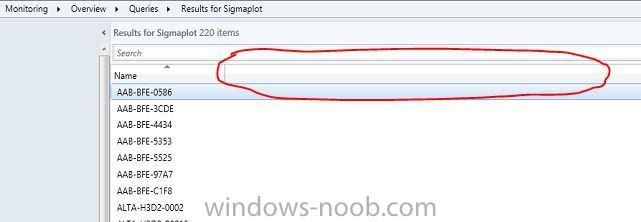
select distinct SMS_G_System_SYSTEM.Name from SMS_R_System as Sys full join SMS_G_System_ADD_REMOVE_PROGRAMS as ARP on ARP.ResourceID = Sys.ResourceId full join SMS_G_System_SYSTEM on SMS_G_System_SYSTEM.ResourceID = Sys.ResourceId where ARP.DisplayName like "Sigmaplot %" This is the query, giving the right result. However, I want the result displaying me more info than just the machines having this installed. I want the result to show name of software, version and if possible how many times it has been used. As shown in the picture attached I want more info inside the red line
-
I have made a query which gives how many have a specific software installed. However, I want to display the result on which machine has the software, what version and product. And maybe when it was installed. How to build this query?? Knut
-
The only difference is that in AD they are marked as "Employees" and as "Students". So I guess something like "Primary owner is employee and his/her machine"?
-
I want to make a query that collects the machines of all employees here, and not the students machines. How to do this?
-
I want to make a query that collects the machines of all employees here, and not the students machines. How to do this?
-
I have an application which behave strange. On windows 8 this app will install fine. However on windows 7 it fails. It wont download all files/folders to the cache on the client. And of course the installation fails when folders are missing... It starts to install but then cant find some folders, rollbacks the installation and fails. How could this be??? Knut
-
Nevermind, I got it to work. In the CMD I copied a dummy file to the client, and in the detection rule I said if that file existed the program installed ok. Then everything work on as planned
-
Hello I have a CMD-file that need to run prior installation of installing Office 2013. This CMD-file will kill processes, uninstall LIP's and LYNC and so on. Then when finished the office 2013 will be installed. However I have trouble of making a detection rule. How do I detect the presence of this application when all it do is remove software? Should I copy a "dummy"-file to let SCCM know its there? Other solutions? Knut


