Bruce Zhang
New Members
-
Joined
-
Last visited
-
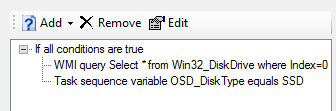
Hi Bro, It's really a nice post, thanks for your contributions and I have another question: How can I monitor the value of the task sequence that I created and write to the log. E.g. MDT : 6.3.8456.1000 installed on Windows Server 2012 R2 Client: HP Laptop with dual hard disk. Disk 0: SSD 256G, Disk 1: HDD 500G Aim: Install the OS on SSD (No all the SSD is on Disk 0, so I want to dynamic select ) I follow your post and create a variable that named OSD_DiskType. powershell -Command "& {(New-Object -COMObject Microsoft.SMS.TSEnvironment).Value('OSD_DiskType') = (Get-Physicaldisk).MediaType}" I can find it run and exist code is 0 in smsts.log But the TS doesn't work as I defined during the disk format and partition Log: The action (Format and Partition Disk (UEFI) Disk0) has been skipped because the condition is evaluated to be false Question: How can I output the queried information to the log so that I know what happened and find the root of the issue.