




misterkai
New Members
-
Joined
-
Last visited
-
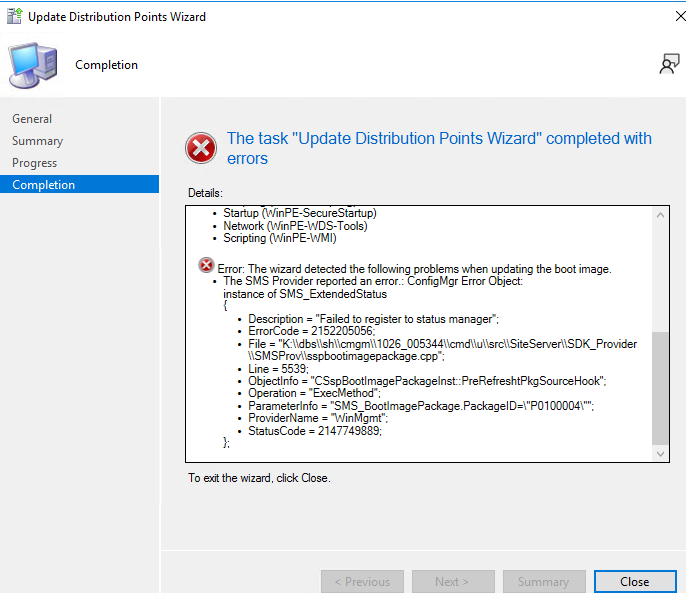
Hi, We upgraded SCCM today to 2309 and on top of that to the 2nd latest ADK + WinPE (22621) since we still are in need of MDT as it is right now. The Upgrade went smoothly however after that I experienced issues with updating the architecture x86 boot image with the new ADK. The x64 and also the new MDT boot image that I created works. When I am trying to update the x86 Boot Image I get the error given in the picture SMSProv.log shows the following errors: Execute SQL =select all SMS_ObjectContentExtraInfo.DateCreated,SMS_ObjectContentExtraInfo.Description,SMS_ObjectContentExtraInfo.FeatureType,SMS_ObjectContentExtraInfo.LastUpdateDate,SMS_ObjectContentExtraInfo.NumberErrors,SMS_ObjectContentExtraInfo.NumberInProgress,SMS_ObjectContentExtraInfo.NumberInstalled,SMS_ObjectContentExtraInfo.NumberUnknown,SMS_ObjectContentExtraInfo.ObjectID,SMS_ObjectContentExtraInfo.ObjectType,SMS_ObjectContentExtraInfo.ObjectTypeID,SMS_ObjectContentExtraInfo.PackageID,SMS_ObjectContentExtraInfo.SoftwareName,SMS_ObjectContentExtraInfo.SourceSite,SMS_ObjectContentExtraInfo.SourceSize,SMS_ObjectContentExtraInfo.SourceVersion,SMS_ObjectContentExtraInfo.Targeted from fn_ListObjectContentExtraInfo(1033) AS SMS_ObjectContentExtraInfo where SMS_ObjectContentExtraInfo.ObjectID = N'P0100004' Error setting property (TransformAnalysisDate) 0x80041002! Error setting property (TransformReadiness) 0x80041002! *~*~K:\dbs\sh\cmgm\1026_005344\cmd\u\src\SiteServer\SDK_Provider\SMSProv\sspbootimagepackage.cpp(5539) : Failed to register to status manager~*~* *~*~Failed to register to status manager ~*~* This in itself causes issue with PXE boot for us. Anyone has any tips on how to resolve this?
-
