ogeccut
Established Members
-
Joined
-
Last visited
Everything posted by ogeccut
-
SUP is a role in SCCM? if so then i dont think it was ever installed. i just installed sccm and did not do any configuration yet. WSUS is a role on the server? I have server 2012 and do see WSUS installed, but i cant find a way to remove it. WSUS role is installed and grayed out. I cant select it in order to remove Am i looking in the wrong place? or i wrong idea about SUP and WSUS?? Thanks for the help.
-
Thank you for the help. Now i am able to open a console. The server does have notification to do a "Post-Deployment Configuration" It is failing and the log has the error: User does not have permission to alter database 'SUSDB'. I think its is related that sql has been installed under local administrator as well. DO i need to add my SMSAdmin user in the SQL? If so, where do i need to add it? Thanks for the help.
-
SMSAdmin is already a member of a local administrators group. And back to my original questions. Is it better to go back to a clean server in Vm and install SCCM under correct SMSAdmin user account? GarthMJ I will add the account in CM logged in locally and post back the results. Thanks for the help.
-
When i log in as a local admin i have no issues. SCCM was installed as a local administrator. However when i log in as SMSAdmin with is in the local administrators group i do get an error:The user account running the Configuration Manager console has insufficientpermissions to read information from the Configuration Manager Can you please go into more details "just assign yourself permission to access CM12". Permission to SMSAdmin account? And where? AD? SCCM? Thank you.
-
I made a mistake by installing a SCCM as a local admin and not a SMSAdmin. And now.......I am getting "The user account running the Configuration Manager console has insufficientpermissions to read information from the Configuration Manager" SMSAdmin is added to a local administrators group Is there a way to fix this or should i got back and re-install? Thanks for the help.
-
I am trying to a new Boot.wimx86 image to SCCM 2007. Keep getting an error: The specified file can not be imported. Please make sure that the file is not read only and you have read and write access to it. I am logged in as a full admin. I tired adding full rights to everyone including the computer name to the directory where i have boot.wim file. When i try to create a boot image from MDT: Create boot image using MDT i get an error: While importing MDT toolkit task sequence. Started processing. Creating boot image. Generating boot image. Capturing new boot image WIM file. Copying WIM image to package source directory. Error while importing Microsoft Deployment Toolkit Task Sequence. Microsoft.ConfigurationManagement.ManagementProvider.WqlQueryEngine.WqlQueryException: The ConfigMgr Provider reported an error. ---> System.Management.ManagementException: Generic failure at System.Management.ManagementException.ThrowWithExtendedInfo(ManagementStatus errorCode) at System.Management.ManagementObject.Put(PutOptions options) at Microsoft.ConfigurationManagement.ManagementProvider.WqlQueryEngine.WqlResultObject.Put(ReportProgress progressReport) --- End of inner exception stack trace --- at Microsoft.ConfigurationManagement.ManagementProvider.WqlQueryEngine.WqlResultObject.Put(ReportProgress progressReport) at Microsoft.BDD.Wizards.Controls.SCCM_ImportTaskSequenceTask.DoWork(SmsPageData smspageData, Dictionary`2 data) After Further troubleshooting it seems that i have 2 separate issues: 1. I am getting an error when i try to create a new mdt boot image. 2. I also get an error when i try to add a new boot.wim file. I open add boot image wizard and point to my boot.wim file. I can see it creates a GUID file same size as my boot.wim file in the same folder as a wim file i selected and wizard completes with an error: Error: Errors The specified file can not be imported. Please make sure the file is not read only and you have read and write access to it.
-
Can someone please explain the best practice for advertising TS to a rebuild clients? Do i need to manually add every client i am rebuilding to a collection? Is there a way to get around that? Thank you.
-
Guys thanks for all the help. I just re imaged the client. Made changes to TS and trying to test it again. And getting same no TS available. I have TS advertised to OSD collection i created as well as all unknown computers......
-
What can i do if computer object has been deleted and i can not see the advertised ts? should it be resolved as a new computer and pick up advertisement from "All unknown computers"? Do you mean delete membership do you mean from the collection? Thank you.
-
I created a collection for Win7OSD, and populated with my test PC's MAC's. Now sometimes i get a TS and sometimes i still get no TS is available. When i try to delete MAC's from the collection i am not able to add them back since its not found in all system collection. Any reason why it is not added to all systems? Thank you.
-
Thank you. I will try this approach.
-
I keep getting the error that there is no TS available for this computer. I have to manually delete it from SCCM "07". Right now i have TS advertised to all unknown computers. I am thinking this could be an issue? What is the proper way to account for new and rebuild clients? Thank you.
-
-
-
-
I am trying to upgrade to SCCM SP1 and CAS server is build 7782. I am a bit stuck on "Step 10. Update your ConfigMgr client Package" When i create a package do i need to point to source files "is so what is the location?" I not then there is 1 under programs and Update distribution points is disabled. What did i miss? Thank you very much for your work and help. http://www.niallbrad...ration-manager/ And one more question. I upgraded CAS server to version 7782. P01 is till 7711. Upgrade is disabled when i select P01 site from the CAS server. Do i need to upgrade it manually? Only secondary site can upgraded from the console? Thank you for the help.
-
You did. Thank you. 1. I think i missed you. 2. I had a network card as a first to boot, and did not pay attention to "Legacy". And 3.....In Hyper-v setting if you have added a card that is not Legacy The boot order still says Legacy So its MS fault But now i will remember this, since i had to find it Thank you very for the site.
-
Fixed. If anyone else is having same issue. Make sure you use "Legacy Network adapter"
-
I have been able to start the TS from the boot.iso i created. Not sure what steps i can take to look into the pxe problem. Thank you.
-
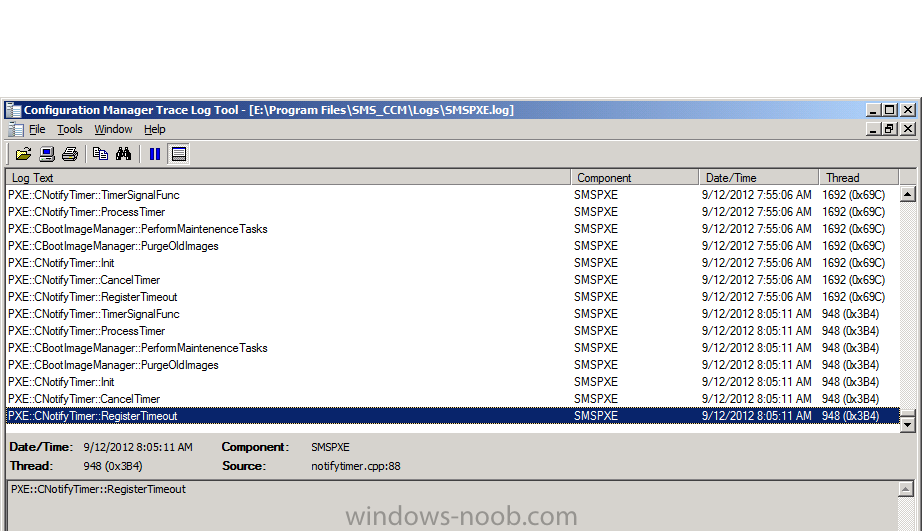
Thank you again. I have completed everything and not getting PXE boot screen. I have changed boot order to boot from NET. I dont see anything in the log file. What am i missing? Thank you.
-
Thank you for the help. Wasnt sure if the software deployment as well as OSD should be done from CAS or P01. Any thoughts on Delegation Control? No matter how many times i try to add CAS and P01 to a container i still do not see anything if it after i am dom. Thank you.
-
And just to make sure. Maybe a stupid question. But all software distribution as well as OSD should be done from Primary Server P01? Thank you.
-
IS this step 4? If so, i completed that but now when i go back to it i do not see any objects in the System Managment container. I am trying to do it again, Completing the Deligation Control Wizard with no issues. However after clicking finish and trying to refresh the view i still do not see any computer objects in the container. What am i missing? Thank you.
-
Thanks for the guide. I am getting a warning on the pre check: Verify site server permissions to publish to active directory. I have completed steps 3 and 4. Installing config mng now. Will i have any issues going forward? What can i check to make sure this is not a valid issue? Thank you.
-
I am not able to open your link since i am a participant of the program. can you please post it here?