



Welcome to windows-noob.com!
Logging in will allow you to download scripts used in the guides.
If you came here looking for the Endpoint Manager step-by-step guides then please start here.
Register for free and ask your questions in our forums.
- 0 replies
- 1904 views
- Add Reply
- 5 replies
- 6613 views
- Add Reply
- 0 replies
- 1748 views
- Add Reply
- 0 replies
- 1709 views
- Add Reply
- 0 replies
- 1453 views
- Add Reply
- 0 replies
- 1455 views
- Add Reply
- 0 replies
- 1791 views
- Add Reply
- 0 replies
- 7683 views
- Add Reply
Task Sequence available when is NOT deployed

By dyg,

Hi,
I have a headache with an extrange issue. I have deployed a Task Sequence time ago, this week i delete it and deployed a new one as i have done previously.Now i still see available both. First i checked the TS status and i reviewed that is not deployed to any collection. I disabled it too but still visible for clients (PXE). I thinks that is cached on DP or in the Databaseany suggestions?
I attach some screens
thanks
Task sequence cannot continue after reboot because TS Manager is not configured to auto-start or GINA is not installed

By krdell,
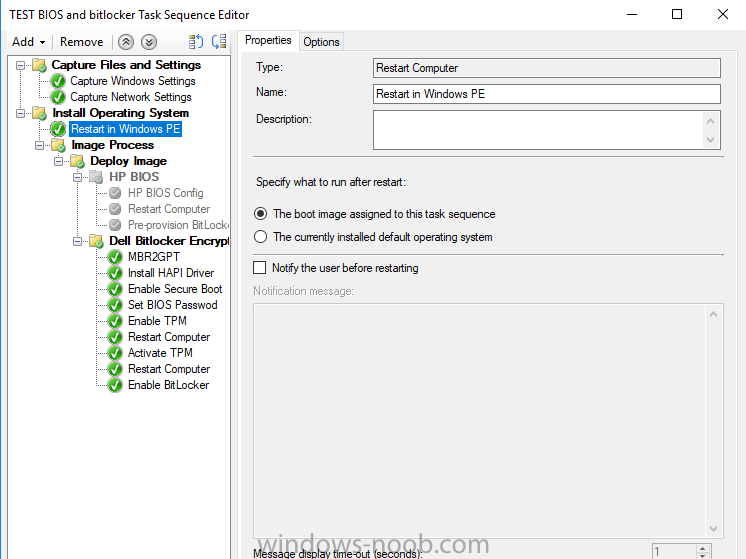
I am trying to apply some steps in a TS to a machine that already has an OS and config manager installed. I only want to apply the tasks then reboot into windows but I am getting this error when I attempt to do so. I read online that I need to have 'setup windows and config manager' step in there before I reboot back into Windows from WinPE but I got an error when that attempted to run as well. I have attached an image of my TS below
WinX during OSD

By matt dee,
Hi,
I'm trying to build an OSD Task Sequence that will deliver a customised Server 2016 installation. This is not be domain joined and will be deployed into customer environments. During the Task Sequence I'm creating up a local user account via powershell (new-localuser cmdlt) that the customer will use to interact with the applications on the VM. A backed up Local policy is then copied across to lock the account down. A part of this local down is the removal of the WinX menus accessible v
OSD driver package stuck...?

By kaiserclaw,
Hello,
Suddenly, our driver packages have stopped working.
The OS WIM is downloaded and applied without any problems.
The next step when installing drivers computer model is detected and downloading Driver package will begin. At 7% downloading everything stops and nothing happens.
I let the computer run for over an hour, but it still stuck at 7%.
I have restarted the SCCM server, removed the package from DP and distributed it again without results.
Please help.
Win7 to Win10 and Sccm2007 to current branch questions

By bardunen,
Hi, we are looking into upgrading/reimaging all our win7 clients to win10, in this regard i have some questions i was hoping to get some answers from this great community
1: Existing Win7 client agents are connected to the Sccm2007 server. A sccm current branch is already set up with a win10 image almost ready to deploy. How would you solve this? I am pondering if we should just go F12 on every machine to get a clean install. Or is it better to somehow migrate the existing win7 agents over
Win7 to Win10 and Sccm2007 to current branch questions
By bardunen,
Hi, we are looking into upgrading/reimaging all our win7 clients to win10, in this regard i have some questions i was hoping to get some answers from this great community
1: Existing Win7 client agents are connected to the Sccm2007 server. A sccm current branch is already set up with a win10 image almost ready to deploy. How would you solve this? I am pondering if we should just go F12 on every machine to get a clean install. Or is it better to somehow migrate the existing win7 agents over
2012r2 to current branch side by side migration

By A raimondi,
Do you know of any good documentation for a Side by side migration from 2012r2 to 1702? We can't do a inplace upgrade and want to do new hardware and OS .. I'm really new at this thank you current setup is CAS with 2 primaries I want to eliminate the ca ps and have one primary with 6 DP's
System Center Configuration Manager Technical Preview 1711 now available !

By anyweb,
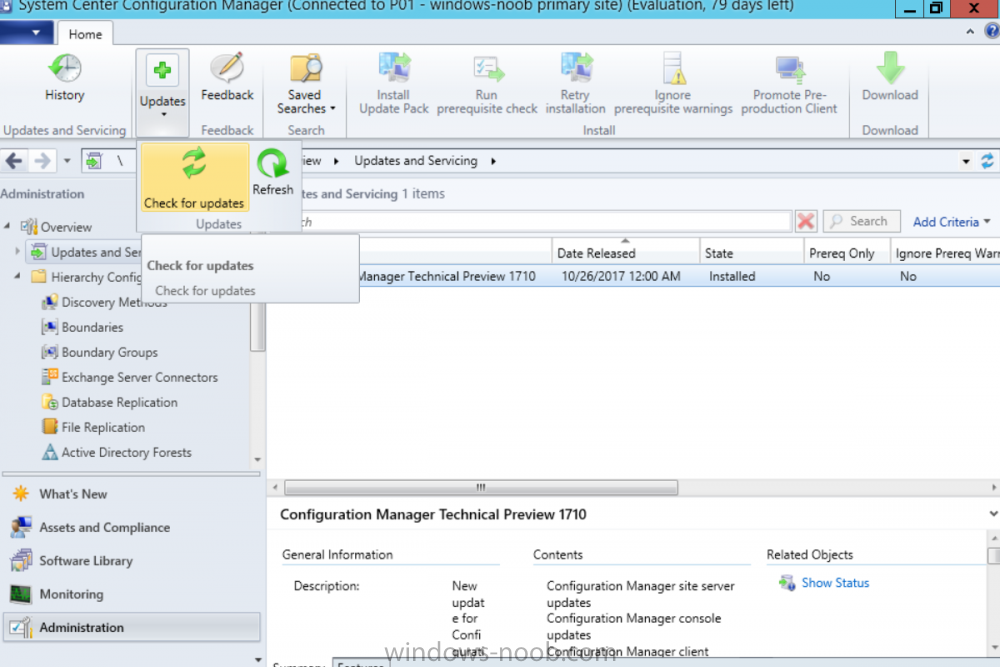
Introduction
Microsoft (together with a bunch of Microsoft MVP's in Seattle) have released the latest Technical Preview release of System Center Configuration Manager namely System Center Configuration Manager Technical Preview 1711.
There are two main versions (of Configuration Manager) available:
System Center Configuration Manager (Current Branch)
System Center Configuration Manager (Technical Preview)
System Center Configuration Manager (Current Branch)