



Welcome to windows-noob.com!
Logging in will allow you to download scripts used in the guides.
If you came here looking for the Endpoint Manager step-by-step guides then please start here.
Register for free and ask your questions in our forums.
- 1 reply
- 2398 views
- Add Reply
- 0 replies
- 2097 views
- Add Reply
- 2 replies
- 18679 views
- Add Reply
- 1 reply
- 2214 views
- Add Reply
- 1 reply
- 4306 views
- Add Reply
- 0 replies
- 1354 views
- Add Reply
- 0 replies
- 1479 views
- Add Reply
- 1 reply
- 2420 views
- Add Reply
Software Updates - Compliance Report

By adurrant,
Hello,
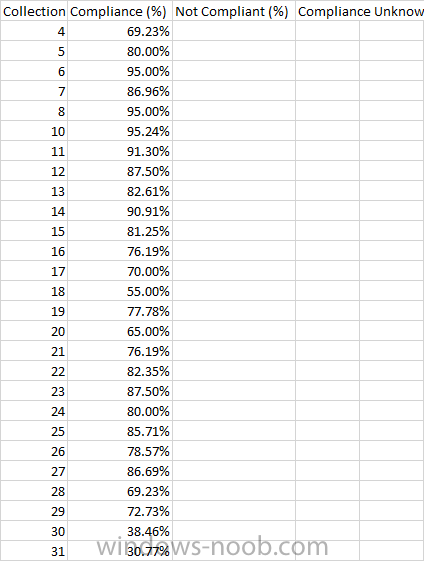
I'm looking on how to create a custom report based on the default report of 'Compliance 1 - Overall Compliance' however I'm looking to just select the update group and then have predefined collections to report against, something like this:
Collection
Compliance (%)
Not Compliant (%)
Compliance Unknown
4
69.23%
5
80.00%
Import HP warranty info from registry

By A.Kassem,
I want to add Workstations and Laptops warranty info to registry so I can import it to SCCM current branch
I used the following script it seems to work fine but when checking info in registry only device S/N and P/N with no warranty end or start info there I guess it was for old HP warranty site I replaced site with new one in script but still no luck can anyone help to get it to work
'//----------------------------------------------------------------------------
'// Purpose: Check Warr
How to create a collection for all the machines with a particular file in a specific path

By gopi8883,
Hi,
Can anyone help me to create a collection for all the machines with a particular file (nlwnsck.dll) in a specific path (c:\Windows\System\)
Thank you,
Supersedence - How To?

By xerxes2985,
Good morning,
I am trying to understand supercedence of an application, and I have a few questions...
1. Will I need to have Multiple applications for Supercedence to work? (for example: Firefox 52, Firefox 53, Firefox 54) If so, then the application list looks "junky" as it would have multiple copies of the same files??
2. Will utilizing supercedence take up more disk space? (I assume if I have to keep at least current version / old version? or will it auto delete it)
3. If
Prerequisite Failed - 1706

By Nomaan,
I am trying to update my configuration manager server currently at 1610 to 1706 (tried 1702) with same results. My lab setup is as follows:
Domain Controller Server GC01 (Server 2016)
Configuration Manager Server SC01 (Server 2016)
SQL Failover cluster named SQL01 with two nodes (SQL01A and SQL01B) (Both servers are Server 2016 running SQL 2016 SP1)
Configuration manager database is installed on default SQL instance. I installed RTM version of configuration manager ser
SCCM Client deployment through GPO

By jslate1980,
Hi
I'm curious to know is SCCM client deployment through group policy still supported through CB?
If it is, I wondering where can you find the latest .msi for the sccm agent?
Regards
Jon
SCCM Client deployment through GPO
By jslate1980,
Hi
I'm curious to know is SCCM client deployment through group policy still supported through CB?
If it is, I wondering where can you find the latest .msi for the sccm agent?
Regards
Jon
Role Base Admin allow a user to run discovery now

By Dpw,
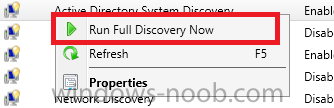
I have a custom role, that allows users to install clients on new computers, however, I also need them to run a system Discovery on demand, I can not find this in RBA. Does anyone know where it might fall under?