



Welcome to windows-noob.com!
Logging in will allow you to download scripts used in the guides.
If you came here looking for the Endpoint Manager step-by-step guides then please start here.
Register for free and ask your questions in our forums.
- 0 replies
- 2862 views
- Add Reply
- 0 replies
- 3225 views
- Add Reply
- 0 replies
- 3052 views
- Add Reply
- 0 replies
- 3067 views
- Add Reply
- 0 replies
- 3037 views
- Add Reply
- 0 replies
- 3952 views
- Add Reply
- 1 reply
- 1793 views
- Add Reply
- 1 reply
- 1809 views
- Add Reply
Learn about Bitlocker Management in Microsoft Endpoint Configuration Manager version 1910 – part 3 customize the portals

By anyweb,
Introduction
In this video I show you how to customize the self service portal to suit your organization, and I show you how you can change what a person see’s in the help desk based on which Active Directory Security Group they are a member of (in relation to Bitlocker Management).
Take a look !
To see the rest of the videos click below:
BitLocker management – Part 1 Initial setup
BitLocker management – Part 2 Deploy portals
BitLoc
Learn about Bitlocker Management in Microsoft Endpoint Configuration Manager version 1910 – part 4 Enforce
By anyweb,
Introduction
In this video I show you how to enforce encryption with no user interaction using Bitlocker Management in Configuration Manager 1910 (and a compliance baseline containing a configuration item with 2 registry keys).
Below are the key path and key names I used in the video:
SOFTWARE\Policies\Microsoft\FVE\MDOPBitLockerManagement
OsEnforcePolicyPeriod= 0
SOFTWARE\Policies\Microsoft\FVE\MDOPBitLockerManagement
UseOsEnforcePolicy =
Learn about Bitlocker Management in Microsoft Endpoint Configuration Manager version 1910 – part 5 key rotation
By anyweb,
Introduction
In this video I show you how key rotation works when a key has been revealed via the helpdesk using Bitlocker Management integrated as a feature in Microsoft Endpoint Configuration Manager version 1910. To see a list of all the videos in this series click below:
BitLocker management – Part 1 Initial setup
BitLocker management – Part 2 Deploy portals
BitLocker management – Part 3 Customize portals
BitLocker management – P
Learn about Bitlocker Management in Microsoft Endpoint Configuration Manager version 1910 – part 6 forcing decryption
By anyweb,
Introduction
In this video I show you how you can enforce decryption of BitLocker encrypted drives in Microsoft Endpoint Configuration Manager version 1910. It involves the use of a custom Configuration Baseline with a Configuration Item to set a registry key.
This is part 6 from a 10 part video series on youtube.
BitLocker management – Part 1 Initial setup
BitLocker management – Part 2 Deploy portals
BitLocker managemen
Learn about Bitlocker Management in Microsoft Endpoint Configuration Manager version 1910 – part 7 Reporting and compliance
By anyweb,
Introduction
In this video I show you how you use the built in reports from the BitLocker Management feature that was released in Microsoft Endpoint Configuration Manager version 1910. I explain what each of the 5 built in reports offer and take a look at compliance both on the server and on the client including deciphering the statemessage.log.
Note: You do not need SSRS to be in HTTPS mode for rendering or using reports about BitLocker Management in Configurat
Learn about Bitlocker Management in Microsoft Endpoint Configuration Manager version 1910 – part 8 Migration
By anyweb,
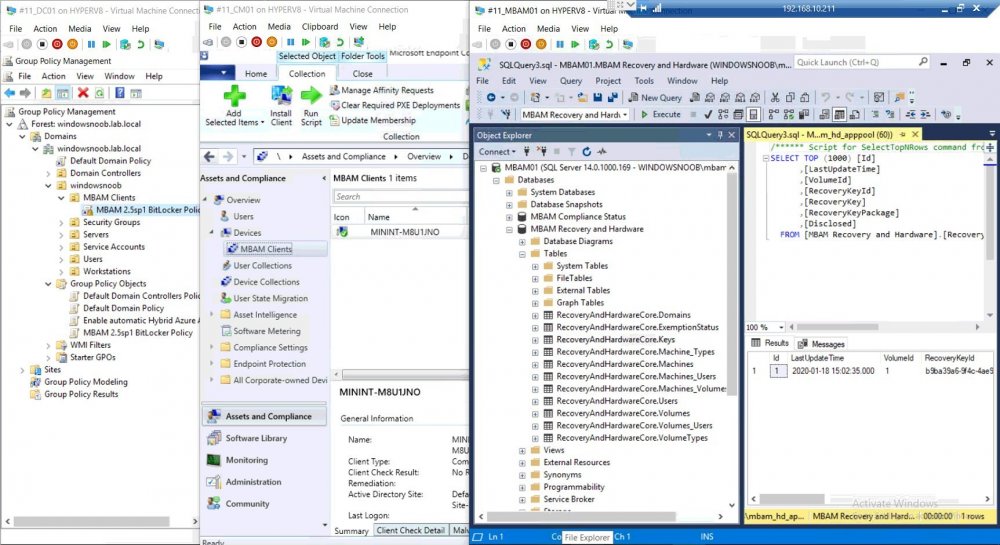
Introduction
In this video (linked at the bottom of this post) I show you how you can migrate existing MBAM managed clients to Configuration Manager using the new BitLocker Management feature that was released in Microsoft Endpoint Configuration Manager version 1910.
In order for this to work you’ll need an existing MBAM standalone server(s) that is managing one or more clients. The recovery keys (and associated data) will be stored on that MBAM server as defined by the Gro
PAST DUE - WILL BE INSTALLED

By Eugene_78,
Hello this should be a simple question for a gurus like you guys
I am pushing an updates at a specific time, they show up in software center fine. after dead line is reached Status Changes to Past due - Will be installed. How long before automatic installation will start the install process? Is there any way to speed up start of the installation after that message comes up?
Reboot on a collection
By Eugene_78,
Hello,
I have what might be a simple question however i am not finding an answer anywhere. I am tasked with doing the following.
Reboot computers in the collection at a specific time. (I am able to do that via simple package that contain one line command to reboot them) This works fine if the computers are on the network and are online. But quite a few of our employees work from home over the weekend so therefore computers are not in the office. I am rebooting computers at 7 am Monday,