




MarshMan0331
Established Members
-
Joined
-
Last visited
Everything posted by MarshMan0331
-
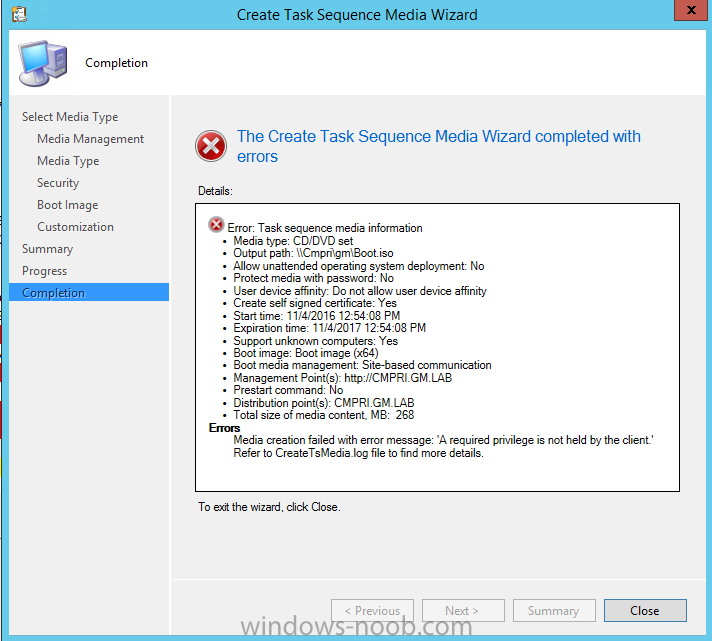
I am trying to create boot media and every time I try it fails stating. "Media Creation failed with error message: 'A required privilege is not held by the client' I have disabled UAC, added my account and the server account to "Manage auditing and security logs" via GPO, ran-as admin and I am scratching my head at this point. Attached are my CreateTsMedia logs and a screenshot of the error. CreateTsMedia.log
-
I have about 20 device collections that won't delete. It promts with a SQL error stating "Collection Cannot be deleted becuase it is refrenced by another collection" SQLseverity: = 15 SQLStatus: = 5000 StatusCode: = 2147749889 But inside the CM console i have looked through all my collections and they are not refrenced. I am looking for a SQL statement to go into the DB and delete them that way, I would assume it would be similar to deleteing a package (see below) Delete from ContentDPMap where ContentID='CAS00242' Delete from DistributionStatus where PkgID='CAS00242' Delete from CI_ContentPackages where PkgID='CAS00242' Delete from PkgAccess where PkgID='CAS00242' Delete from SMSPackages_G where PkgID='CAS00242' Delete from SMSPackages_L where PkgID='CAS00242' Delete from PkgPrograms_G where PkgID='CAS00242' Delete from PkgPrograms_G where PkgID='CAS00242' Delete from PkgServers_G where PkgID='CAS00242' Delete from PkgServers_L where PkgID='CAS00242' Delete from PkgStatus_G where ID='CAS00242' Delete from PkgStatus_L where ID='CAS00242' Delete from PkgStatusHist where PkgID='CAS00242' Delete from PkgNotification where PkgID='CAS00242' Thank You
-
Install VMware Tools on Windows 2008 and copy the entire contents of the C:\Program Files\Common Files\VMware\Drivers\vmxnet, pvscsi and vmxnet3 folders to your CAS and import these drivers and then add them to your boot image.
-
In our live production environment I have deleted some device collections that had active application, package and Task Sequence deployments. After I deleted these device collections it triggered a re-replication of all content. The logs show my account deleting the collections from the CAS but for all the packages and applications the logs say I "modified the package properties of a package named" XYZ. but in the logs it says I performed these actions from a "Unknown Machine". Any body else seen this or experience this before?
-
The script below will tell me the uptime on PC's. I want to add the language that says if Uptime is greater than X amount of days then it will send a reboot in 15 Mins. Any help would be appreciated. # This PS script provides Uptime and Pingstatus for list of computers. ####################################################################### $names = Get-Content "C:\Test\computers.txt" @( foreach ($name in $names) { if ( Test-Connection -ComputerName $name -Count 1 -ErrorAction SilentlyContinue ) { $wmi = gwmi Win32_OperatingSystem -computer $name $LBTime = $wmi.ConvertToDateTime($wmi.Lastbootuptime) [TimeSpan]$uptime = New-TimeSpan $LBTime $(get-date) Write-output "$name Uptime is $($uptime.days) Days" Write-Host "$name Uptime is $($uptime.days) Days" -ForegroundColor Green } else { Write-output "$name is not pinging" Write-Host "$name is not pinging" -ForegroundColor Red } } ) | Out-file -FilePath "C:\Test\results1.csv"
-
We have windows xp workstations that have roughly 40GB on the C: drive and the D: drive around 100GB. When migarting to win 7 we are only having one large partiton and no longer a C: and D: like on the XP Machines. If my D: drive is filled with 80GB of data and my c: drive isnt even that large to copy all data over to C: how do i grab all user date from c: and D: and save if for the hardlink. to migrate to windows 7 and restore all data back to C:.
-
Need help with how to set " Schedule a full update on this collection" for Device collections. I have a PowerShell script that creates over 90 Device collections for our environment in the Test lab right now. I can set all the setting I need even "Incremental updates" but I cannot figure out how to set a full schedule in the PowerShell Script. looking for any help. Thank You.
-
-
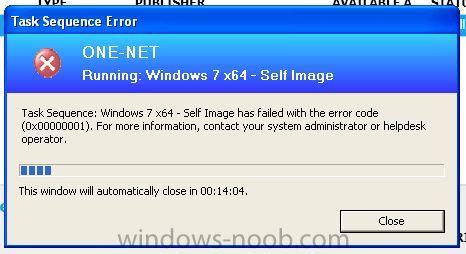
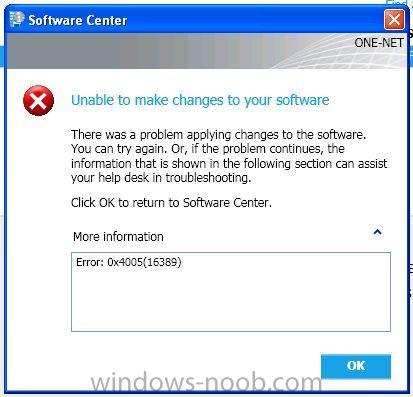
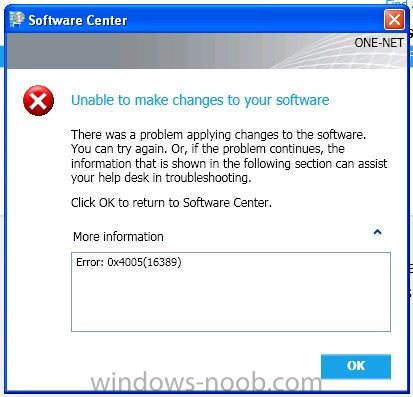
I am having issues with a Task Sequence executing a runbook, I have created a Task Sequence with 1 step to "execute runbook" and I get error 0x4005(16389). the runbook kicks off a series of task to prep the machine for a MIP to windows 7. Does the machine I am running the TS from need permissions to execute runbooks in Orch or a system account? I have attached the smsts logs and 2 screen shots of the errors. smsts.log
 If you have a known list if your Laptops and Desktops you can build one collection to target the System models for laptops. I will attach my query tomorrow and show you how I make those queries. .Same Errors, any resolution to this yet?I need to know if it is possible to connect to the CM server with the CM Console through VPN. I currently have a Windows 7 Desktop that I use to VPN in the network to manage the SCCM server by RDP. But if I install the CM console on the Windows 7 box I can’t connect to the site. I can only connect if I RDP to the server. I even added the IP's and the FQDN in the host file on the Windows 7 machines. Not sure if it is even possible. GarrettNeed help building one PowerShell script to run on Windows XP and Windows 7 If possible. I need the script to perform the following functions. Remove all temp files for all users Empty Recycle Bin for all users Empty Temp Direrctory Empty Temp Internet Files for all users Delete User Profile's 90+ days inactive Run Check Disk Clean up tool at the end. I have attached a script that was given to me but needs to modified for XP I think and add other items listed above. Disk_Cleaup_Tool.txtI am new to using SCCM 2012, need help adding licnece files and configruations to Applications and packages within SCCM 2012. This has to be zero user interaction. Programs will be Project 2010, Visio 2012, Adobe Pro, Photoshop, and some other programs. Also is thier a way to create applications with .exe files. Garrett

Important Information
We have placed cookies on your device to help make this website better. You can adjust your cookie settings, otherwise we'll assume you're okay to continue.