Ranjithckm7
Established Members
-
Joined
-
Last visited
Everything posted by Ranjithckm7
-
In my case it was network issue. I.e. default gateway wasn't set in dhcp options.
-
I have same issue and struggling to get a clue to resolve it.
-
Hi Team, I have been facing an strange issue. After the machine built by OSD TS, client isn't visible as online in Console and I don't think client is getting policies applied. Validated Firewall ports (80,443,10123) and all are fine. Any clue or troubleshoot approach would be much appreciated. I have attached policyagent.log. Note: To test this tried to install a client on Site Server using clientpush, it installed and shows as online and all the configurations getting applied. PolicyAgent.log
-
Hello @anyweb, I just wanted to update you on this issue. It was due to Gen 1 hyper v drive. TS run successfully after i changed to Gen 2.
-
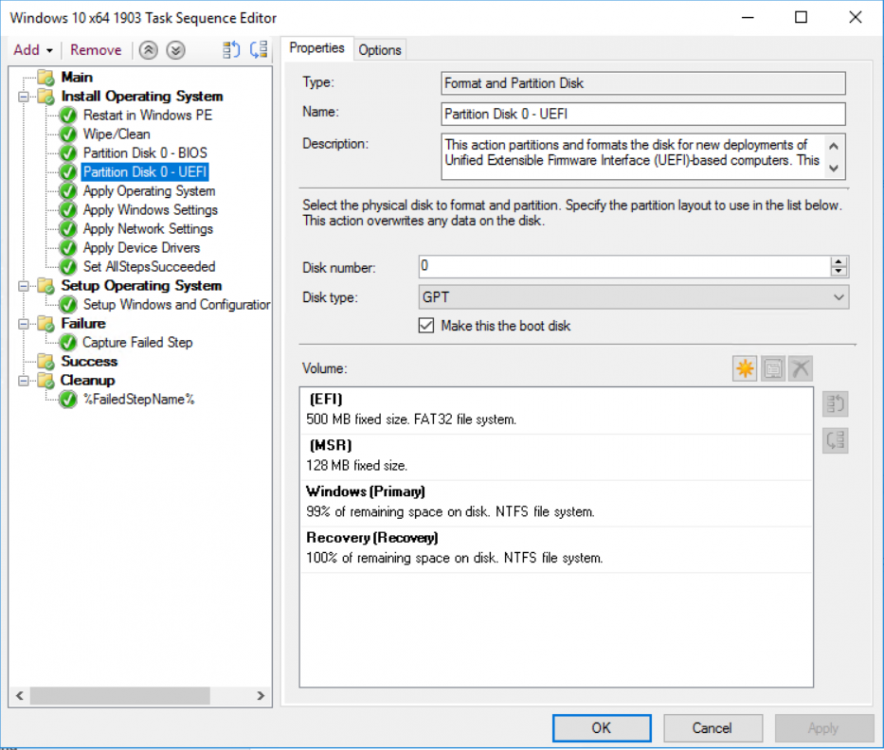
Hi, Sorry about thread. I'll follow from now carefully reading thread. And I have checked my TS step and it's exactly identical to yours. A: drive is diskette drive comes along with new VM in Hyper-V Manager and not sure if this can be removed blank VM.

-
It's Hyper-V vm(Within Windows 10 2004 Physical machine) and I'm deploying 1903 using a native or default Task Sequence created without MDT.
-
Hi @anyweb, Any luck with it? I'm going to try this in a new HDD instead of earlier one. I don't know why it's not working because i haven't modified any step in this TS. It is like created through native one without MDT.
-
Sorry it took some time. messed up with dp. But here's the most recent smsts. smsts.log
-
It's exactly similar to below. I'll get you the log by a retry now. Failed to make volume C:\ bootable. Code 0x80004001
-
Hi @anyweb, I'm exactly into the same issue. I'm trying to install a OS in Hyper-V VM. It exactly gives the error as above mentioned. Format and Partition Disk is configured with GPT Type only. PF TS step and advise please.

-
-
-
-
It's not possible.
-
-
Could you please share this distribution point properties including content transfer window if you have set?