



Welcome to windows-noob.com!
Logging in will allow you to download scripts used in the guides.
If you came here looking for the Endpoint Manager step-by-step guides then please start here.
Register for free and ask your questions in our forums.
- 1 reply
- 12394 views
- Add Reply
- 0 replies
- 2015 views
- Add Reply
- 3 replies
- 4959 views
- Add Reply
- 5 replies
- 21129 views
- Add Reply
- 4 replies
- 3729 views
- Add Reply
- 0 replies
- 1990 views
- Add Reply
- 1 reply
- 2060 views
- Add Reply
- 1 reply
- 5583 views
- Add Reply
MP is not responding to HTTP requests

By pseudoyams,
Hey Everyone-
I'm deploying a new ConfigMgr 2016 server and running into a bit of an issue where the Management Point role is reporting an error state in Site Status. The error shown is "MP Control Manager detected MP is not responding to HTTP requests. The http error is 2147500037." and when I check the mpcontrol.log file I have repeated messages of:
Begin validation of Certificate [Thumbprint 54b7384b28154466383c3195ac15ed00f08ad1d5] issued to 'ConfigMgr.domain.com' SMS_MP_CONT
Windows 10 1607 TS and Appv Caching

By IAmATeaf,
As part of the build of a Windows 10 desktop I'd like to pre-cache some Appv applications. So I have a default user who is a member of the relevant AD groups which are linked to the Appv apps. If I logon to a built desktop as this user then the Appv client caches all the Appv that the user has been given access to.
So I'd like to do this as part of the build Task Sequence so what I've done is create a few Powershell scripts and added these as Run Command Line steps:
1) Enables Appv on
32 bit and 64 bit Software Package?

By xerxes2985,
I am trying to create a SINGLE software package using the native MSI installers that will install based upon architecture, 32bit/64bit. Is this possible? Or do I need to have a separate application/package for each version?
I am trying to avoid the use of a script to handle this.
Software deployment - Icons for Packages?
By xerxes2985,
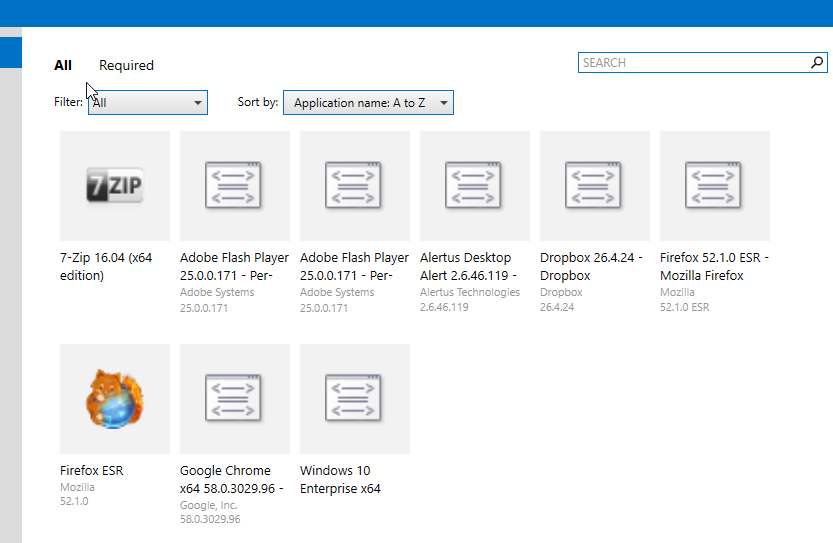
Two questions
The 7zip and Firefox are applications, which I can easily add/change an icon. Is there a similar process or method to make the "programs" from Packages have icons?
2nd question - Some of my applications don't show icons in Add/Remove Programs, While this doesn't really cause any issues other than it is less aesthetically pleasing,
I am curious has anyone else come across this, and if so, is there a fix?
New SCCM 1702 Setup Issue

By day79,
Setup a new SCCM 1702 environment following the System Center Configuration Manager (Current Branch) guide. Single server with Windows 2016 Standard and SQL 2014 Standard. The Management Point won't install. It keeps failing with a fatal error. I checked Prereqs, uninstalled/reinstalled BITS, uninstalled/reinstalled the management point role, rebooted the server, and confirmed InstallUtil.exe and RegSvcs.exe had loadfromRemoteSources enabled="true". Attached are some logs that hopefully hel
OSD Issue with Current Branch 1610. PXE flag not getting Set after deployment

By dhileep,
Hello Experts,
Need your Guidance. we recently upgraded our SCCM from 1606 to 1610. we have PXE environment enabled for OSD. it was perfectly fine before the Upgrade.
We have task sequence deployed to the device collection for the OSD. Whenever the client machine initiated the OSD it will set the PXE flag on the machine.Next time it will not start the PXE process until we cleared the PXE flag on the console.
But after 1610 upgrade when OSD deployment started it's not set any PXE f
No reboot after Sysprep

By indy,
Hey
Running latest CB and newest ADK.
When running a build and capture (Windows 10 - Edu - 1703 - on HyperV) - the computer does not restart after sysprep. (if i manually restart the computer - it continues capturing)
(The NIC seems to be disabled after Sysprep?)
See attached log-file.
Any ideas?
Michael
smsts.log
SCCM CB 1702 - Stuck at SQL configuration during install

By n4rk0o,
Hello,
I'm trying to install SCCM from scratch with a brand new virtual machine on Windows Server 2016. I installed SQL Server 2016 SP1 CU3 and I followed the guide from CB 1702 guide.
I have already an Active Directory with extended schema (from a previous install of SCCM 2012 R2), so I skipped this part.
When I try to install SCCM I have a warning regarding the System Management container. It seems that the computer account has not rights on Children objects (create&delete)