



Welcome to windows-noob.com!
Logging in will allow you to download scripts used in the guides.
If you came here looking for the Endpoint Manager step-by-step guides then please start here.
Register for free and ask your questions in our forums.
- 2 replies
- 8662 views
- Add Reply
- 2 replies
- 6275 views
- Add Reply
- 0 replies
- 1633 views
- Add Reply
- 0 replies
- 11549 views
- Add Reply
- 0 replies
- 2799 views
- Add Reply
- 0 replies
- 3978 views
- Add Reply
- 2 replies
- 4492 views
- Add Reply
- 2 replies
- 2746 views
- Add Reply
TS Fails at Setup Windows and Configuration Manager after upgrade to 1606

By lord_hydrax,
Hi,
Been a while since I had to do anything to my environment but last week I finally updated SCCM 2012 SP1 to 1606.
The update itself seemed to go pretty smoothly.
We are finding that our Task Sequence stops at the Setup Windows and Configuration Manager step and won't install any of the applications/packages that are list in the steps after.
I guessed that maybe the Configuration Manager Client Package had automatically updated to support the latest version so I have redistribu
SUP scan failed after https switch over

By gomezar,
Good Morning gents,
I recently switch my SCCM CB 1610 from http tp https, everything it's working fine until I tested the Software Update. I downloaded and deploy a patch and on the client i get the following errors:
Its a WSUS Update Source type ({B3CE6C4E-8947-43F7-9E10-275AFDD23DB8}), adding it. WUAHandler 3/7/2017 11:03:03 AM 17740 (0x454C)
Existing WUA Managed server was already set (https://sccmserver.domain.LOCAL:8531), skipping Group Policy registration. WUAHandler 3/7/2017 11
Building new TP LAB, and keeping existing environment.

By ogeccut,
I have a general question on what would be a best approach to build a tech preview lab. My current lab runs in VM with one DC and one CM/SQL server and few win10/win7 clients. I am currently in CB1610. I would like to install 1702, should i just build a new CM/SQL server and install 1702? Or there is a better way? Thank you.
Configuration Manager primary site and central administration site require SQL Server Tcp is enabled and set to Static port.

By farisnt,
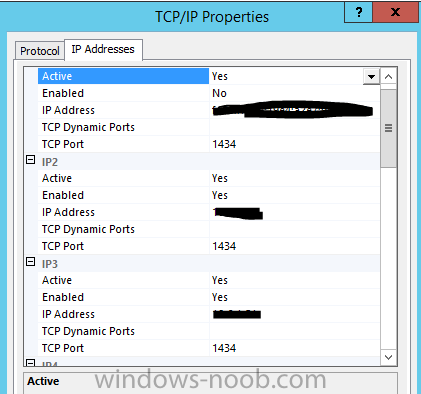
Hi
I am using SQL 2016 with the Default Static Port 1433 and custom collation
As SCCM require SQL_Latin1_General_CP1_CI_AS and our SQL is configured with another collation, I created a new instance with the required collation and I set the static port 1434 as the 1433 is used by the default instance.
Now I am stuck in the installation I am keep getting the following error
Configuration Manager primary site and central administration site require SQL Server Tcp is enabled and set to Sta
Mystery Account (Trying to use BranchCache and PeerCache)

By CJamesEd,
I am seeing errors in the DataTransferService.log
Successfully queued event on HTTP/HTTPS failure for server '<WORKSTATION.MYDOMAIN.COM>'.
Error sending DAV request. HTTP code 401, status 'Authentication Required'
GetDirectoryList_HTTP('http://<WORKSTATION.MYDOMAIN.COM>:8003/SCCM_BranchCache$/Content_9f1e6a11-f929-4cab-ba1f-6c9ee5e44b9e') failed with code 0x80070005.
There is an entry like above for multiple workstations in my environment.
The timing (within a few 10-
PXE boot issue

By Karthik2811,
Hi All,
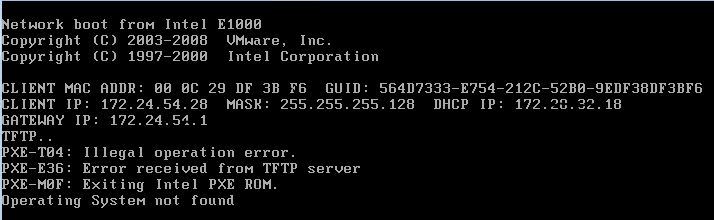
I am unable to PXE boot from one of the site.This is first time we are trying to use PXE in this site.
IP helper is enabled and WDS IP address is added in the IP helper.
All other sites are working fine with PXE method.Only this site has issue.
Below is the error message during PXE boot.I have attached the error screen shot
PXE-T04: Illegal operation error
PXE-E36: Error received from TFTP server
PXE-MOF: Exiting Intel PXE-ROM
Operating System not found
Any help is mu
Windows 10 Updates Dual Scan Issue

By cumbrianblues,
just wondered if anyone had seen this https://blogs.technet.microsoft.com/windowsserver/2017/01/09/why-wsus-and-sccm-managed-clients-are-reaching-out-to-microsoft-online/
MS have released a hotfix for 1610 and the KB article https://support.microsoft.com/help/4010155 now states DO NOT set the defer updates GPO's as this bascially enables machines to use Windows Updates for Business so they will ignore SCCM and go to the internet for updates.
There is another article here confirming it as
Match Packages and Applications packages to IIS download link
By gomezar,
Good Morning everyone,
I'm looking for the simplest way to follow a package or application package once it's replicated to a DP. I'm looking to verify that that link works for any of my available packages. I know the SCCM 2012 resource kit has a tools to review all the packages on the DP but I'm looking for a more direct way in IIS.
I was able to figure out that packages have a virtual folder in DP iis which I could pull up as http://dpname/SMS_DP_SMSPKG$/PackageIDbut cant seem to find