




keywan
-
Posts
177 -
Joined
-
Last visited
-
Days Won
2
Everything posted by keywan
-
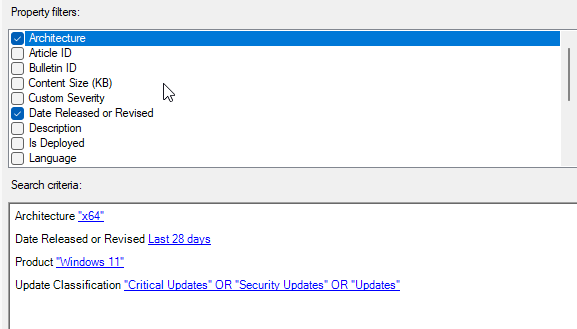
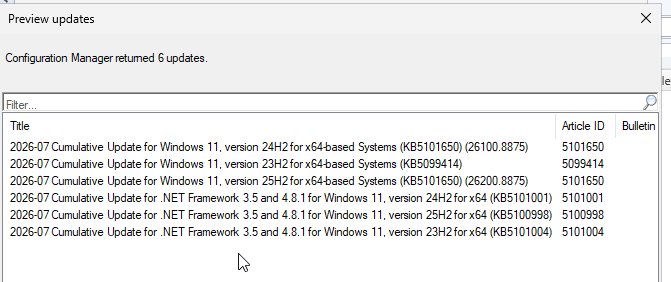
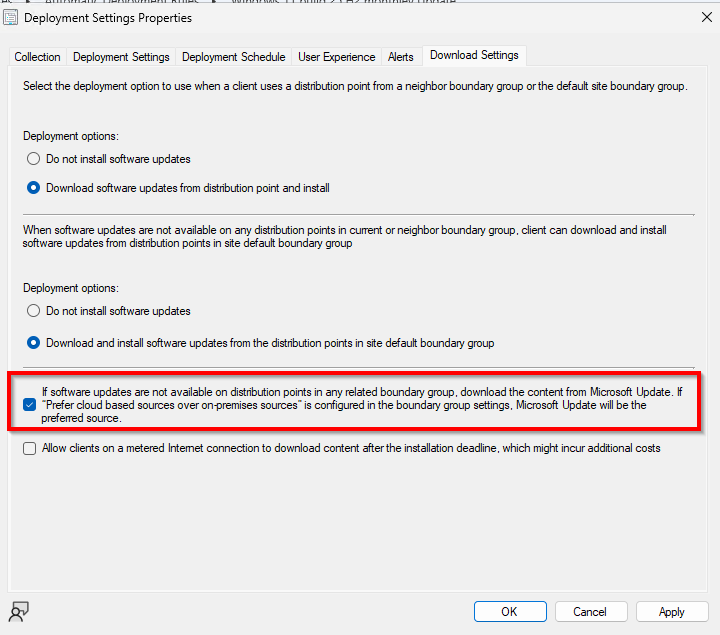
Hi, I am using SCCM on Prem and not Cloud I have created an ADR for Windows 11 monthly update. Some Clients machine does not get any Windows updates. I have checked all log files, UpdatesDeployment.log, ScanAgent.log,UpdatesStore.log,UpdatesDeploymentAgent.log, It display the updates is "not Applicable" even the build version on the client is from may and I have deployed the KB5101650 from JULY. What is if I check the following options on the "download setting" does it mean, the client will download the update from internet? Or does it means the SCCM Client download from internet immediately and ignore the ADR from SCCM and Software Center? does display the Windows update on the Software Center or not any more? because I have checked that options? Thank for help
-
my goal is better and easier to deploy Windows Clients and Server monthly updates. SCCM and WSUS does work always not fine, there are sometimes more issues My SCCM is on Prem with WSUS
-
Hi, I have followed your link. It means my AD goes to the Azure Cloud. I dont want it. Is there other way without AD Azure Cloud?
-
Hi, I am using SCCM version 2603 on Prem and want to know what is more value to enable Cloud Attach on the SCCM Server. - Does it mean my SCCM on Prem is now in the Cloud? - Could I deploy better Windows Clients and Server Updates? - Does it publish my Collections or my data or application in the Cloud? - Is publish any Windows Clients or Server Data in the Cloud? Regards
-
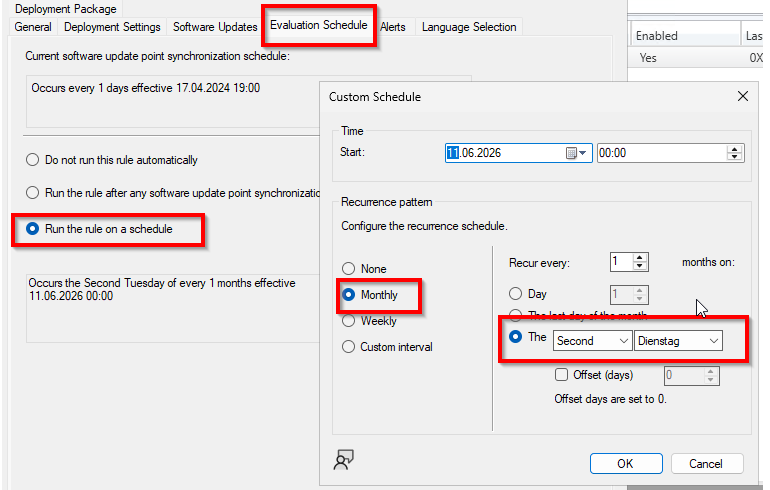
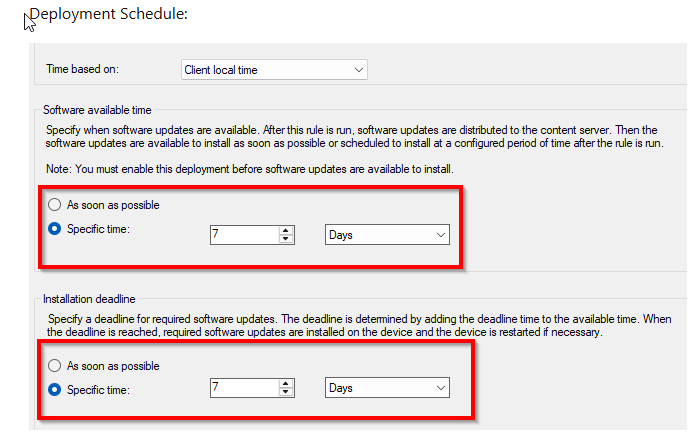
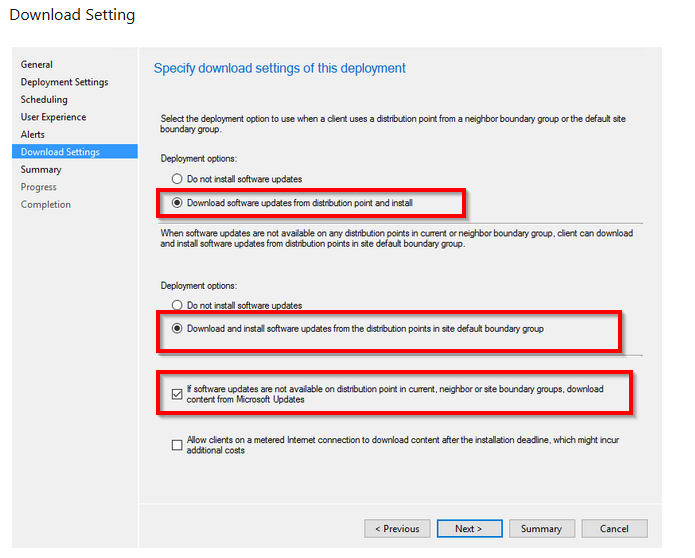
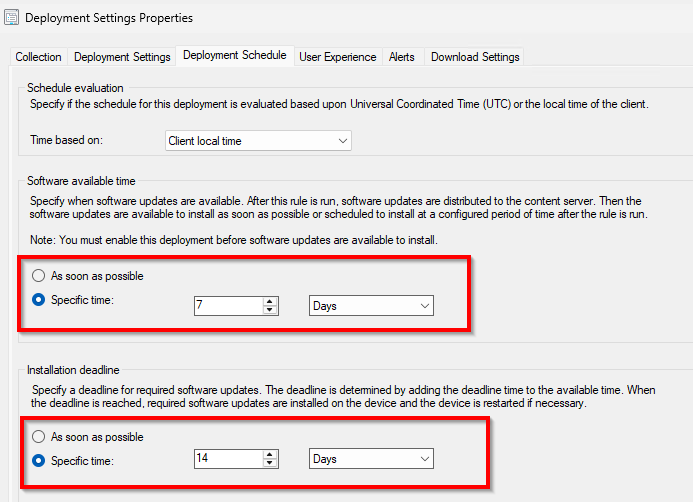
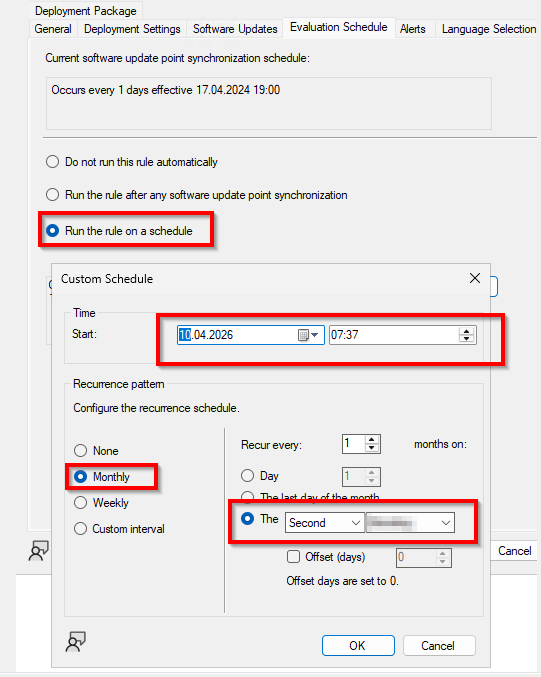
Hi, I have created an ADR for monthly Windows 11 Update and have select the following settings: Evolution Schedule: Monthly the second Tuesday My Questions about: Evolution Schedule: base of my settings, it should be run every the second Tuesday of month automatically, but it does not. I have to run it as manually. Any Idea why? Deployment Schedule: base of my setting, it should be run 7 days after the second Tuesday of month and should available on the Software Center. But every time I have to set it "as soon as Possible" and after that it downloaded the content. Should be not run automatically and download the content? Download Setting: My ADR was enabled and it downloaded no Content and the Package Source of the Deployments was empty. I saw many clients has downloaded the Content and install it, the Update was not available on the software center. Could you tell my why and Where did my updates download from? is that setting the reason? If software updates are not available on distribution point in current, neighbor or site boundary groups, download content from Microsoft Updates. Thank you for help
-
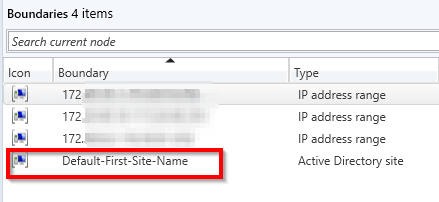
Hi Anyweb, First question What do you mean with best practice? Use IP range boundaries as primary Do you mean I have to change from Active Directory site to IP RANGE? Can I edit the Active Directory site to to IP RANGE? I created 4 new Boundary with IP Range and add them to the existing Boundary Group( I have only one), Now my Boundary Group show me 4 Members. My default Boundary was Active Directory site and I added 3 new IP RANGE Boundary and the "References" Is there any more steps I have to do?


-
I'm in the process of deploying windows updates to Windows Clients (Windows 11 build 25H2) Windows servers(2019,2022,2025) in my environment with SCCM and ADRs and most of the client computers have installed updates just fine however around 50 or so client computers are not installing updates and the updates are not getting downloaded. When I click to install updates it just stays stuck at 0% downloading and never installs until eventually it times out My Boundary and Boundary Groups the updates have been distributed to the DP servers. The boundaries are configured to include the clients in the scope. All of my boundary groups are set up with the Active Directory site only. We have the following IP Range 192.168.0.0, 172.20.0.0, 172.10.0.0. 172.40.0.0 But I set my My Boundary and Boundary Groups with the Active Directory site only. Is that the my issue? Should/Could I create or add some new Boundary with IP address Range(what we have see above IP Range) additionally to my Active Directory site? Could you please help me? Regards
-
Hi, my SCCM Server does not work fine like before many years. I want to building a new SCCM server from scratch can I still use the old container (called System Management) and delegate control by adding the new server without necessarily extending the AD schema? Could I let running it the old SCCM server and install a new one fresh instillation of SCCM Server? Regards Nick
-
Hi Nail, I have a big issue with ADRs on the SCCM with monthly Windows updates. On the client machine the download does not work or stucking by 0% or waiting for install. I'm really desperate, do have time for a remote session? Thank you Nick
-
Pros and Cons. It means, I do not to run Cons?
-
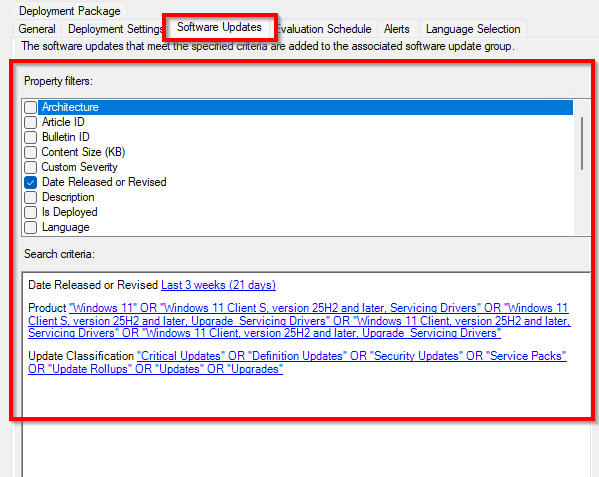
Hi, I have created some ADRs for Windows Server and Clients Updates with following settings Software Updates Deployment Schedule If I understand this option correctly, it should run automatically after 7 Days and deploy it to Distribution Server Evaluation Schedule, every month on second Tuesday Could you tell me please why it is not running automatically evey month? What is here wrong? Thank you Regards
-
Hi, I have created some ADRs for Windows Server and Clients Updates with following settings Software Updates Deployment Schedule If I understand this option correctly, it should run automatically after 7 Days and deploy it to Distribution Server Evaluation Schedule, every month on second Tuesday Could you tell me please why it is not running automatically evey month? What is here wrong? Thank you Regards
-
Hi, I have created a ADR for Windows Defender to deploy every day the new security intelligence update on Windows Client and Windows Server. It works fine, but only one machine (windows server 2025) does not get the security intelligence update. But if I go the device and proprieties, I see on the Deployment, the security intelligence update is there, but not install. How and where check it why? Regards
-
Yes I want only have the WSUS Server to convert to HTTPS Do have a Guide step by step?
-
it is a lot of work, are you sure, I cannot convert only Wsus Server to HTTPS?
-
No I dont have pki infrastructure in place, I want only to convert or to change the WSUS Server from HTTP to HTTPS. An I have to be sure that after convert the WSUS and SCCM does work together for SUP and Windows Updates. What should I do for WSUS Server on the SCCM and for all Clients machine? Thank you for help
-
Hi, I have a SCCM Server with WSUS Server on the same machine with Windows Server 2025. Now I want to change the WSUS Server from http to https. Is that easy or is there any step by step guide? I have to be 100% sure after change from HTTP to HTTPS, my SCCM and WSUS Server work fine Regards Keywan
-
Hi, I am not sure but since one month my ADR for monthly Windows update does not work. I see the KB deployed to the client machine, but on the Software Center tuck at Downloading (0% complete). All Applications can be downloaded and install it, only Windows Update does not work I restarted the IIS but not help. Can anybody help me? Regards
-
issue with Powershell script in Task Sequence (output)
keywan replied to keywan's question in Deploy software, applications and drivers
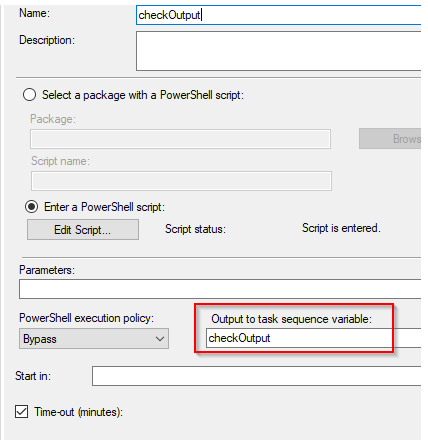
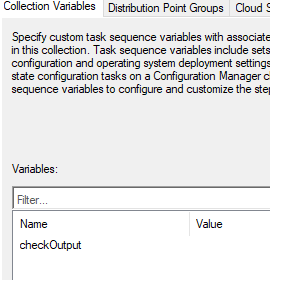
What I want in my TS, is to run my PS and it should display it in my Collection as Value and can see there the Result. Have you any Idea how I can realize it? -
Hi, I have Power Shell script a want to run in simply Task Sequence. the script should be output to file or to a output to a task sequence variable. my Collection What I want, it should show the result or the output of my PS script here on the Collection. Is there any way to do that? Regards
-
I'm trying to Sysprep a Windows 11 Enterprise 24H2 Installation with many installed Applications. I am getting always fails because of this error: ###################################################################### SYSPRP Package Microsoft.DesktopAppInstaller_1.25.199.0_x64__8wekyb3d8bbwe was installed for a user, but not provisioned for all users. This package will not function properly in the sysprep image. SYSPRP Failed to remove apps for the current user: 0x80073cf2. SYSPRP Exit code of RemoveAllApps thread was 0x3cf2. SYSPRP ActionPlatform::LaunchModule: Failure occurred while executing 'SysprepGeneralizeValidate' from C:\Windows\System32\AppxSysprep.dll; dwRet = 0x3cf2 SYSPRP SysprepSession::Validate: Error in validating actions from C:\Windows\System32\Sysprep\ActionFiles\Generalize.xml; dwRet = 0x3cf2 SYSPRP RunPlatformActions:Failed while validating Sysprep session actions; dwRet = 0x3cf2 [0x0f0070] SYSPRP RunDlls:An error occurred while running registry sysprep DLLs, halting sysprep execution. dwRet = 0x3cf2 [0x0f00d8] SYSPRP WinMain:Hit failure while pre-validate sysprep generalize internal providers; hr = 0x80073cf2 ########################################################################## I ran the following command wit PS Get-AppxPackage -AllUsers Microsoft.DesktopAppInstaller_1.25.199.0_x64__8wekyb3d8bbwe | Remove-AppxPackage and: Get-AppxProvisionedPackage -Online | Where-Object DisplayName -like "Microsoft.DesktopAppInstaller_1.25.199.0_x64__8wekyb3d8bbwe" | Remove-ProvisionedAppPackage -Online and I try with following command too Import-Module Appx Import-Module Dism Get-AppxPackage -AllUsers | Where PublisherId -eq 8wekyb3d8bbwe | Format-List -Property PackageFullName,PackageUserInformation Remove-AppxPackage -Package Microsoft.DesktopAppInstaller_1.25.199.0_x64__8wekyb3d8bbwe Remove-AppxProvisionedPackage -Online -PackageName Microsoft.DesktopAppInstaller_1.25.199.0_x64__8wekyb3d8bbwe ############################################################### No above command help me. I did run that command too sysprep /audit /reboot Has anyone any Idea? I need really help Thank you
-
No. I did not. Is there anyway other way to prevent the uninstall client?
-
sorry for delay. I am in Germany, I am from 8:00 until 17:00 German time in the Company
-
Hi, I have upgraded my SCCM 2403 to SCCM 2503 and Hotfix KB33177653 successfully. If I deploy now any Application or Package to any machines, I see the Application and Packages on the Software center, it is downloaded , but "Waiting to insall" and cannot install. If I uninstall the CCM Client on the machine and install again the CCM Client, it works fine. Is that issue known? Is there any other solution? Regards Nick
-
Update: I have added some Packages into TS, all Packages are installed, but no Applications do you have time today?