keywan
-
Posts
177 -
Joined
-
Last visited
-
Days Won
2
Everything posted by keywan
-
how can I know whether that machine need all those updates? My ADR is for Windows 7 and my creteria is for Windows 7 too. What do you mean with "how many systems? Do you mean in Devices? If yes I have 4 systems 1) Windows 7 2) Windows 2012 3)Windows 2008 R2 4) Endpoint Protection And I have 3 OS in my SCCM 2012. The most OS are Window 7(70 machine).
-
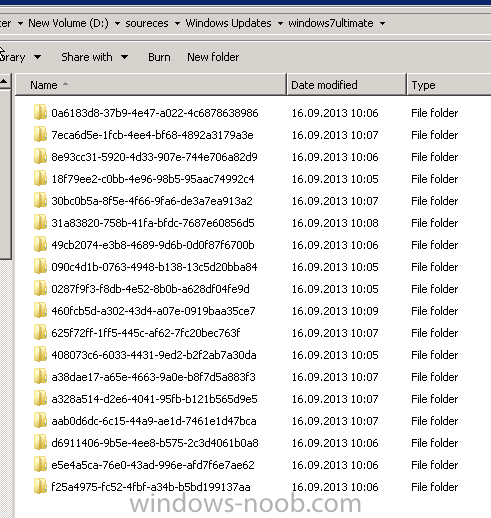
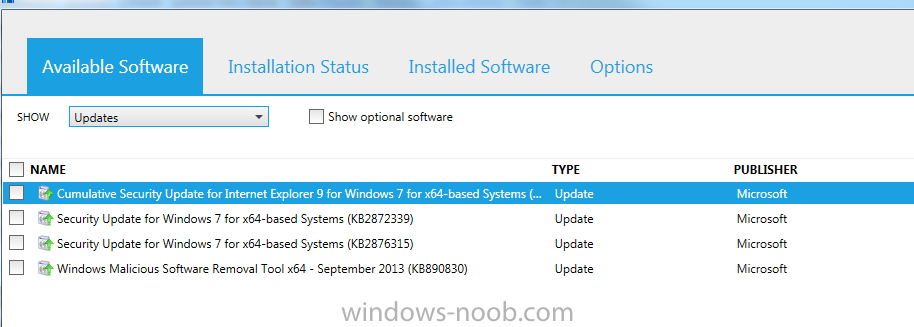
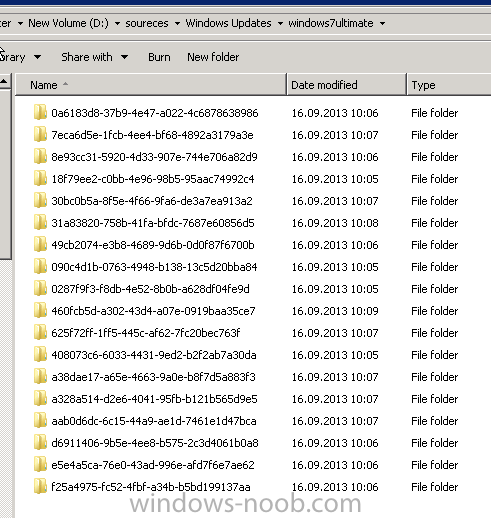
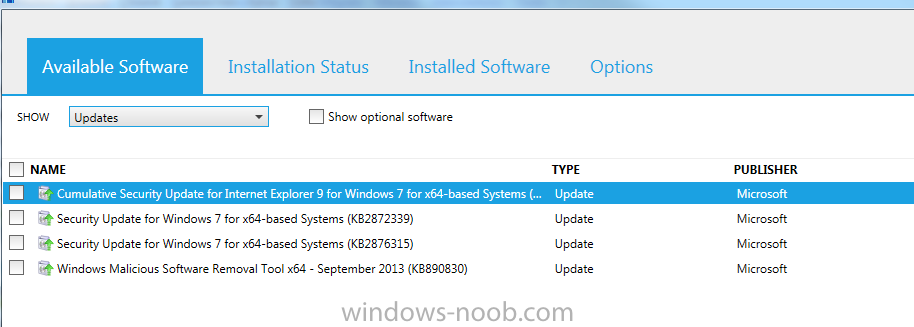
Hi all, I have created a new ADR for monthley Windows Update, it does work. My problem ist that after running the ADR I saw in my source Folder for Windows Update 18 Updates.But on the client machine I see only 4 Update in Software center to install. Can anybody tell me why? Regards Keywan
-
Hi anyweb, Tell me please why the selection "Last 1 day" does not work? And does work the selection "Last 1 month"?
-
Ok I understand it means I should get on 17th September Updates?Should I change "Last 1 day" or let it be?
-
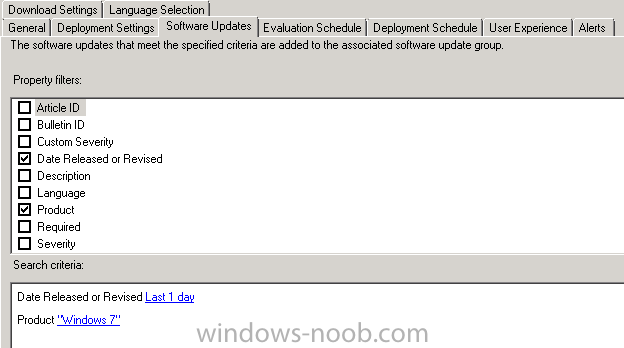
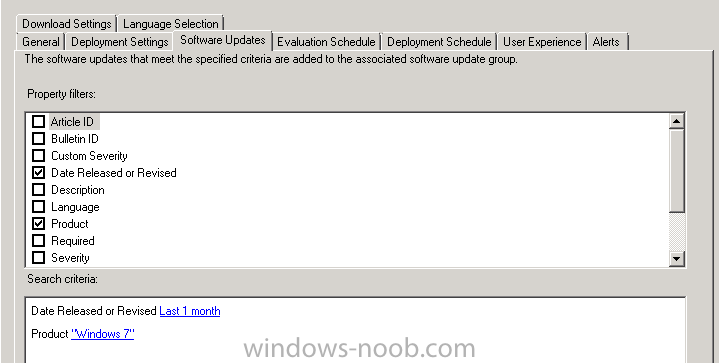
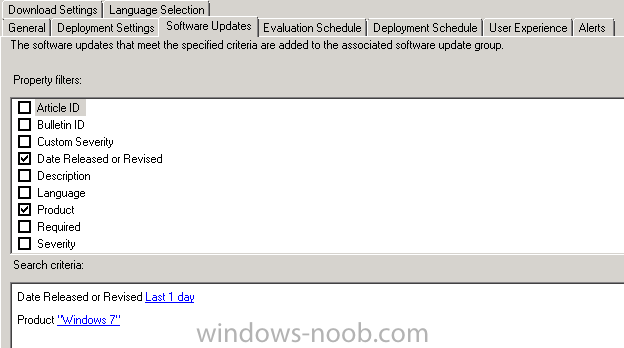
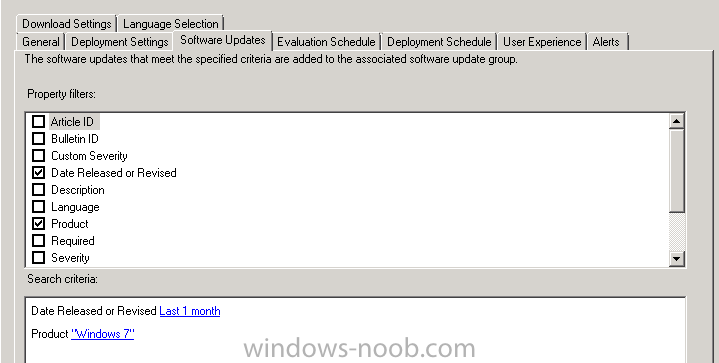
Hi All, I did follow the guide here for "Deploying monthley Windows 7Update". My Problem ist the creteria. I select by "Software Update": 1) Date Released or Revised "Last 1 Day" 2) Product "Windows 7" If run my ADR, I did not see any Updates in my Folder. If I change my creteria of Date Released or Revised "Last 1 Day" from "last 1 day" to "Last 1 month", I get immediatley some Updates and I can see Windows 7 Updates in my Folder. Can anybody tell why? And what do I here wrong? best Regards Keywan
-
Hi, I have a problem with installing with Endpoint Protection on my client machine. I have installed on my SCCM 2012 R2 Server the Endpoint Protection and I see now on the desktop a green symbol of End Protection. But I have some questions: 1)How can I install or deploy Endpoint Protection on my others servers and my client machine? 2) After installing Endpoint Protection on my client machine or my Servers, should I see the green symbol too? Thanks for help Regards Keywan
-
Hi Anyweb, I did follow exactly your guide and created two ADRs and I disabled the first ADR and run the second ADR like your guide. But it does not work. I cannot see any update in my Window Update directory and I saw in my logfile "ruleengine.log" and found no errors. Here is my log: ########### ~ Populating Criterion Skeleton $$<SMS_RULE_ENGINE><08-20-2013 13:25:29.447-120><thread=8848 (0x2290)> ~ Populating Action Skeleton $$<SMS_RULE_ENGINE><08-20-2013 13:25:29.450-120><thread=8848 (0x2290)> ~ Populating Action Skeleton $$<SMS_RULE_ENGINE><08-20-2013 13:25:29.451-120><thread=8848 (0x2290)> ~CRuleHandler: Need to Process 1 rules $$<SMS_RULE_ENGINE><08-20-2013 13:25:29.452-120><thread=8848 (0x2290)> ~CRuleHandler: Processing Rule with ID:16777223, Name:ADR: Windows 7 Ultimate Software Update. $$<SMS_RULE_ENGINE><08-20-2013 13:25:29.453-120><thread=8848 (0x2290)> ~Evaluating Update Criteria for AutoDeployment Rule 16777223 $$<SMS_RULE_ENGINE><08-20-2013 13:25:29.453-120><thread=8848 (0x2290)> ~ Evaluating Update Criteria... $$<SMS_RULE_ENGINE><08-20-2013 13:25:29.454-120><thread=8848 (0x2290)> ~ Rule Criteria is: <UpdateXML xmlns:xsi="http://www.w3.org/2001/XMLSchema-instance" xmlns:xsd="http://www.w3.org/2001/XMLSchema" Name="SMS_SoftwareUpdate" LocaleId="1033"><UpdateXMLDescriptionItems><UpdateXMLDescriptionItem PropertyName="DateRevised" UIPropertyName=""><MatchRules><string>0:0:1:0</string></MatchRules></UpdateXMLDescriptionItem><UpdateXMLDescriptionItem PropertyName="_Product" UIPropertyName=""><MatchRules><string>'Product:bfe5b177-a086-47a0-b102-097e4fa1f807'</string></MatchRules></UpdateXMLDescriptionItem></UpdateXMLDescriptionItems></UpdateXML> $$<SMS_RULE_ENGINE><08-20-2013 13:25:29.454-120><thread=8848 (0x2290)> ~ Inserting PropertyName:DateRevised, PropertyValue:0:0:1:0 $$<SMS_RULE_ENGINE><08-20-2013 13:25:29.455-120><thread=8848 (0x2290)> ~ Inserting PropertyName:_Product, PropertyValue:'Product:bfe5b177-a086-47a0-b102-097e4fa1f807' $$<SMS_RULE_ENGINE><08-20-2013 13:25:29.455-120><thread=8848 (0x2290)> ~ Query to run is: select CI_ID from dbo.fn_ListUpdateCIs(1033) ci~where IsExpired=0~ and (DateRevised>=N'2013-08-19 11:25:29')~ and (CI_ID in (select CI_ID from v_CICategories_All where CategoryInstance_UniqueID in (N'Product:bfe5b177-a086-47a0-b102-097e4fa1f807'))) $$<SMS_RULE_ENGINE><08-20-2013 13:25:29.455-120><thread=8848 (0x2290)> Rule resulted in a total of 0 updates $$<SMS_RULE_ENGINE><08-20-2013 13:25:29.557-120><thread=8848 (0x2290)> Evaluation Resultant XML is: <EvaluationResultXML xmlns:xsi="http://www.w3.org/2001/XMLSchema-instance" xmlns:xsd="http://www.w3.org/2001/XMLSchema"><CI_IDs></CI_IDs> </EvaluationResultXML> $$<SMS_RULE_ENGINE><08-20-2013 13:25:29.561-120><thread=8848 (0x2290)> ~Enforcing Content Download Action $$<SMS_RULE_ENGINE><08-20-2013 13:25:29.561-120><thread=8848 (0x2290)> Download Rule Action XML is: <ContentActionXML xmlns:xsi="http://www.w3.org/2001/XMLSchema-instance" xmlns:xsd="http://www.w3.org/2001/XMLSchema"><PackageID>DIG00087</PackageID><ContentLocales><Locale>Locale:9</Locale><Locale>Locale:0</Locale></ContentLocales><ContentSources><Source Name="Internet" Order="1"/><Source Name="WSUS" Order="2"/><Source Name="UNC" Order="3" Location=""/></ContentSources></ContentActionXML> $$<SMS_RULE_ENGINE><08-20-2013 13:25:29.561-120><thread=8848 (0x2290)> Criteria Filter Result XML is: <EvaluationResultXML xmlns:xsi="http://www.w3.org/2001/XMLSchema-instance" xmlns:xsd="http://www.w3.org/2001/XMLSchema"><CI_IDs></CI_IDs> </EvaluationResultXML> $$<SMS_RULE_ENGINE><08-20-2013 13:25:29.561-120><thread=8848 (0x2290)> 0 update(s) need to be downloaded in package "DIG00087" (\\SCCM2013\soureces\Windows Updates\Windows 7 Ultimate) $$<SMS_RULE_ENGINE><08-20-2013 13:25:29.576-120><thread=8848 (0x2290)> List of update(s) which match the content rule criteria = {} $$<SMS_RULE_ENGINE><08-20-2013 13:25:29.576-120><thread=8848 (0x2290)> No new update was added to the package. Package "DIG00087" would not be updated. $$<SMS_RULE_ENGINE><08-20-2013 13:25:29.576-120><thread=8848 (0x2290)> Download action completed for the AutoDeployment $$<SMS_RULE_ENGINE><08-20-2013 13:25:29.577-120><thread=8848 (0x2290)> ~Enforcing Create Deployment Action $$<SMS_RULE_ENGINE><08-20-2013 13:25:29.577-120><thread=8848 (0x2290)> ~ Create Deployment Rule Action XML is: <DeploymentCreationActionXML xmlns:xsi="http://www.w3.org/2001/XMLSchema-instance" xmlns:xsd="http://www.w3.org/2001/XMLSchema"><CollectionId>DIG00018</CollectionId><IncludeSub>true</IncludeSub><Utc>false</Utc><Duration>7</Duration><DurationUnits>Days</DurationUnits><AvailableDeltaDuration>4</AvailableDeltaDuration><AvailableDeltaDurationUnits>Hours</AvailableDeltaDurationUnits><SuppressServers>Unchecked</SuppressServers><SuppressWorkstations>Unchecked</SuppressWorkstations><PersistOnWriteFilterDevices>Unchecked</PersistOnWriteFilterDevices><AllowRestart>false</AllowRestart><DisableMomAlert>false</DisableMomAlert><GenerateMomAlert>false</GenerateMomAlert><UseRemoteDP>false</UseRemoteDP><UseUnprotectedDP>true</UseUnprotectedDP><UseBranchCache>true</UseBranchCache><EnableDeployment>true</EnableDeployment><EnableWakeOnLan>false</EnableWakeOnLan><AllowDownloadOutSW>false</AllowDownloadOutSW><AllowInstallOutSW>false</AllowInstallOutSW><EnableAlert>true</EnableAlert><AlertThresholdPercentage>90</AlertThresholdPercentage><AlertDuration>7</AlertDuration><AlertDurationUnits>Days</AlertDurationUnits><EnableNAPEnforcement>false</EnableNAPEnforcement><UserNotificationOption>DisplayAll</UserNotificationOption><LimitStateMessageVerbosity>false</LimitStateMessageVerbosity><StateMessageVerbosity>10</StateMessageVerbosity><AllowWUMU>false</AllowWUMU><AllowUseMeteredNetwork>false</AllowUseMeteredNetwork></DeploymentCreationActionXML> $$<SMS_RULE_ENGINE><08-20-2013 13:25:29.577-120><thread=8848 (0x2290)> ~ Rule XML is: <AutoDeploymentRule xmlns:xsi="http://www.w3.org/2001/XMLSchema-instance" xmlns:xsd="http://www.w3.org/2001/XMLSchema"><DeploymentName>ADR: Windows 7 Ultimate Software Update</DeploymentName><DeploymentDescription/><LocaleId>1033</LocaleId><UseSameDeployment>false</UseSameDeployment><EnableAfterCreate>true</EnableAfterCreate><NoEULAUpdates>false</NoEULAUpdates><AlignWithSyncSchedule>false</AlignWithSyncSchedule><ScopeIDs><ScopeID>SMS00UNA</ScopeID></ScopeIDs></AutoDeploymentRule> $$<SMS_RULE_ENGINE><08-20-2013 13:25:29.578-120><thread=8848 (0x2290)> ~ Criteria Filter Result XML is: <AutoDeploymentRule xmlns:xsi="http://www.w3.org/2001/XMLSchema-instance" xmlns:xsd="http://www.w3.org/2001/XMLSchema"><DeploymentName>ADR: Windows 7 Ultimate Software Update</DeploymentName><DeploymentDescription/><LocaleId>1033</LocaleId><UseSameDeployment>false</UseSameDeployment><EnableAfterCreate>true</EnableAfterCreate><NoEULAUpdates>false</NoEULAUpdates><AlignWithSyncSchedule>false</AlignWithSyncSchedule><ScopeIDs><ScopeID>SMS00UNA</ScopeID></ScopeIDs></AutoDeploymentRule> $$<SMS_RULE_ENGINE><08-20-2013 13:25:29.578-120><thread=8848 (0x2290)> ~ Parsing Deployment Action XML... $$<SMS_RULE_ENGINE><08-20-2013 13:25:29.579-120><thread=8848 (0x2290)> ~ Parsing Rule XML... $$<SMS_RULE_ENGINE><08-20-2013 13:25:29.579-120><thread=8848 (0x2290)> Could not find element DeploymentId $$<SMS_RULE_ENGINE><08-20-2013 13:25:29.580-120><thread=8848 (0x2290)> Could not find element UpdateGroupId $$<SMS_RULE_ENGINE><08-20-2013 13:25:29.580-120><thread=8848 (0x2290)> Could not find element UpdateGroupName $$<SMS_RULE_ENGINE><08-20-2013 13:25:29.580-120><thread=8848 (0x2290)> The rule resulted in no updates being found. Skip deployment creation or update... $$<SMS_RULE_ENGINE><08-20-2013 13:25:29.582-120><thread=8848 (0x2290)> ~CRuleHandler: Rule 16777223 Successfully Applied! $$<SMS_RULE_ENGINE><08-20-2013 13:25:29.582-120><thread=8848 (0x2290)> ~CRuleHandler: ResetRulesAndCleanUp() $$<SMS_RULE_ENGINE><08-20-2013 13:25:29.582-120><thread=8848 (0x2290)> ~Updated Success Information for Rule: 16777223 $$<SMS_RULE_ENGINE><08-20-2013 13:25:29.584-120><thread=8848 (0x2290)> ~CRuleHandler: Deleting Rule 16777223 $$<SMS_RULE_ENGINE><08-20-2013 13:25:29.584-120><thread=8848 (0x2290)> ~Found notification file C:\Program Files\Microsoft Configuration Manager\inboxes\RuleEngine.box\16777223.RUL $$<SMS_RULE_ENGINE><08-20-2013 13:25:39.443-120><thread=8848 (0x2290)> RuleSchedulerThred: Change in Rules Object Signalled. $$<SMS_RULE_ENGINE><08-20-2013 13:25:39.444-120><thread=4240 (0x1090)> Refreshed ScheduleList instance for Rule (16777217) from schedule string () with next occurence (01.01.1970 01:00:00) $$<SMS_RULE_ENGINE><08-20-2013 13:25:39.445-120><thread=4240 (0x1090)> Refreshed ScheduleList instance for Rule (16777218) from schedule string () with next occurence (01.01.1970 01:00:00) $$<SMS_RULE_ENGINE><08-20-2013 13:25:39.445-120><thread=4240 (0x1090)> Refreshed ScheduleList instance for Rule (16777219) from schedule string () with next occurence (01.01.1970 01:00:00) $$<SMS_RULE_ENGINE><08-20-2013 13:25:39.446-120><thread=4240 (0x1090)> Refreshed ScheduleList instance for Rule (16777222) from schedule string (B6748AC000231400) with next occurence (10.09.2013 19:45:00) $$<SMS_RULE_ENGINE><08-20-2013 13:25:39.446-120><thread=4240 (0x1090)> Refreshed ScheduleList instance for Rule (16777223) from schedule string (EE748AC000231400) with next occurence (10.09.2013 19:59:00) $$<SMS_RULE_ENGINE><08-20-2013 13:25:39.446-120><thread=4240 (0x1090)> FindNextEventTime found next event for RuleID 16777222 as :10.09.2013 19:45:00 $$<SMS_RULE_ENGINE><08-20-2013 13:25:39.446-120><thread=4240 (0x1090)> RuleEngine: Got next rule execution time successfully. Next event is in 30619 minutes $$<SMS_RULE_ENGINE><08-20-2013 13:25:39.447-120><thread=4240 (0x1090)> Sleeping for 15 minutes $$<SMS_RULE_ENGINE><08-20-2013 13:25:39.447-120><thread=4240 (0x1090)> ~CRuleHandler: Need to Process 0 rules $$<SMS_RULE_ENGINE><08-20-2013 13:25:39.445-120><thread=8848 (0x2290)> ~CRuleHandler: ResetRulesAndCleanUp() $$<SMS_RULE_ENGINE><08-20-2013 13:25:39.465-120><thread=8848 (0x2290)> ################# Where is the Problem? Thanks Keywan
-
Hi, We have installed the SCCM 2012 SP1 and want to deploy Windows 8. We have some Windows 7 Ultimate machine and they should migrate Windows 8 using SCCM. 1) How can I or can I deploy Windows 8 per Software Center to my Windows 7 Client to upgrade? 2) Should I use "Task Sequences"? When I use Task Sequence" I have to boot my Client and press F12, Is the Correct so? 3) What happend with my Application and data files? regards Keywan
-
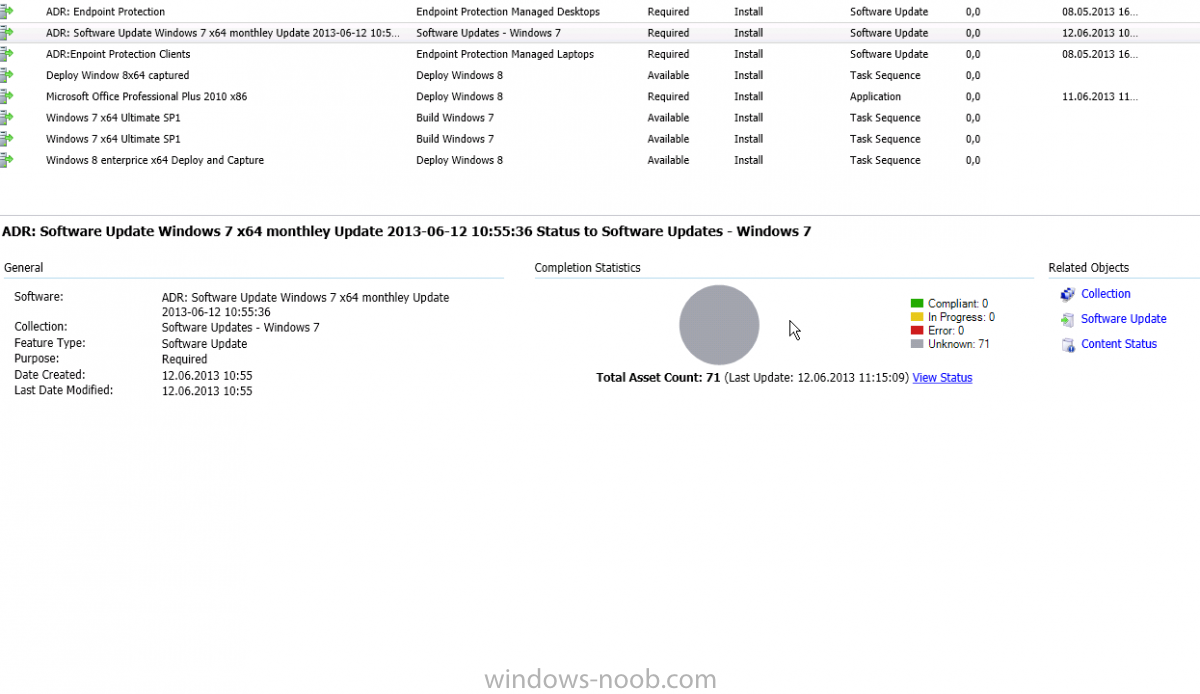
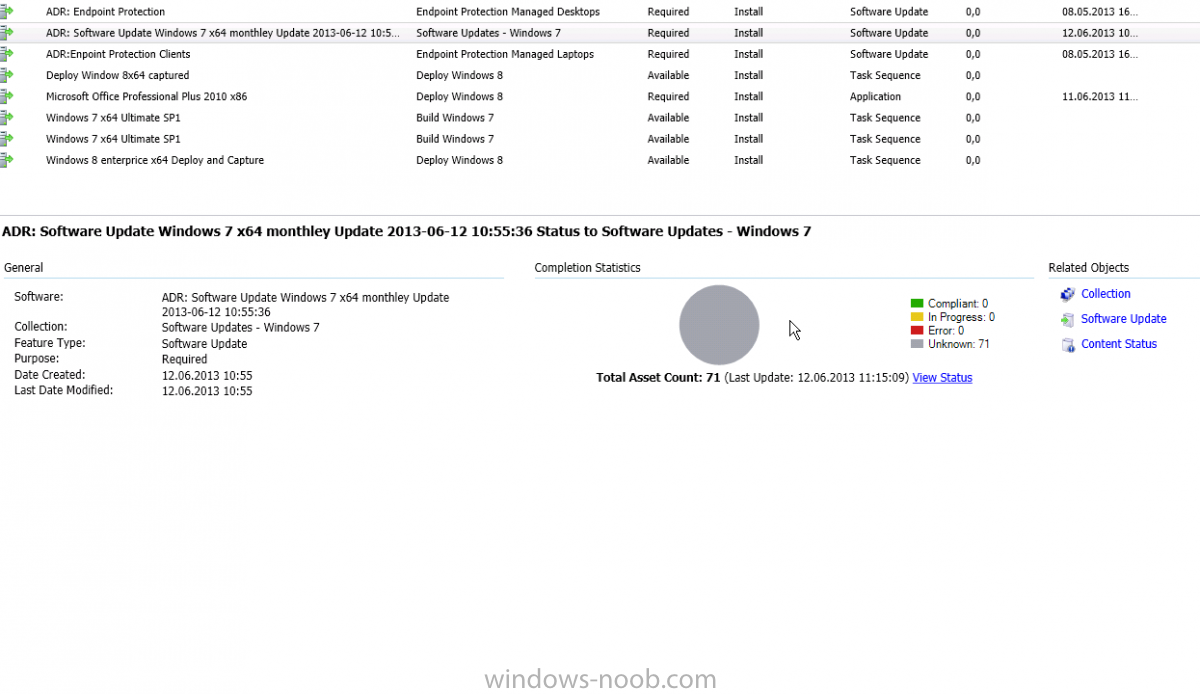
Hi anyweb, First of all great tutorial many thanks for your hard work. I created first one named ADR: Window 7 monthley update and follow your descrition until: After running the rule, verify that the Deployment Package is indeed created and when done, right click on the ADR again, and choose Disable.( here I choose create a new deployment package) After runing the ADR:Window 7 monthley update I saw the deploment package is created I disabled the ADR Window 7 monthley update and recreate again a new ADR named: ADR:windows 7 monthley updated and follow exact the description choose this time the Select Deployment Package and follow the wizard. My question is: Which ADR should I run for deploy my updates to the Windows client? The ADR:Window 7 monthley update still is disabled and ADR:windows 7 monthley updated is enabled. For testing I did run (manalley) The ADR:Window 7 monthley update( it is still disabled) and I open my Windows Explorer at this point and browse to the location of my Windows 7 Updates package source location and saw alle updated files. If I go the Software Library workspace, select Software Updates and expand Deployment Packages, select my Windows 7 Updates deployment Package and click on Content Status. I can see that everthing is OK. But my client computer does not receive any windows update. I cannot see any new software update in the Software center. What do I here wrong? Thanks for help. Here you see my compliance information revealed at this point is listed as Unknown (71).
-
The CM12 BitLocker FrontEnd HTA
keywan replied to anyweb's question in Frontends, HTA's and Web Services
Which instructions please? Where find I that? -
Hi, I have captured and build successfully window 8. But I have add to application(Adobe reader and PSPad) to the image, after finishing it does not installed my applications. Could somebody tell why? Where can I find the logs for application?
-
Can I save me the steps of udi task sequence durin the deployment? I mean I dont want to type all informations of volume, select target,deployment Readniss and ............. Is there any way to do that automatically?
-
The CM12 BitLocker FrontEnd HTA
keywan replied to anyweb's question in Frontends, HTA's and Web Services
Hi, How to install or set up "The CM12 BitLocker FrontEnd HTA" on SCCM 2012 SP1? Thanks -
Windows server 2012 as DP TS error 80070002
keywan replied to Kerimrasmop's topic in Configuration Manager 2012
Hi Kerimrasmop, I have the same problem with TS OSD and DP with Windows 2008 R2 Sp1 to deploy and I get always the error code 0x80070002. Could you please tell what did do for deploy Windows 2008 R2? Could you please write the steps for deploying Windows 2008 R2? Best regards Keywan -
Hi all, I am using SCCM 2012 SP1 with Windows 2008 R2 x64 and want to try to deploy Windows 2008 R2. It does not work and I get the error message from x:\SMSTSLog\smsts.log (__hrMethodRetVal == ((HRESULT)0L)) || (bFailIfMissing == false), HRESULT=80070002 (e:\NTS_SCCM_RELEASE\sms\common\inc\ccmxml.h,582) (__hrMethodRetVal == ((HRESULT)0L)) || (bFailIfMissing == false), HRESULT=80070002 (e:\NTS_SCCM_RELEASE\sms\common\inc\ccmxml.h,582) (__hrMethodRetVal == ((HRESULT)0L)) || (bFailIfMissing == false), HRESULT=80070002 (e:\NTS_SCCM_RELEASE\sms\common\inc\ccmxml.h,582) And from directory x:\Windows\Temp\SMSTSLog\smsts.log follow errors: Failed to open Software\Microsoft\Sms\Mobile Client\Software Distribution registry key. The client should not get checked for RWH OpLock Type Failed to run the action: Apply Operating System. The system cannot find the file specified. (Error: 80070002; Source: Windows) The execution of the group (Build the Reference Machine) has failed and the execution has been aborted. An action failed. Operation aborted (Error: 80004004; Source: Windows) Failed to run the last action: Apply Operating System. Execution of task sequence failed. The system cannot find the file specified. (Error: 80070002; Source: Windows) I can ping my sccm server with FQDN too Regards
-
Hi anyweb, Thanks for your replay. What do you mean with "building a reference image"? Yes I did try to do that. It is a real comupter. Yes I have a valid IP address and can ping FQDN of MP. I'm almost to despair. Did you have a other post for deploying Windows 2008 R2? Thanks for help Regards Keywan
-
Hi all, I am using SCCM 2012 SP1 with Windows 2008 R2 x64 and want to try to deploy Windows 2008 R2. It does not work and I get the error message from x:\SMSTSLog\smsts.log (__hrMethodRetVal == ((HRESULT)0L)) || (bFailIfMissing == false), HRESULT=80070002 (e:\NTS_SCCM_RELEASE\sms\common\inc\ccmxml.h,582) (__hrMethodRetVal == ((HRESULT)0L)) || (bFailIfMissing == false), HRESULT=80070002 (e:\NTS_SCCM_RELEASE\sms\common\inc\ccmxml.h,582) (__hrMethodRetVal == ((HRESULT)0L)) || (bFailIfMissing == false), HRESULT=80070002 (e:\NTS_SCCM_RELEASE\sms\common\inc\ccmxml.h,582) And from directory x:\Windows\Temp\SMSTSLog\smsts.log follow errors: 401 - Authentication failure on request with anonymous access, retrying with context credentials. 401 - Authentication failure on request with anonymous access, retrying with context credentials. Failed to open Software\Microsoft\Sms\Mobile Client\Software Distribution registry key. The client should not get checked for RWH OpLock Type Failed to run the action: Apply Operating System. The system cannot find the file specified. (Error: 80070002; Source: Windows) The execution of the group (Build the Reference Machine) has failed and the execution has been aborted. An action failed. Operation aborted (Error: 80004004; Source: Windows) Failed to run the last action: Apply Operating System. Execution of task sequence failed. The system cannot find the file specified. (Error: 80070002; Source: Windows) Can anybody help me? I did checked follow: Click the Administration section Right-click the site in question > Configure Site Components > Software Distribution Choose the Network Access Account tab Specify the correct credentials to the share I can connect with my credential the shared folder Best regards Keywan
-
Hi all, I wanna to deploy office 2010 with sccm 2012 sp1. Does know somebody how can I set up or deploy Outlook 2012 with server information, user information, login information and ....? I mean I want to give all user specification?(E mail address, login name, imap, smpt login name and password). I hope you can help me Regards Keywan
-
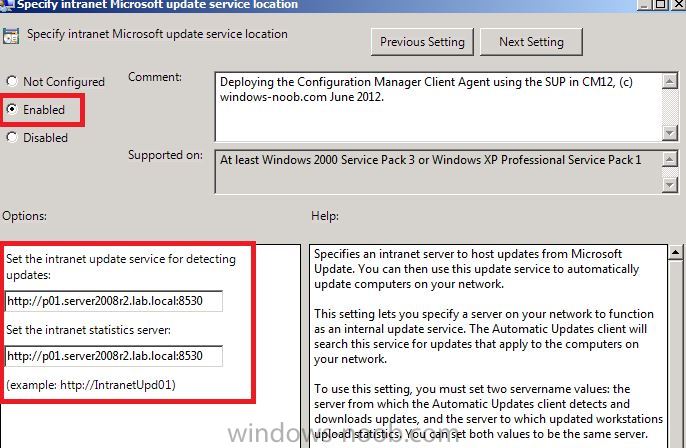
Do mean I need that entry only for deploying the Configuration Manager client? Or I need that for others too? If that ebtry is only for deploying the Configuration Manager client then I do not to do that
-
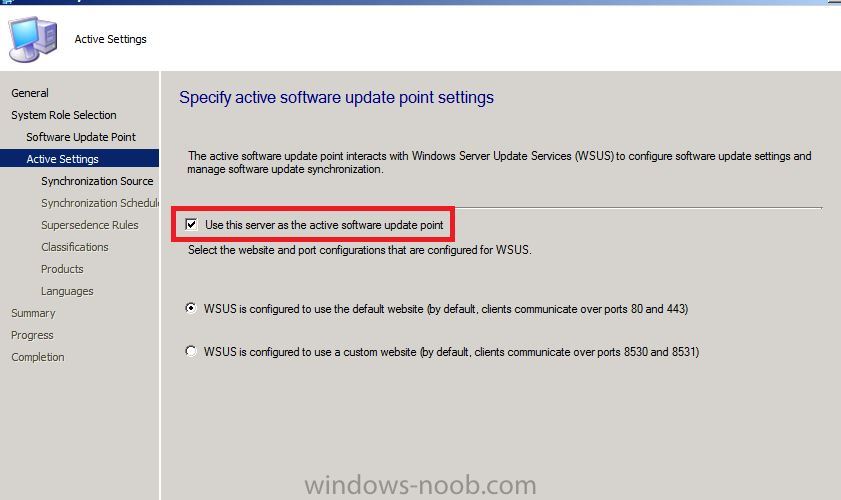
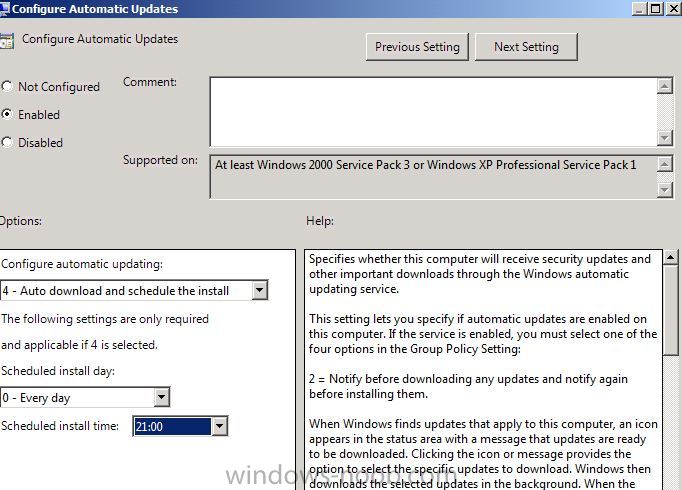
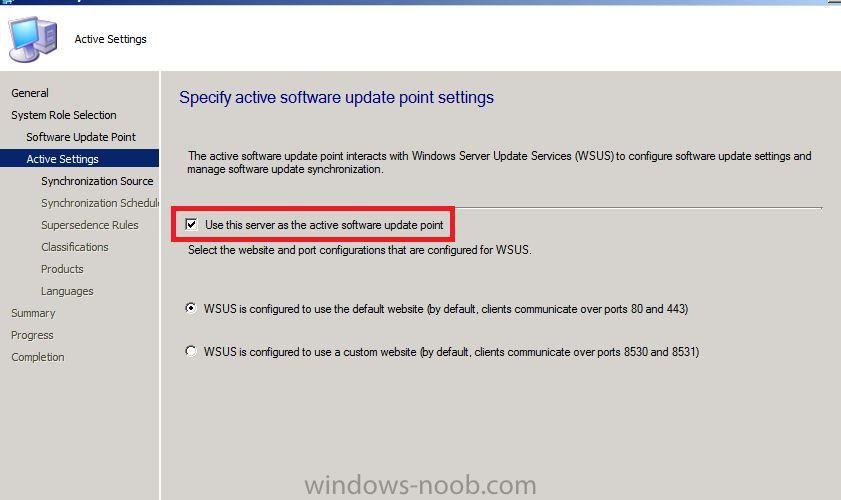
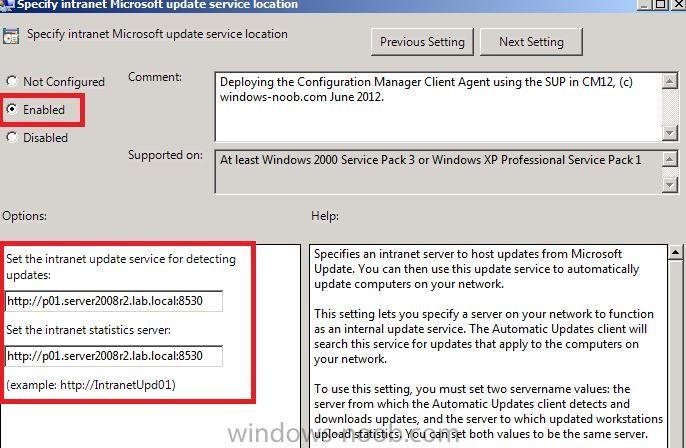
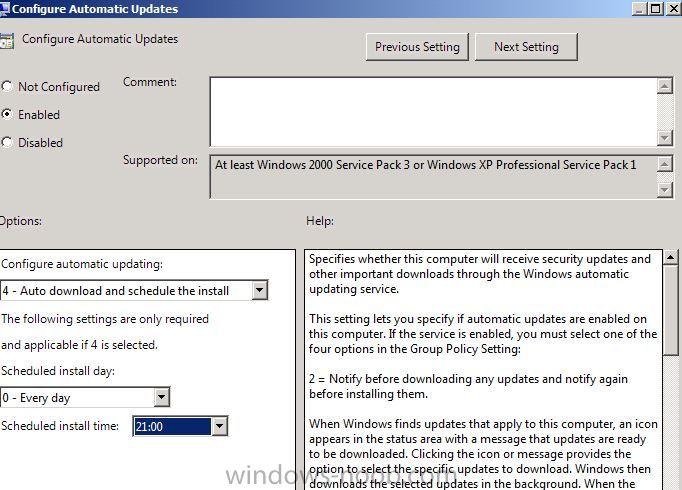
Hi Anweb, Do I need to set an GPO Specify intranet Microsoft update service location, and set it to Enabled it, if I have installed an standalone sccm server and put http://mysccmserver.mydomainname.com:8530 or not? I have installed SUP and set it so: What should I do in GPO? Should I set too or not? Thanks for help
-
Hi anyweb, Yes you are right, I know that too. I only have one server and I want to install standalone primary side. I am setting up a production. I did follow your parts (index) http://www.windows-noob.com/forums/index.php?/topic/4045-system-center-2012-configuration-manager-guides/ If I go to above link and Standalone Primary Server and click on CM12 in a lab - Part 1. Installation., I see follow information: Update: This post has been superseded since the release of the RTM version of Configuration Manager 2012. To see the new post please click here. If I click on here, I see the same parts like CAS. Is the link correct? How many clients can I configure with standalone primary side? What is the differnet between Lab and Production? Let me please know which documentation should I follow to installing standalone primary side Best regards
-
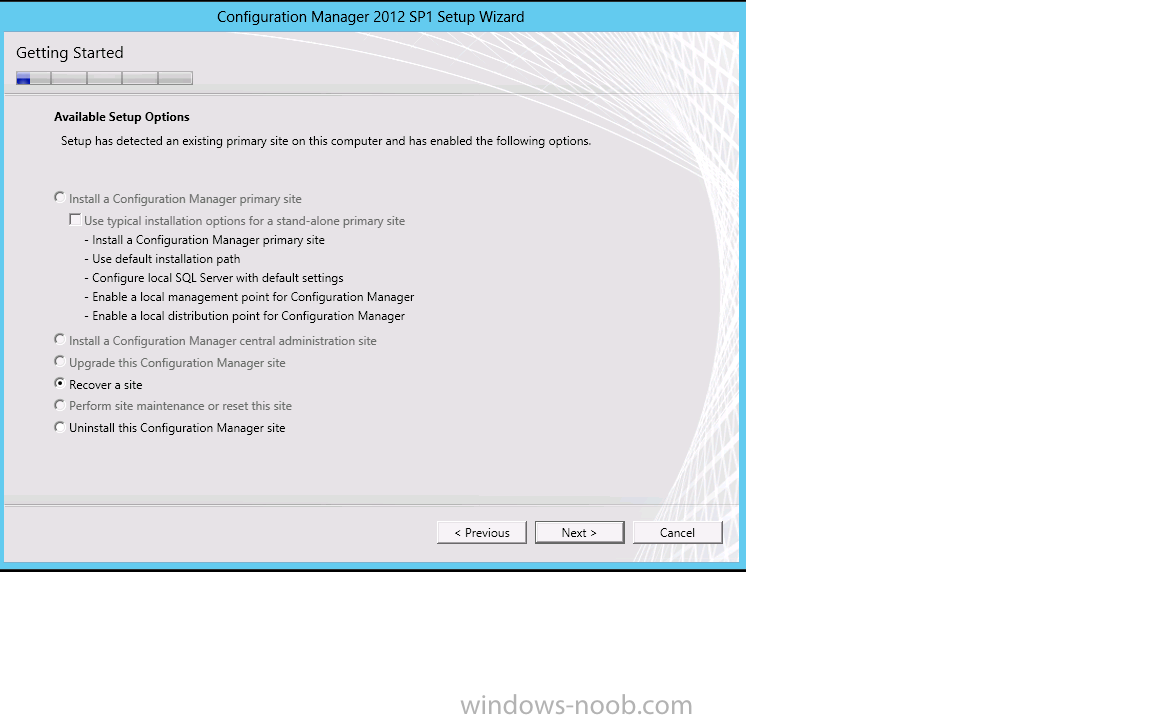
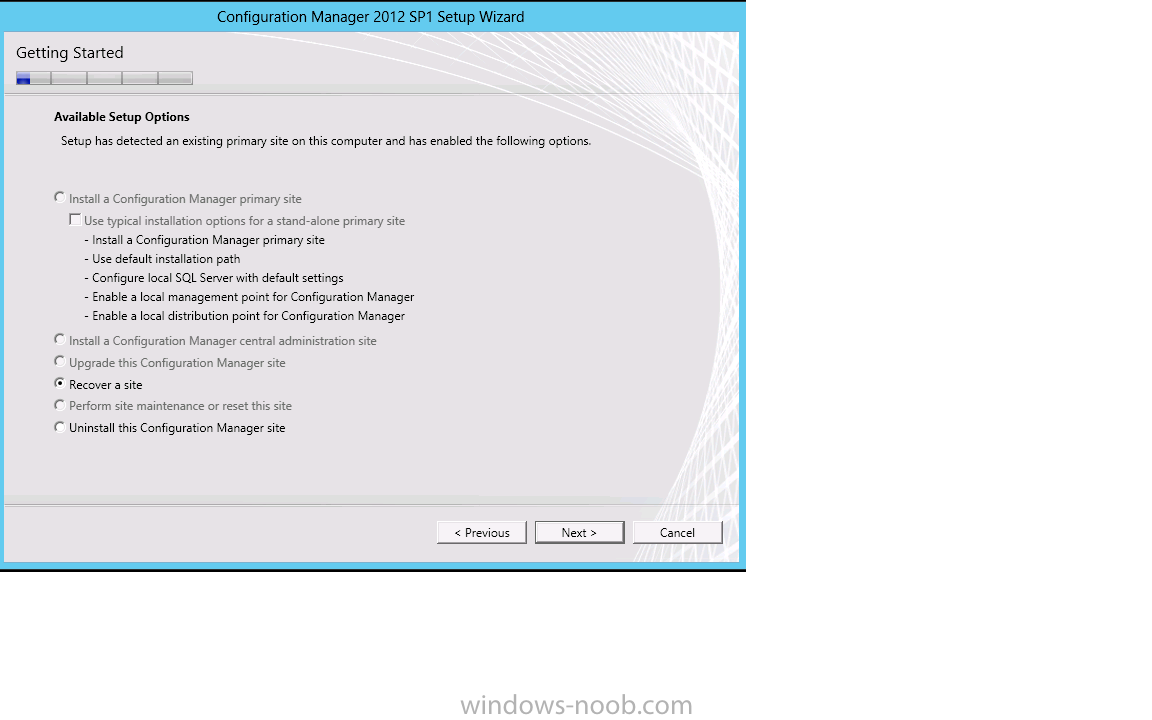
Hi, My machine is new and I do not have installed any SCCM 2012 before. I install first "Install a Configuration Manager central administration site" and after that I did want to install the second option "Install a Configuration Manager primary site" but it is gray out and I can choose only recover the side or uninstall the side. Is the problem because I have only one sccm server and I should to install an standalone primary server?
-
Hi Anyweb, Could you please tell me, why I cannot install SCCM 2012 SP1 the both follow options? "Install a Configuration Manager central administration site" and after that I could install "Install a Configuration Manager primary site" I know I could install these above option by SCCM 2012. But SCCM 2012 SP1 you can install on of these option. Is that correct? Best regards
-
Hi anyweb, During the installation of SCCM 2012 SP1 with SQL 2012 SP1 and Windows 2012 Server I got the error message by Database Information" follow error message: --------------------------- Setup is unable to connect to SQL Server with the connection information provided. Verify the following: . The SQL Server and instance names are entered correctly . The specified SQL Server instance is not configured to use dynamic ports . If a firewall is enabled on the SQL Server, inbound rules exist to allow connections to the correct ports . The account used to run Setup has permissions to connect to the specified SQL Server instance --------------------------- Do you have any Idea? Best regards Keywan
-
SCCM 2012 upgrade to SCCM 2012 SP1 Final
keywan replied to Damien's topic in Configuration Manager 2012
Hi anyweb, do you have an step by step guide for SCCM 2012 SP1? Would you recommend to install SCCM 2012 SP1 on Windows 2008 R2 Server with SQL 2008 R2 or on Windows 2012 Server and SQL 2012? I have a domain with Windows 2008 R2 and I am not sure whether I can take Windows 2012 Server in the domain with Windows 2008 R2 Server? Best regards Keywan