regan
Established Members
-
Joined
-
Last visited
-
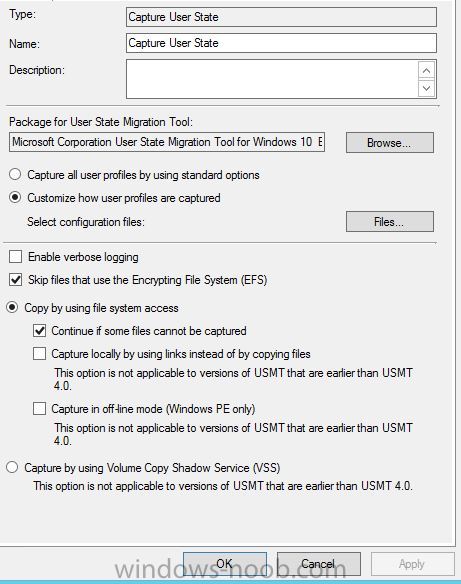
I’m trying to use USMT on a windows 10 pc to the same PC. Ideally Id like to keep the format and partition step as normal which is why I’m trying to use the SCCM migration point to store the files. I have put in the first step- request state store followed by - capture user state Then at the end of the TS Release user state store – restore user state currently using USMT 5.0 is there any other options I need to change in order to do the above
-
I have installed Wsus role and required roles on a remote sever and linked it to my config manager database and within the database it does show the show the susdb. however when i try and sync i get these errors below ( firewall is off on both sites and they are both on the same subnet)



-
You could use Select * from Win32_ComputerSystem where Name like "%LIB-%"
-
If i understand you correctly you could always point the part of the TS that changes the homepage to a computer name so if they are called lib-01 for example you could do lib-%
-
I'm trying to configure reports so they can be sent to an email address , however my stumbling block is using office 365 (i think), Under "specify account" you need a network account but to authenticate against 365 i need an email address so i cant get the two to work together. Has anyone successfully done this?


-
Ive used them all in a task sequence's, i would suggest create applications rather than packages and see how you get on.
-
-
-
-
No there's not, i can do that, how would i reference that in the bat file though? if not exist "C:\Program Files\SIMS\SIMS.Net\connect.ini" copy /y "\\%~dp\Sims Connect ini" "C:\Program Files\SIMS\SIMS.Net"
-
ive added below to the top and it works is u run as administrator but without it i dont have permission to c:\program files NET USE \\MySccmserver\e$
-
I think the issues is access to the C:\WINDOWS folder as i have to run as administrator in order to work. During a TS i can just create a package and use xcopy which works but im trying to build it into the application
-
I have created an application which contains multiple installs which all work well however I have added a bat file at the end which copies a couple of INI files to a directory. The bat file seems to work fine but during the install it doesn’t. I may be going about it the wrong way so any advice would be welcome. The bat file is del "C:\WINDOWS\sims.ini" if not exist "c:\program files\sims\sims .net\connect.ini" copy /y "\\MySccmserver\Sources\OS Deployment Share\Shortcuts\Sims Connect ini\connect.ini" "c:\program file\sims\sims .net" if not exist "C:\WINDOWS\sims.ini" copy /y "\\ MySccmserver \Sources\OS Deployment Share\Shortcuts\Sims Ini\sims.ini" "C:\WINDOWS\"

-
is your contenlib on your c drive? if so that will be why
-
I made the mistake of not putting the NO_SMS_ON_DRIVE.SMS file on the drive I want to keep clean when I first setup my site. Now I think Ive got two locations for my contenlib ect and this is causing issues with the package and content status saying file are missing missing every so often( this could be a different issue) . I have since created the NO_SMS_ON_DRIVE.SMS file so could I just delete the old folders and redistribute the content which I would assume would them move to my secondary drive which already has a conentlib or should I move it? i am aware of he content library tool but im not sure of the consequences of moving if there's is already a contentlib being used