



Welcome to windows-noob.com!
Logging in will allow you to download scripts used in the guides.
If you came here looking for the Endpoint Manager step-by-step guides then please start here.
Register for free and ask your questions in our forums.
- 3 replies
- 3287 views
- Add Reply
- 2 replies
- 2256 views
- Add Reply
- 3 replies
- 3804 views
- Add Reply
- 3 replies
- 4904 views
- Add Reply
- 2 replies
- 4404 views
- Add Reply
- 3 replies
- 6934 views
- Add Reply
- 3 replies
- 7712 views
- Add Reply
- 8 replies
- 10645 views
- Add Reply
Importing Drivers During Production Hours?

By allenr74,
Is it safe to import drivers into SCCM during production hours? We're getting new models in this week and I've always imported drivers on the weekend after business hours for fear of corrupting current production task sequences. Am I correct in importing and creating driver packages only after business hours?
Deploy Configuration baseline to Collection problem

By A.Kassem,

When I try to deploy Configuration baseline to Collection none of my collections appears to be selected . I can't figure out what is the problem ! anyone can help with that ?
Software Baseline for approved software
By A.Kassem,
How can I create a configuration baseline for approved software list in my organization .
I created configuration item for approved software and set compliance rule to be must exist .
Is there is a way to determine which clients have installation for not approved software to report it as noncompliance.
SCCM 1702 Problem Installing Client on Windows 10 Devices

By lestat1977uk,
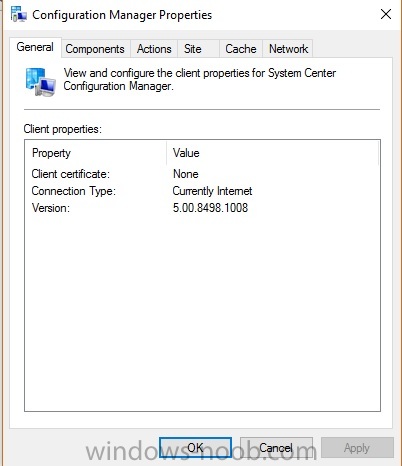
SCCM 1702
Server 2012 R2
Windows 10 Devices
Windows Firewall Off on All Devices
Hi all,
Having some real issues installing the SCCM Client onto my physical windows 10 devices, one is a Surface pro 3 and the other Fujitsu hardware.
When i push the client the process never starts and if i run the a manual installation (ccmsetup.exe /mp:SCCMSERVER /logon SMSSITECODE=MYSITECODE) the client does install but if not assigned to any MP and the button to 'Find Site' is greyed out s
Adding Windows Update to task sequence?

By xerxes2985,
Good Morning,
I am not currently utilizing WSUS, however, I was wondering if it was at all possible to utilize the same pre and post installation windows updates that are present in MDT 2013?
SCCM Database Move (SCCM 1702 prep)

By pembertj,
SCCM database question. We are moving our sccm database (its on a remote server I KNOW... I inherited the setup) from SQL 2008 R2 to SQL 2014 in preparation for upgrading to SCCM 1702. I see four accounts created by SCCM during install - SMSDBUSER_READONLY, SMSDBUSER_READWRITE, SMSDBUSER_REPORTSCHEMA, and CONFIGMGR_DVIEWACCESS. He wants to transfer these accounts over but no where can I find documented passwords for these accounts. Any solutions besides resetting passwords?
Was cu
In place Windows 10 Upgrade - Task Sequence Manager could not initialize Task Sequence Environment. code 80070005

By SighBee,
I posted this yesterday in the "How do I?" forum (not sure I can delete it) but thought it probably belongs here. Apologies if this is frowned upon.
I have a task sequence to run an in-place upgrade to Windows 10 and it's run successfully on nearly 100 machines. However, one machine has just encountered an error I can't decipher. According to smsts.log, it completed the first part of the upgrade on Friday evening (today is the following Monday) and then rebooted but the next entry isn't
report service broken after inplace upgrade SQL 2008 to SQL 2014

By SpacePants,
Hi All.
Long time lurker here but now is the first time I have been moved to create an account and ask for some advice. I’m looking for a bit of direction on how to proceed as I’m a bit stuck, I’d like to fix this without breaking anything else in SCCM.
I’m running SCCM build 1606 – Last week we upgraded the SQL instance hosting all out SCCM databases from SQL 2008 SP3 to SQL 2014 (this because we plan to upgrade to SCCM 1702). The SQL upgrade wizard reported that it upgraded a