


Welcome to windows-noob.com!
Logging in will allow you to download scripts used in the guides.
If you came here looking for the Endpoint Manager step-by-step guides then please start here.
Register for free and ask your questions in our forums.
- 1 reply
- 3482 views
- Add Reply
- 1 reply
- 3202 views
- Add Reply
- 3 replies
- 18213 views
- Add Reply
- 0 replies
- 1858 views
- Add Reply
- 15 replies
- 12019 views
- Add Reply
- 4 replies
- 3275 views
- Add Reply
- 1 reply
- 1881 views
- Add Reply
- 0 replies
- 9724 views
- Add Reply
Wake up client notification option greyed out

By OwenWilliams,
I have recently upgraded SCCM from 1806 to 1810 and followed a number of guides to enable Wake on LAN. When I right click on a device with the 1810 client version the “Wake Up” option is greyed out.
Does anyone have any suggestions on this?
Applications with multiple deployment types

By xerxes2985,

Quick question, is it necessary when updating an application with two separate deployment types to update content on each deployment type? I assume I should do both?
WMI QUERY using NOT doesnt work

By sacaliabu,
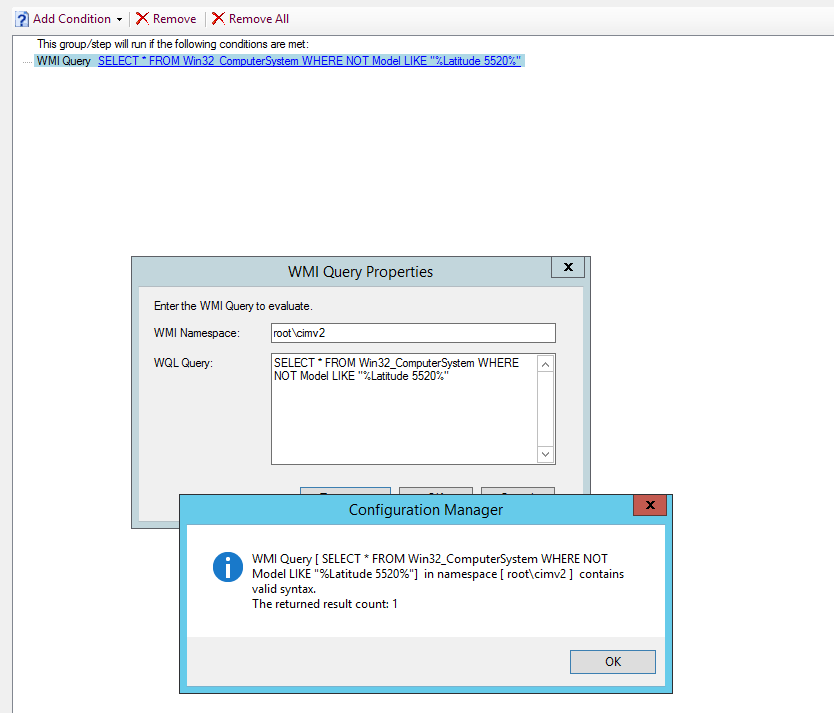
Does anyone have an idea why this query doesn't work when it's written everywhere it should?
This is the query
SELECT * FROM Win32_ComputerSystem WHERE NOT Model LIKE "%Latitude 5520%"
And I have tried with the same results
SELECT * FROM Win32_ComputerSystem WHERE Model NOT LIKE "%Latitude 5520%"
Thank you.
Base updates for Windows 2012 R2 RTM missing

By erikbennett,
As part of a new project, we're building a few Windows 2012 R2 VHDXs from scratch (and starting with RTM) and I've run into a problem when it comes to windows updates.
I can confirm that the problem definitely does not seem to be SCCM specifically, as a few of our packages get installed (after the client is installed, etc) AND one of the windows updates does get installed.
When I run Microsoft Update on a fresh, RTM copy of Windows 2012 R2, I get the following list of Windows Updates a
Reporting Permissions and Empty Software Reports

By Sanchez,
Hi.
I recently set up a new Configuration Manager 1806 environment (now upgraded to 1810). Its SQL database is on a named instance, on a failover cluster, and Reporting Services is installed on one of its nodes (I know that SSRS is not cluster-aware).
The site appears to be mostly fine, but reporting has always seemed a little off. Firstly, while most of the reports work as expected, some of the reports in the "Software - Companies and Products" folder, either produce no results, or on
User-based application deployment not detected

By msee,
Hi!
If I deploy an application to users ConfigMgr doesn't detect the app as installed if it is already present on the client. If I deploy the same application to a device, the application gets detected. If I click on install in the software center, the application state switches immediately to installed.
Does anyone know how to force the software center to re-evaluate user based deployments?
Thanks
Br
Markus
Reports results vs Installed Apps (Hardware INV)

By Mexico,
Hi,
Trying to figure out the mismatch here.
I have an app (installed outside of ProgramFiles/x86 - C:\myApp).
The "Reports: Software - Companies and Products > computers with a specific product" will return for example Office 2016 systems but not my app installed in the root of the drive.
Now if I open the "Hardware Inventory - Installed Applications" on a computer with both apps installed, I can see my app that is installed to the root of the drive as well as Office 2016.
at my wits end...

By sysadmin101,
Hi!
I am deploying W10 1809 using SCCM + MDT UDI.
However, my TS is a little different.
I want to run UDi Wizard before any disks are formatted
For that, Toolkit package must be used first
This is only possible if there is a formatted disk, or if TS runs the files directly from the share (which I did not enable)
Instead, what I did was
Add the Toolkit files directly to the Boot Image (so that I can run it, without formatting the disk, and