



Welcome to windows-noob.com!
Logging in will allow you to download scripts used in the guides.
If you came here looking for the Endpoint Manager step-by-step guides then please start here.
Register for free and ask your questions in our forums.
- 3 replies
- 2951 views
- Add Reply
- 0 replies
- 1854 views
- Add Reply
- 1 reply
- 2105 views
- Add Reply
- 0 replies
- 4466 views
- Add Reply
- 4 replies
- 3527 views
- Add Reply
- 3 replies
- 3669 views
- Add Reply
- 1 reply
- 1864 views
- Add Reply
- 3 replies
- 2795 views
- Add Reply
Is Get-CMalert broken, or am I misunderstanding something?

By Jaybone,
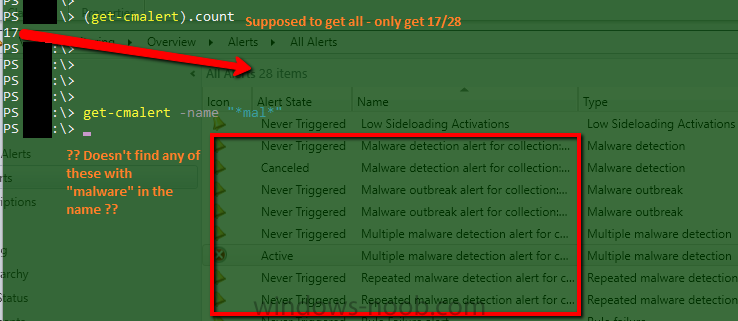
I could find approximately nothing with Google, other than the standard documentation, which is either wrong, or I'm completely misunderstanding.
From its own help:
SYNOPSIS
Gets Configuration Manager alerts.
Example 1: Get all alerts
PS C:\> Get-CMAlert
Except it doesn't. It misses a ton of them. On our new 1606 site, it returns only 17 of 28 alerts, and none of the ones I'm actually interested in (SCEP alerts). In another forest with 2012 R2 + CU3, it returns 186 of
USMT to migration point back to PC

By regan,
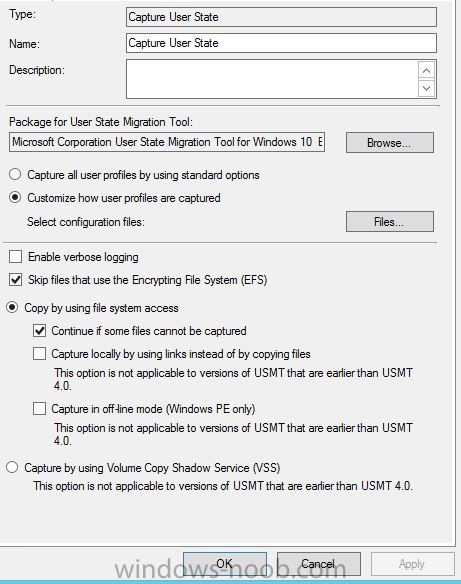
I’m trying to use USMT on a windows 10 pc to the same PC. Ideally Id like to keep the format and partition step as normal which is why I’m trying to
use the SCCM migration point to store the files.
I have put in the first step- request state store followed by - capture user state
Then at the end of the TS Release user state store – restore user state
currently using USMT 5.0
is there any other options I need to change in order to do the above
deploying other distribuion

By honestvip,
We are now two to Nqth distribution and we want a specific IP range
The establishment of a specific distribution program is just like other distributions are slower
What is the setting?
1606 OSD Multicast

By lmccormick1922,
Happy New Year!
Having an issue with content availability for multicast. I can unicast an image just fine, but when I setup a multicast I'm getting the 80070002, which says the content is not available. Not really sure where to go. SMSTSLog atached
Any pointers would be appreciated!
smsts.log
Software Updates during OSD (B&C Image)

By cfreeman21,
I know there have been changes in software updates by reading starting in 1606... How are you all patching your B&C Image using SCCM... I use SCCM to B&C not MDT... I do have MDT integrated into SCCM.
Windows 10 1511 to 1607 Upgrade during OSD

By josephwagner,

Is there a way I can upgrade our current images during the OSD process. Our wim files were built on Windows 10 1511 and we are currently in the process of upgrading our current workstations from 1511 to 1607 using the method outlined here: https://osddeployment.dk/2016/08/05/how-to-upgrade-windows-10-1607-with-sccm-1606-inplace-task-sequence/
We would like to update our images as well so new workstation deployments are receiving the update. We are unable to update our wim files at this time.
Last 4 mount Update 20 gig
By honestvip,
date relased last 4 moints
language english
product windows 10
update classifiction critical or security update
Why such a high volume of updates?
20gig
SCCM1610 Replication Issue

By abhi1411,
we have 1 CAS and 4 Primaries in our environment and had recently updated our sccm environment from 1602 to 1610. we are facing replication issues in CAS and one of the primary sites. On CAS every things seems to be OK but on one of the primary sites it shows replication link in failed state.
On bit digging down replication group CloudProxy is in failed state and RLA is in degraded state. On initiating replication analyzer, CloudProxy become active but RLA remains in degraded state and after