



Welcome to windows-noob.com!
Logging in will allow you to download scripts used in the guides.
If you came here looking for the Endpoint Manager step-by-step guides then please start here.
Register for free and ask your questions in our forums.
- 4 replies
- 6070 views
- Add Reply
- 1 reply
- 4006 views
- Add Reply
- 0 replies
- 5074 views
- Add Reply
- 6 replies
- 4455 views
- Add Reply
- 6 replies
- 3598 views
- Add Reply
- 2 replies
- 3389 views
- Add Reply
- 3 replies
- 2586 views
- Add Reply
- 2 replies
- 7035 views
- Add Reply
Computername doesn't change during task sequence

By kevlar01,
Hi,
Since a while we have problems with a step during our Windows 10 task sequence. This step is a powershell script which changes the computer description based on a variable which is set during the OSDMenu.hta (a form which pops up in the beginning of the task sequence where the computerdescription is filled out).
For whatever reason, this step doesn't work anymore, but in the past this worked fine.
The computerdescription isn't too long (more than 15 characters), and the user
SCCM query to find log4j*.jar file in C drive

By andyya,
Is this a correct query to find log4j*.jar file in C drive?
select SMS_R_System.ResourceId, SMS_R_System.ResourceType, SMS_R_System.Name, SMS_R_System.SMSUniqueIdentifier, SMS_R_System.ResourceDomainORWorkgroup, SMS_R_System.Client from SMS_R_System inner join SMS_G_System_SoftwareFile on SMS_G_System_SoftwareFile.ResourceID = SMS_R_System.ResourceId where SMS_G_System_SoftwareFile.FilePath like "C:\\" and SMS_G_System_SoftwareFile.FileName like "log4j*.jar"
Checking for network cable connections before deploying an OS from the CMG via Software Center

By anyweb,

Introduction
Note: In a previous blog post I showed you how you can deploy an Operating System from a Cloud Management Gateway (CMG) using bootable media. That blog post assumed you had a working network connection (wired) and also required the use of bootable media. Please review that blog post and associated video before starting this one. This new ability to deploy OS via the CMG was added to Configuration Manager version 2010, screenshots in this blog post come from Configuration Manage
Weird Issue with Device Reimage - DELL Alienware Aurora Devices

By coolsport00,
Hey gang -
We just got new DELL Alienware gaming devices to disperse to high schools for gaming sports. Had to tweak things in our OSD Task Sequencing to get these to image properly due to having 2 disks (1 PCIe and 1 HDD; they were 'backwards' as far as Disk 0 & Disk 1 goes. Disk 0 is the HDD and we need the OS deployed on the PCIe). Anyway, got that sorted ok. Was able to get these imaged and settings deployed fine. But, one thing happened during my OSD testing. I can get these device
Problem upgrade W10 via SCCM

By adelgehier,
Hello,
I am currently trying to update workstations with SCCM to go from Windows 10 1903 to Windows 10 21h1.
The problem is that once the update is pushed on the desired clients, on the client no update is available in the software center.
HP Elitebook x360 1040 G8 pxe issue

By frank czech,
We use Microsoft Endpoint Configuration Manager to image computers. We have new HP elitebook x360 1040 g8 laptops and we are unable to image them. We added the new Hp client pxe park along with the nic, chipset and storage drivers and still cannot image. We updated the boot image to include the above drivers and the IP4 loads and stops at where the MECM screen will appear. The laptop just sits there no matter how long we wait.
we are able to image G6 laptops without any issues.
Secondary site server - msg queue taking most space in drive

By Kiran chandra B,
Hi,
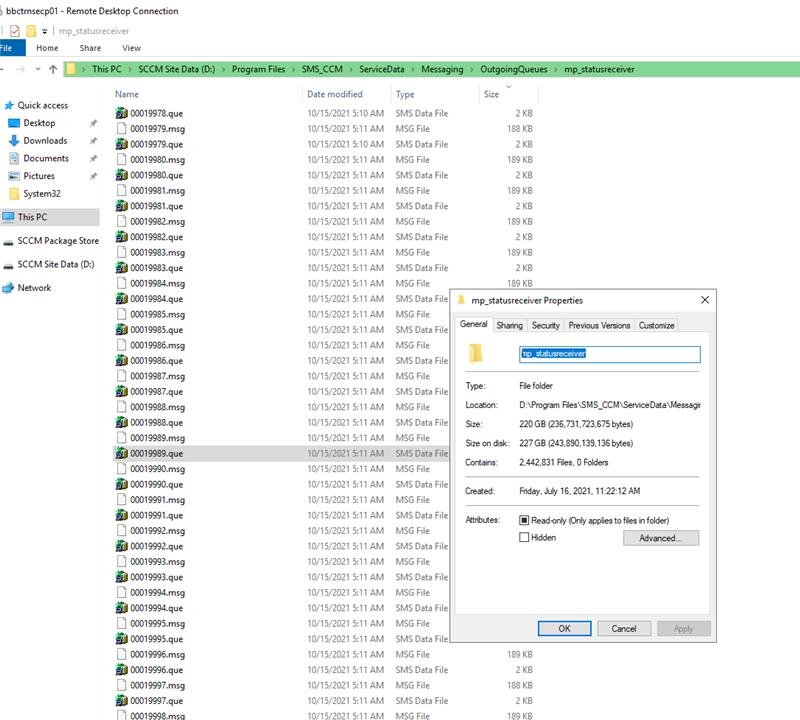
wanted to check with you on secondary site - msg queue taking most space in drive as below - , Please provide yur suggestion if server restart will help to resolve this issue -
check with you on secondary site - msg queue taking most space in drive as below
Running OSD task sequence from Software Center shows installation in progress

By radish,
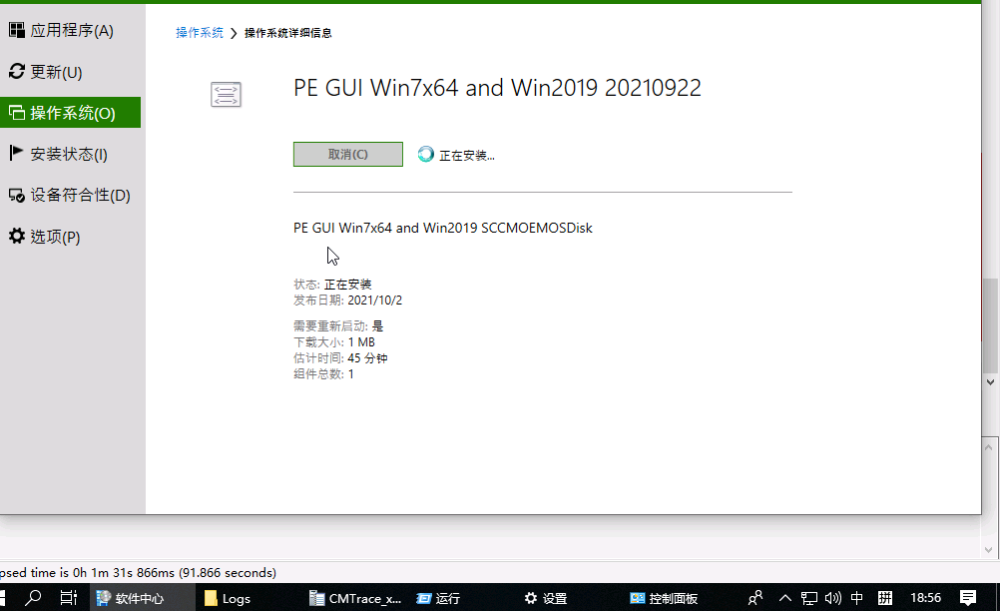
Running the OSD task sequence from the Software Center shows that it is being installed...
Does anyone know what's going on?
TSAgent.log Show these errors
reply has no message header marker
Failed to request policy assignments (Code 0x80004005)
Error initializing policy environment variables. Code 0x80004005
Error LoadPolicyBasedEnvVars, return code 80004005
Error initializing Task Sequence environment. Code 0x80004005
Task sequence launcher deployment