
anyweb
-
Posts
9286 -
Joined
-
Last visited
-
Days Won
371
Everything posted by anyweb
-
 thanks ! this is normal with SP1 - see this post for details
 -
simple, reduce the number, create a top 50 list of apps that you will install dynamically for users during the task sequence, everything else gets installed using normal Configuration manager jobs, that's how we do it where I work (global company,26000 clients)
-
Supporting older workstations after SP1
anyweb replied to h4x0r's topic in Configuration Manager 2012
yes that's what I mean, it's manual work, give it a try and see what happens, note that in order for this to work (if it works at all) you have to manually configure WDS prior to adding PXE support in CM12.. -
below is a quote from the guide you linked to (it was written for the release candidate version of CM12), did you do the below or not ?
-
you could prompt for the Username via a HTA frontend and use that username instead of computername to do the checking against.
-
Supporting older workstations after SP1
anyweb replied to h4x0r's topic in Configuration Manager 2012
at some stage in the past in one of my CM07 labs i had wds configured and Configmgr configured with different response times meaning i could switch back and forth between the two, i haven't tried this with CM12, but i'm sure you will, now so i don't know if i will work but go ahead and try -
using vNext in a LAB - Part 7. Deploying Windows 7 Enterprise
anyweb replied to anyweb's topic in Configuration Manager 2012
this post is for a beta release of Configuration Manager 2012, which version of Configuration Manager are you testing with ? -
if you create a new package does it work to distribute to the local dp or is this only for already created packages?
-
Help: How to add DotNet Framework 3.5 to Windows 8 during OSD Task sequence
anyweb replied to gvlaarho's question in How do I ?
ok thanks for the update and i'm glad it's working -
Help: How to add DotNet Framework 3.5 to Windows 8 during OSD Task sequence
anyweb replied to gvlaarho's question in How do I ?
what version of Windows 8 are you using ? and are you using the SXS folder from the same media that was used to install Windows 8 -
ok i've changed the link fyi
-
i'll change the link in the article to point there, i just wanted it easy for others to find but i have no problem sending traffic the right way as regards the partitions, i absolutely let the task sequence do the partitioning and yes it removes the recovery partition, which is a good thing as it frees up 10gb
-
thanks for posting the solution to your problem and i'm glad it's working for you now, what driver did you end up using ? broadcoms ? or Dells, please include the link (for others with the same issue)
-
Help: How to add DotNet Framework 3.5 to Windows 8 during OSD Task sequence
anyweb replied to gvlaarho's question in How do I ?
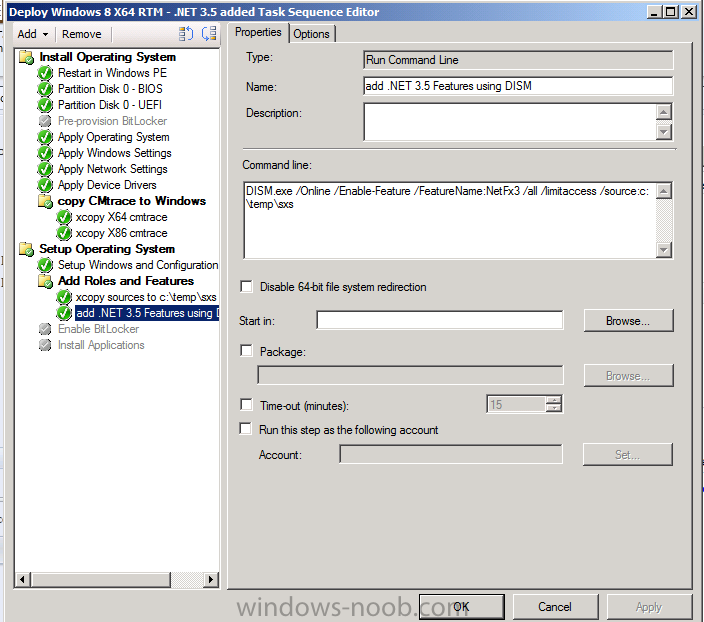
ok here's how I do it xcopy the files locally then install the .net feature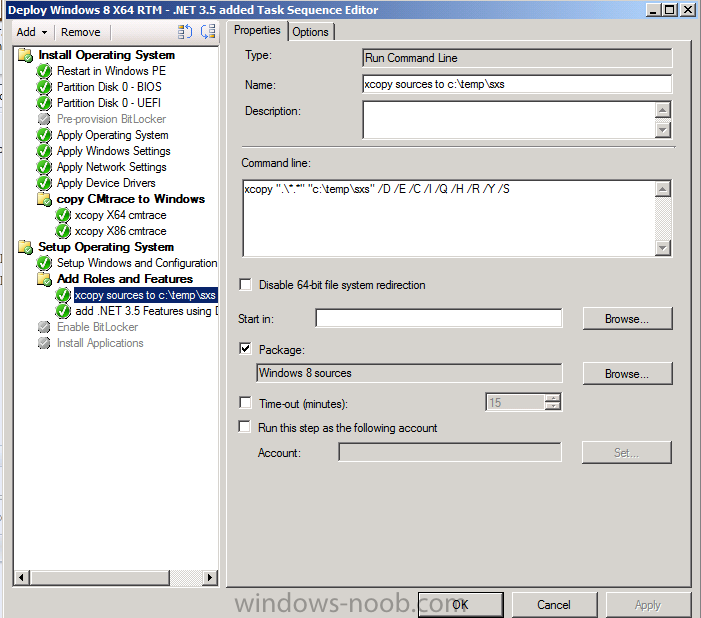
-
Help: How to add DotNet Framework 3.5 to Windows 8 during OSD Task sequence
anyweb replied to gvlaarho's question in How do I ?
i copy the files to a local temp folder and then install from there, i'll post the steps when i get home and get access to my lab -
ok did you experiment with secure boot and the other boot options in the firmware screen (bios), to access it, shutdown then press Volume Up while holding the power button
-
SCCM with Active Directory
anyweb replied to Ray-Tube's question in Troubleshooting, Tools, Hints and Tips
can you elaborate on what do your component logs on the configuration manager server tell you ? -
the built in step should work fine, have you tried doing the pause BEFORE the enable bitlocker step, and directly after ? that way you can see (in the smsts.log) exactly what the cause of your issue is
-
try booting that usb key on another computer, does it boot ?
-
you should pause the task sequence before that step and bring up the command prompt, then open smsts.log in cmtrace you can download the pause script in this HTA download, the included task sequence also contains the step to pause if you want to see how its done...
-
yup it should work just fine,
-
well the logs should reveal why it's failing to enable bitlocker so what does the smsts.log file say ? also, please re-review the guide here as it explains what you need setup in AD prior to starting the deployment.
-
System Center 2012 Configuration Manager SP1 is released
anyweb replied to anyweb's topic in Configuration Manager 2012
are you doing a clean install or upgrade ? please post a screenshot of what you are seeing -
did you shutdown prior to attempting to boot from USB ? what happened when you did try to boot from USB ?