

GarthMJ
Moderators
-
Joined
-
Last visited
Everything posted by GarthMJ
-
It is not supported to do this with CM12 however it is supported with CMCB.
-
I think that you posted this exact question at least three different places. Have you applied an updated to Windows 2012 R2, and therefore these updates don't apply anymore?
-
I could have sworn that I added the Max function to this query. select Distinct RV.Netbios_Name0, RV.User_Name0, RV.Resource_Domain_OR_Workgr0, OS.Caption0, max(MUS.LastUsage) from v_R_SYSTEM_Valid RV inner join v_MonthlyUsageSummary MUS on RV.ResourceID = MUS.ResourceID inner join v_MeteredFiles MF ON MUS.FileID = MF.MeteredFileID left outer join dbo.v_GS_OPERATING_SYSTEM OS on RV.ResourceID = OS.ResourceID WHERE DateDiff(day, MUS.LastUsage, GetDate()) < 90 --AND MF.RuleID = 16777318 Group by RV.Netbios_Name0, RV.User_Name0, RV.Resource_Domain_OR_Workgr0, OS.Caption0 Order by RV.Netbios_Name0, RV.User_Name0, RV.Resource_Domain_OR_Workgr0, OS.Caption0 BTW, I will tell you to pay attend to my blog too and I post many helpful tips there too.
-
Actually your WQL code wasn't that bad. I only fixed two things (really), ensured that you only get active PCs and that you get the real OS name. If you want to learn more about reporting, <sorry for the shameless self promotion> this book can help you out https://www.amazon.com/System-Configuration-Manager-Reporting-Unleashed/dp/0672337789/ or I will be presenting at IT/Dev connections too http://www.itdevconnections.com/dc16/Public/Enter.aspx
-
So clone that report and edit it to give you the last 90 days. It is fairly easy to add the last logon user or top console user. Again, if you clone the report you can add anything. That is what I love about SSRS report you can create any report that you like and it will do anything that you want, it just takes time to create it. Personally I would avoid using Excel only because you are adding an extra step each month, instead I would create a SSRS will all the data that is need and formatted exactly how you want it to reduce the effort involved in this. I took the time to convert and clean up your query to give you the best results. I commented out the Rule # for my testing, you will need to undo that. select RV.Netbios_Name0, RV.User_Name0, RV.Resource_Domain_OR_Workgr0, OS.Caption0, MUS.LastUsage from v_R_SYSTEM_Valid RV inner join v_MonthlyUsageSummary MUS on RV.ResourceID = MUS.ResourceID inner join v_MeteredFiles MF ON MUS.FileID = MF.MeteredFileID left outer join dbo.v_GS_OPERATING_SYSTEM OS on RV.ResourceID = OS.ResourceID WHERE DateDiff(day, MUS.LastUsage, GetDate()) < 90 --AND MF.RuleID = 16777318 You can edit the report to get the query within any report.
-
Have you looked at the built-in reports for this? Computers that have run a specific metered software program Computers that have a metered program installed but have not run the program since a specified date
-
-
0x87d00231 = Transient error So it sound like you have a network error that has nothing to do with CM12
-
First off it is not recommend to run the report via the console. Running the report via the console add extra over head. Secondly, if you have created two RP then they will automatically show up within the console. However you will first have to change over to the other RP.
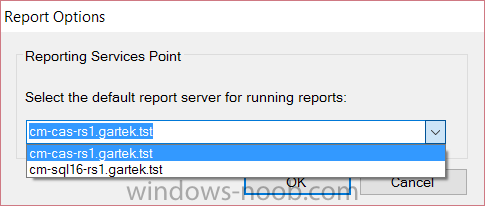
-
You will have to try it to find out. Since this is not supported, you will have to figure is this this work. IMO = In My Opinion
-
-
You are asking the wrong person, you need to ask you client / stake holder, if they call that HA. Personally, I would question the need to have reporting HA. IMO it is a waste of money. Again, You will have to manually keep the reports consistent. As such you will need to manually write the process to this. Again, you are asking the wrong person, you need to ask your client / stake holder. IMO there is no reason to have HA for RPs.
-
I hope that you find it useful. I hang out here so if you have questions, feel free to post them. But did you notice that within your query above you are missing the "0" for the column name, in all three places?
-
There is no trick to this, add each server as a RP. The RP can't share a database, each SSRS server MUST have it own db. RP will NOT know about each other. Report will only be consistent if YOU copy then across yourself. Again SSRS is NOT supported on a cluster.
-
You can clearly have two or more RP on any given site. SSRS is not support on a cluster. As for hardware NLB, the CM12 team will clearly not support this and never will. This does not mean it will not work, it means that you will have test this within your environment.
-
The IP address is a String and not a Number therefore the >= and <= will treat everything as a string. This will produce odd results. For this I would try to look at the gateway, instead of the IP address..
-
-
-
-
Why is it failing? How did you create the package/program? What error message are you getting?
-
-
Yes, client talk directly with the SUP.
-
Error code: 0x8024400e = Same as SOAP_E_SERVER - The SOAP message could not be processed due to a server error; resend later. Source: Windows Update Agent So there is a problem with your server.
-
Have a read of this http://www.enhansoft.com/blog/slow-software-inventory-cycle-in-sccm-2012 and you have a nice day.
-
So that report use SW inventory, Which virtually no one recommend using as it is so useless. The statement was for all ARP reports, not all reports.