




wmmayms
Established Members
-
Joined
-
Last visited
-
Yes, run SCCM in native mode instead of mixed. This will allow you to manage computers connected to the internet. This will however require that you have a working PKI infrastructure.
-
-
Check your USMT package..remember the source should be pointing to the amd64 and the x86 folder. Not directly into x86 or amd64!
-
-
I had the same error last week. My error was because i copied the TS to a new env and forgott to change this setting: I had a customized file selected that did not exist in my USMT package.
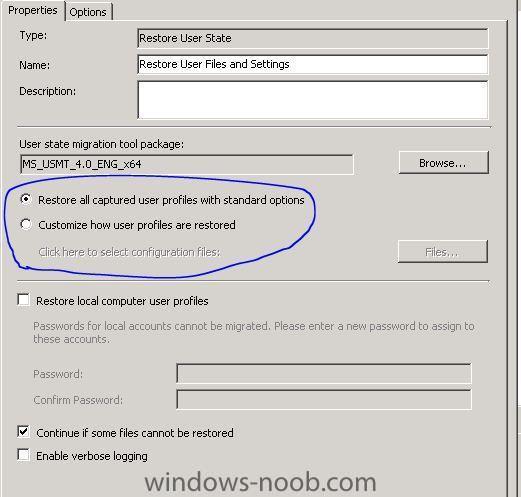
-
Is the software metering agent enabled?
-
As long as any modern windows will run on your hardware SCCM will accept it =)
-
What kind of information are you looking for? Just some kind of network overview or more like serialnumber, modelnumber etc?
-
I have done printer and monitors and my experience is thats it´s not really 100% and it requires some work to get it right..
-
-
yes it´s possible. wmi query: SELECT * FROM Win32_ComputerSystem WHERE Model LIKE “%dc5700%” for HP Compaq dc5700 computer models.
-
0x80004005 is generally an access denied issue, check dns and network access account.
-
Does your join account have Full Control (OU and all decendant objects) on the OU where your computer account is located?
-
-
Hm i think it will work. Allthough i think you will need wds installed and multicast needs to be supported in your network infrastructure. Have a look at this doc:Using the Microsoft Deployment Toolkit.zip


