



Welcome to windows-noob.com!
Logging in will allow you to download scripts used in the guides.
If you came here looking for the Endpoint Manager step-by-step guides then please start here.
Register for free and ask your questions in our forums.
- 5 replies
- 31062 views
- Add Reply
- 20 replies
- 34486 views
- Add Reply
- 2 replies
- 2661 views
- Add Reply
- 13 replies
- 21893 views
- Add Reply
- 2 replies
- 2612 views
- Add Reply
- 4 replies
- 9404 views
- Add Reply
- 3 replies
- 5359 views
- Add Reply
- 21 replies
- 13700 views
- Add Reply
How can I install System Center Configuration Manager (Current Branch) version 1802 on Windows Server 2016 with SQL Server 2017 - Part 1

By anyweb,
Introduction
UPDATE: please use the newer version of this guide here.
This multi-part guide will show you how to install the latest baseline version of Configuration Manager from Microsoft. The latest available baseline version is System Center Configuration Manager (Current Branch) version 1802 as of March 29th 2018.
How can I install System Center Configuration Manager (Current Branch) version 1802 on Windows Server 2016 with SQL Server 2017 – Part 1
How can I install System
How can I install System Center Configuration Manager (Current Branch) version 1802 on Windows Server 2016 with SQL Server 2017 - Part 2
By anyweb,
This multi-part guide will show you how to install the latest baseline version of Configuration Manager from Microsoft. The latest available baseline version is System Center Configuration Manager (Current Branch) version 1802 as of March 29th 2018.
How can I install System Center Configuration Manager (Current Branch) version 1802 on Windows Server 2016 with SQL Server 2017 – Part 1
How can I install System Center Configuration Manager (Current Branch) version 1802 on Windows Server 20
SMS_CLOUD_USERSYNC ERROR: RemoveLicensedUsers Duplicated object

By dyg,
Hi,
We have a hibrid SCCM + Intune scenario and i got an alert on SMS_CLOUD_USERSYNC component.
In cloudusersync.log reports that are a duplicated object and it can't remove the license:
ERROR: RemoveLicensedUsers exception Microsoft.Management.Services.Common.InvalidParameterException: Duplicate object key found in request: Id: 'guid'219c3d11-feed-4291-b251-c84b782ed7b4''~~ at Microsoft.Management.Services.DistributedQuery.DistributedQuery`1.CheckBatchForDuplicat
Push HP BIOS Settings via OSD (Windows 10)

By adurrant,
Hi guys,
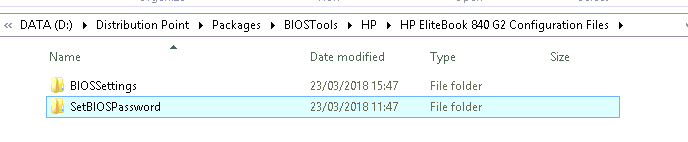
Hoping to find people that have managed to push HP BIOS settings via OSD (Windows 10), I've pretty much followed this guide (only the folder structures are slightly different) but I'm having issues actually deploying the settings, setting the BIOS password seems to work okay and I've read that for certain TPM settings to be pushed then a BIOS password must be set prior.
My folder setup:
BIOS Config settings to push:
BIOSConfig 1.0
;
; Originall
1702 Installation -Did the schema extend

By zoetaite,
Hopefully I'll explain this correctly. We are currently planning on setting up SCCM CB 1702 in our DEV environment. The domain itself is a little strange (or at least to me). There is an empty root (absr.domain.com) where the schema admin resides - was setup way before my time. Then the actual DEV domain (abc.domain.com). Tried extended the schema there and it failed stating I didn't have the needed ID privileges. I then logged in as the 'root' admin and ran it and from the command line. It stat
PXE-E51: No DHCP or proxyDHCP offers were received

By kevlar01,
We have trouble using PXE in our environment.
Our setup:
SCCM 2016 management point in remote datacentre (running on Windows Server 2016)
SCCM 2016 distribution point + OSD in local serverroom (running on Windows Server 2016).
On this server, 2 network cards are configured. One is connected to the domain, the other is connected to a seperate 'installation LAN'.
We also configured DHCP on this server with a binding only to the 'installation LAN NIC'. We also configured DHCP option
Unable to upgrade 1606 to 1702

By Muhsin,
Hi Techies,
I am in a desperate situation. I have got SCCM 1606 site version 5.0.8412.1313 and was trying to upgrade to 1702 and then to 1710 if that is the correct route. I have trouble getting updates on updates and servicing. Tried everything possible which are explained on different forums. So far I have tried the following.
- Checked the permissions for administrative users.
- Tried offline mode to download updates manually using instructions from this site. I had downloaded
Going bald over this

By 66945,
This is one of my worst experiences with SCCM.
I have a secondary site located in office X.
Then, I have a small remote office Y without any local site servers (DP, MP, etc) so all PCs there will pull from the secondary site server in office X.
Application & Software Update deployment and CPI works fine over S2S VPN from office X > Y.
However, package deployments just don't work.
I create various package deployments (some with, some without co