



Welcome to windows-noob.com!
Logging in will allow you to download scripts used in the guides.
If you came here looking for the Endpoint Manager step-by-step guides then please start here.
Register for free and ask your questions in our forums.
- 0 replies
- 3417 views
- Add Reply
- 2 replies
- 5267 views
- Add Reply
- 0 replies
- 2855 views
- Add Reply
- 2 replies
- 3168 views
- Add Reply
- 7 replies
- 4949 views
- Add Reply
- 9 replies
- 16707 views
- Add Reply
- 5 replies
- 8490 views
- Add Reply
- 0 replies
- 2458 views
- Add Reply
Announcing Windows 10 Insider Preview Build 14257

By anyweb,
Microsoft released build 14257 yesterday to Windows Insiders on the fast ring, and here's some info about that
more > https://blogs.windows.com/windowsexperience/2016/02/03/announcing-windows-10-insider-preview-build-14257/
Cannot connect to the Application Server (Application Catalog)

By surfincow,
Hello,
Have built a new configmgr cb system and I'm running into issues with the application catalog.
Server 2012R2 & ConfigMgr Current Branch and we use SSL for all communications (except SUP>WSUS uses HTTP)
With the new configmgr, the application catalog as mostly gone away as user targeted apps will now show up in the Software Center. I tested deploying a package to a test user but it never appeared in the SC. To see if it is getting deployed correctly, I clicked the link t
Windows 10 overtakes Windows 8.1 usage finally
By anyweb,
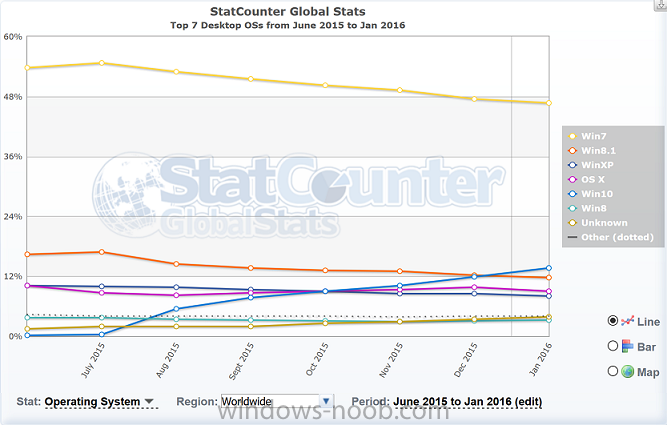
According to statcounter.com Windows 10 has overtaken Windows 8.1 usage cross the world.
from the graph above it looks like this occurred last December. Interesting to note is that Windows 7 tops the usage at approx 46%. Based on this graph it looks like Windows 10 still has an uphill battle before it becomes the dominant Operating System
more info > http://gs.statcounter.com/#desktop-os-ww-monthly-201506-201601
How to recover a ConfigMgr 2012 R2 SP1 site using a restored db

By keywan,
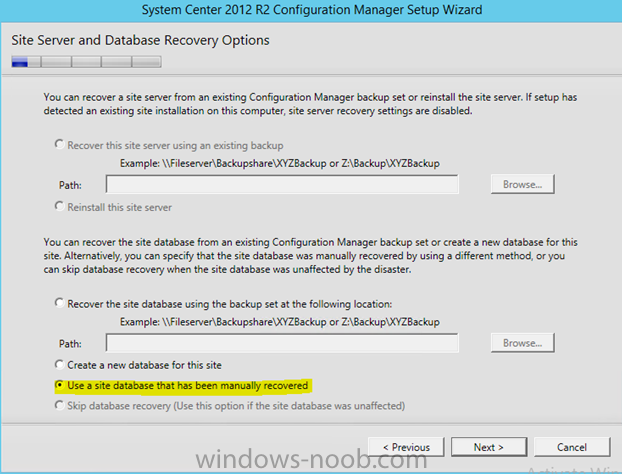
Hi guys,
I want to recover my sccm2012 R2 SP1 on an new machine. I run the splash.exe and select "recover site" and choose the option "use a site database that has been manually restored". Because I have restored my site database man manually to the new SQL server. But how can I restore my site server? if I use this option "use a site database that has been manually restored" where and how can I use and put the path of my existing backup of the site server?
BR . Nick
Clients automatically updating

By Kevin79,
My clients are automatically updating or rebooting even though I don't have anything checked under Client Upgrade. Why would this be happening?
SMS_PROVIDERS in Configuration Manager Service Manager
By Kevin79,
The service SMS_PRODIVERS in Configuration Manager Service Manager is showing as unknown. When I try to query the service I get "Error communicating with component". I upgraded from 2012 R2 SP1 to Configuration Manager Current Branch. How do I fix this? Will it cause any issues?
SCCM 1511 DRIVER MIGRATION FAILS

By crossan007,
Cross Post from https://www.ccrossan.com/sccm/sccm-1511-driver-migration-fails/
While migrating drivers from SCCM 2012 to SCCM 1511, the migration can fail with the following error message:
Couldn't find the specified instance SMS_CategoryInstance.CategoryInstance_UniqueID='DriverCategories:
This occurs given the following scenario:
A driver is added to SCCM A category is assigned to the driver The category is deleted from the driver The migration job attempts to migrate the driver to a n
Announcing Windows 10 Insider Preview Build 14251
By anyweb,
Sharp-eyed Insiders likely noted the big jump in build numbers from our last preview build (11102). Historically, the codebase for mobile had a different OS version than the codebase for PC because they were developed by different teams on different schedules. With Windows 10, we became one Windows team and brought these two codebases together. We started by changing the version string displayed in the UI to be consistent, which is why you saw similarly labeled builds over the past year for both