Peter33
Established Members
-
Joined
-
Last visited
Everything posted by Peter33
-
Download this script https://gist.github.com/CHEF-KOCH/7872799 and run the following command cscript.exe uninstalloffice2013.vbs VISPRO,PRJPRO /quiet /nocancel /bypass 1
-
Of course, you can do almost anything with MDTs customsetting.ini. The question is, why would you want to do that. We are using only the serial number as computer name for a long time now. I think that's the most reliable way of unique naming. This way don't have to rename a computer when you are moving it to a different OU.
-
You can achive this without heavy scripting, just by using MDT and MDT Database. Check out this http://deploymentresearch.com/Research/Post/305/Generate-computer-names-in-MDT-2012-2013-based-on-prefix-and-a-sequence-number You can add the Location part also by using the MDT Database as backend and the default gateway as trigger option.
-
Why are you not simply just using a task sequence, where you can run a command line with a different account, which has permissions to the share. That's how i am dealing with a special application that needs to be installed from the share where the backend is installed (not very enterprise friendly). Actually i'm not excited about such solutions, but it works. The Application model of SCCM is not designed to handle such situations. So i don't see the point in trying or to complain about
-
Task Sequences will not rerun after successful execution except the schedule is set to always rerun. Your best option is do delete the old deployment, copy the sequence and then deploy the new task sequence.
-
SCCM is not needed. You can simply use the Windows Defender and configure it with group policies. That's basically the same what the SCEPInsatall.exe is doing when you are using Endpoint Protection with SCCM in Windows 10.
-
A simple package will do. It's the way i run it too, as one of the last steps in the TS.
-
Run this batch as part of your task sequence. Should solve your problem. @echo off :OSPP reg query HKLM\Software\Microsoft\Office\15.0\Common\OSPPREARM if %errorlevel%==1 (goto RUN) else (goto END) :RUN set ProgramFilesPath=%ProgramFiles% "%ProgramFilesPath%\Common Files\microsoft shared\OfficeSoftwareProtectionPlatform\OSPPREARM.EXE" C:\Windows\system32\cscript.exe "%ProgramFilesPath%\Microsoft Office\Office15\ospp.vbs" /act set ProgramFilesPath=%ProgramFiles(x86)% "%ProgramFilesPath%\Common Files\microsoft shared\OfficeSoftwareProtectionPlatform\OSPPREARM.EXE" C:\Windows\system32\cscript.exe "%ProgramFilesPath%\Microsoft Office\Office15\ospp.vbs" /act REG ADD "HKLM\Software\Microsoft\Office\15.0\Common\OSPPREARM" :END Exit
-
I added a confirmation prompt for the memberships. param( [parameter(Mandatory = $true)] [string]$SiteServer, [parameter(Mandatory = $true)] [string]$SiteCode, [parameter(Mandatory = $true)] [string]$ReferenceMachine, [parameter(Mandatory = $true)] [string]$ReplacementMachine ) Import-Module -Name "$(split-path $Env:SMS_ADMIN_UI_PATH)\ConfigurationManager.psd1" $location = $SiteCode + ":" Set-Location -Path $location if(Get-CMDevice -Name $ReferenceMachine){ if(Get-CMDevice -Name $ReferenceMachine){ $ReplacementID = (Get-CMDevice -Name $ReplacementMachine).ResourceID $ResID = (Get-CMDevice -Name $ReferenceMachine).ResourceID Get-WmiObject -ComputerName $SiteServer -Class sms_fullcollectionmembership -Namespace root\sms\site_$SiteCode -Filter "ResourceID = '$($ResID)'" | % { if(Get-CMDeviceCollectionDirectMembershipRule -CollectionID $_.CollectionID -ResourceName $ReferenceMachine){ $colname = (Get-CMDeviceCollection -CollectionId $_.CollectionID).Name if(!(Get-CMDeviceCollectionDirectMembershipRule -CollectionID $_.CollectionID -ResourceName $ReplacementMachine)){ $confirm = Read-Host "Do you want to add $ReplacementMachine to the collection" $_.CollectionID "'$colname' ? (y/n) " if($confirm -eq "y"){ Write-Host "adding $ReplacementMachine to collection" $_.CollectionID "'$colname'" Add-CMDeviceCollectionDirectMembershipRule -CollectionId $_.CollectionID -ResourceId $ReplacementID } else { Write-Host "skipping collection $colname" } } else { Write-Host "$ReplacementMachine is already a member of" $_.CollectionID "'$colname'" } } } } else { Write-Host "Error. Unknown replacement machine : $ReplacementMachine" } } else { Write-Host "Error. Unknown reference machine : $ReferenceMachine" }
-
That should do the trick param( [parameter(Mandatory = $true)] [string]$SiteServer, [parameter(Mandatory = $true)] [string]$SiteCode, [parameter(Mandatory = $true)] [string]$ReferenceMachine, [parameter(Mandatory = $true)] [string]$ReplacementMachine ) Import-Module -Name "$(split-path $Env:SMS_ADMIN_UI_PATH)\ConfigurationManager.psd1" $location = $SiteCode + ":" Set-Location -Path $location if(Get-CMDevice -Name $ReferenceMachine){ if(Get-CMDevice -Name $ReferenceMachine){ $ReplacementID = (Get-CMDevice -Name $ReplacementMachine).ResourceID $ResID = (Get-CMDevice -Name $ReferenceMachine).ResourceID Get-WmiObject -ComputerName $SiteServer -Class sms_fullcollectionmembership -Namespace root\sms\site_$SiteCode -Filter "ResourceID = '$($ResID)'" | % { if(Get-CMDeviceCollectionDirectMembershipRule -CollectionID $_.CollectionID -ResourceName $ReferenceMachine){ Write-Host "adding" $ReplacementMachine "to collection" $_.CollectionID Add-CMDeviceCollectionDirectMembershipRule -CollectionId $_.CollectionID -ResourceId $ReplacementID } } } else { Write-Host "Error. Unknown replacement machine :" $ReplacementMachine } } else { Write-Host "Error. Unknown reference machine :" $ReferenceMachine }
-
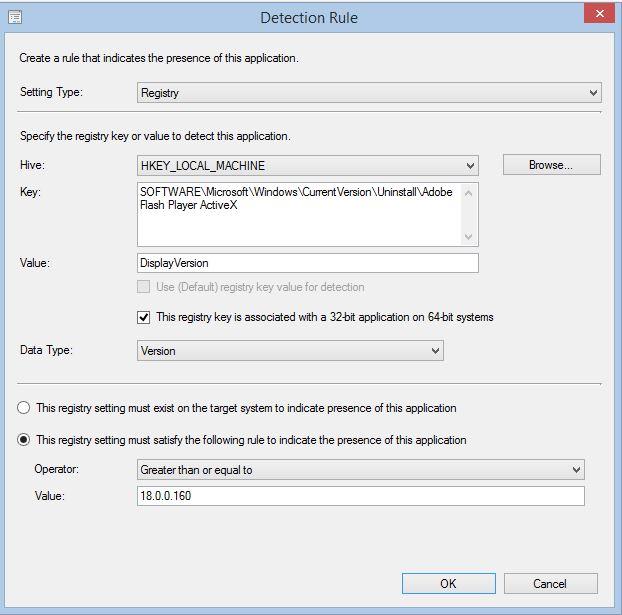
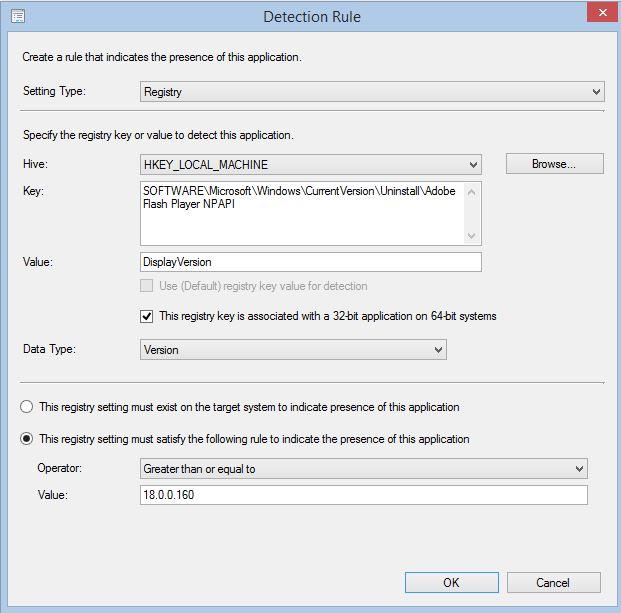
Don't use the msi installers for Adobe Flash. Tey are pretty bad and result usually in a 10% error rate. I am using the exe installers for a long time now with a success rate of 100%. The installer is pretty solid. https://www.adobe.com/products/flashplayer/distribution3.html "install_flash_player_18_active_x.exe" -install -au 2 -force "install_flash_player_18_plugin.exe" -install -au 2 -force
-
Check this out. Might help you with your Problem. https://social.technet.microsoft.com/Forums/de-DE/fe7d59be-b357-4efd-9890-6c52ca375922/sccm-2012-microsoftsmstsenvironment-does-not-work-in-task-sequence-as-part-of-vb-or-powershell?forum=configmanagersdk
-
You need to edit the e1d64x64.inf file (DriverVer = 09/29/2014,12.12.80.19) from the PE package and delete everything in the [ControlFlags] section. After that you will be able to import the driver correctly to the SCCM database and to inject it to your boot image.
-
Hi everyone, there is an update available for Windwos 7 clients, fixing the ugly 8007000E error of the Windows Update Client. Just stumbled over it on Ronni Pedersens blog. http://www.ronnipedersen.com/2015/06/updating-the-windows-update-agent-on-windows-7-clients/ https://support.microsoft.com/en-us/kb/3050265
-
Simply put a WMI filter on the auto driver step to exclude this model from it.
-
Yes, you can fix it. Open the SQL Server Management Studio on your Primary Server (run as Administrator, otherwise the query will throw an error just as in the log file ) and select the SCCM Database. Run a new query: select the ID from line before the error in the objreplmgr.log delete from dbo.CI_CurrentRuleDetail where Setting_CI_ID = '16872948' Restart the Object Replication Manager with the Configuration Manager Service Manager. You will have to repeat the steps until there is no errors anymore in the objreplmgr.log As a side note. If you delete an application in the console, make sure that you delete every deployment type before. Otherwise you will see this error again in your logs. Anyways, this is not a supported method. Only do this if you feel comfortable with it. I fixed the errors this way.
-
You could have waited for the application deployment and evaluation cycle to run or force it to run manully. That would also update the status in the Software Center. Did you delete the c:\windows\ccm Folder after uninstalling the client? This way you will get rid of corrupted local databases. Also check the ciagent.log for any errors.
-
Sounds like a wmi problem. Uninstall the client, then stop the wmi Service and delete the repository Directory c:\windows\system32\wbem\repository. Restart wmi and install the client again.
-
Sorry, you got to keep in in english, so people can understand what you said. forum rules. What about the "files2copy" part in your path ? Is that a folder name or do the files names all start with files2copy? If it is a older you are still missing a backslash "files2copy\*.*" Also make sure that the target directory exists on the machine.
-
First of all, no need to start a new cmd form a batch file. So cut the "cmd /c" from your comand line. Second, the variable is named %programfiles%.
-
Edit the inf file and delete everything in the section [ControlFlags]. See if that helps and will let you Import the drivers.
-
That is know bug for superseded applications which are used in optional task sequences. All Clients which are targeted by the task sequence will get the new version as mandatory Installation. This will be hopefully fixed in SP1 for R2. Did not find the release notes by now.
-
Are your partitions encrypted (1) or did you create a new boot image without the proper storage drivers (2)? 1) run a clean disk command before partitioning 2) import the needed drivers to your boot image
-
OK, i forgot some other things not less important. SP1 for SCCM 2012R2 and SP2 for SCCM 2012 should be out this week and they will fix the multiple reboot issue for Windows updates during a task sequence. There are also improvements for application handling during task sequences.
-
Hi Guys, back from MS Ignite and sharing a side note i catched there during a session. Microsoft is planning on an updated ISO for Windows 7 which includes all updates until now and later (no date was mentioned). They realised that it's no fun to install 200 updates and wait 8 hours for an Image build. The crowd was very pleased to hear that.