AmrelMahdy
Established Members
-
Joined
-
Last visited
Everything posted by AmrelMahdy
-
-
-
no there isnt a way to do this , as you have to capture an image that has SCCM Client installed
-
check execmgr.log , this log file will provide you with more information
-
Dear All, I'm having very weird problem , I Have sccm 2012 sp1 , i captured Windows7 Image ,After capturing when i rejoin it to the domain , I find that the Computer is not assigned to the sccm site , but computer is discovered on the SCCM with NO client installed, Suppose when the computer is discovered and no client installed it should install the sccm client (as I already enabled automatic Side-wide Client Push) but this never happens only with the captured Image , the client is Always Automatically pushed to newly discovered computers. Also am sure that boundaries & boundary groups are configured correctly and assigned to the Site Also Client push account is local Admin in all my clients and the captured image. server logs doesn't show that the server ever tries to push the client on the Image that has been captured. Any suggestions ? Thanks
-
1.Build and Capture: if you just have the DVD of the windows and you still need to install specific applications and updates Using SCCM ,this process will install Image from scratch and then capture it. install existing Image: AFter the Capture Process from the step above you'll get an Image (WIM file) that has your Windows Settings configured and needed applications installed 2.task sequence is deployed to unknown computers
-
check execmgr.log file
-
Did the Client download the Lync Package in the SCCM cache folder ?, if yes , Can your run the Package manually on the same computer and Logged in user ?
-
Yes , i already published it in the AD
-
Yes I provide the Site Code
-
Dear All, Am having SCCM 2012 SP1 in my Environment, I from few days I captured a new Image (Win7) and the client was working fine on it, I deployed the Image using the Task Sequence Media , I realized after deploying the Image the SCCM Client is not assigned to any site (I have only 1 primary site), the Computer appears in the SCCM with no installed client, my Boundaries and Boundary groups are configured , my boundary group is assigned to my primary site. Hint:if I push the client from SCCM to this machine the setup runs fine and i find that the client is assigned to the site correctly , but I wasn't doing this step before (SCCM 2012), suppose after OSD the client is discovered by the SCCM and then it is assigned to the site. ClientIDManagerStartup.log: Client is not assigned to a site. LocationServices.log.log: doesnt show any logs since the day of capturing the image Any Ideas ?
-
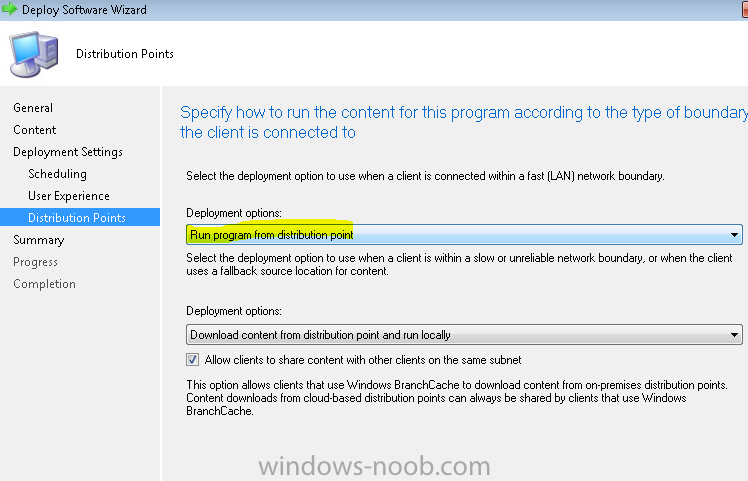
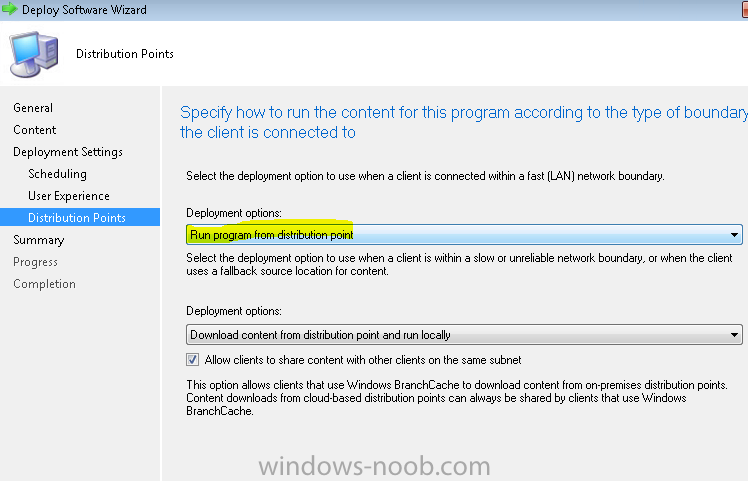
when you Deploy the Package you have the option to run it directly from the DP
-
Did u test this Script Manually ( Without SCCM ) ?
-
if you are using SCCM 2012 use this command: "C:\Program Files (x86)\Microsoft Configuration Manager\AdminConsole\bin\i386\CreateMedia.exe" /K:full /P:ServerName /S:SiteName /D:ServerName /L:Image /A:TaskSequenceID /Z:False /T:CD /M:44482 /F:"E:\Image.iso" , then copy files in iso to the Flash memory if you are using SCCM 2012 SP1 has solved this problem
-
I mean after you created the Task Sequence from media , did u try to Deploy that Image ?
-
I just pushed the Client from the SCCM then everything worked fine
-
Did u check ur USB flash memo after u finished ? Did the OSD Deployed successfully ?
-
Forgot to tell you , I have SCCM 2012 SP1 , and I have Boundaries based on IP Subnets assigned to Boundary group that is assigned to my site , I have double checked the configuration and i found it made correctly , so Any suggestions why clients not assigned to my Site ?
-
Dear All, i have a windows 7 that has been captured, when i Deployed the captured Image i found that the Client is not assigned to any site , Hence the newly deployed Window 7 client appears in the SCCM that they don't have client installed, Any suggestions please ? Thanks,
-
Did u push on them the Client from the new SCCM 2012 ??
-
if you have two existing SCCM servers in your environment , one is 2007 and the other is 2012 , if you pushed the client of 2012 , the client will be automatically assigned to the newest version (Site SCCM 2012)
-
Yes )))
-
yes it'll run once the computer starts
-
yes sure , just create a program with the blow command (Assume file is on shared server X and u want to copy it on C Drive of the Clients): cmd /c copy /y "\\serverX\sharedfolder\File1.txt" "C:\File1.txt\" Hint: you wont run distribute content as actually there is not program source to distribute it to dps ))
-
run deployment with user rights