AmrelMahdy
Established Members
-
Joined
-
Last visited
Everything posted by AmrelMahdy
-
-
I noticed 2 things in the VCRedist installation log : in the first line it identifies the OS as it is XP which is actually not true , it is Win7 SP1 that it didnt pass the condition that meets the minumum prerequistes so the line " Condition 'VersionNT64 >= v6.0 OR (VersionNT64 = v5.2 AND ServicePackLevel >= 1)' evaluates to false." Did Anyone faced this problem ??
-
Dear All, I've been through SCCM for many years , and now i faced a weird problem after i Upgraded my SCCM from 2012R2 CU4 to SCCM 2012 R2SP1, the problem is with the installation of client on most of Windows 7 machines (they are All X64 machines) (Windows 7 SP1). the SCCM Client shows that it failed when it tries to install "vcredist_x64.exe" which is "Microsoft Visual C++ 2013 Redistributable (x64) - 12.0.21005", when i install the vcredist_x64.exe using the GUI or using the command line it installs succesfully, but it only fails when sccm tries to install it Attached is the SCCM Installation log file and the vcredist_x64.exe installation log SCCM Setup Log ccmsetup.log vcredist_x64.exe installation log VCRedist_x64_Install.log Thanks,
-
Tcilmo, would you please show me how you deployed the .hta program in the TS , to be more clear i Wanna see the TS Step "Prompt for Password"
-
Dear All, I would like to thank you for this Amazing forum. I have a simple Question Regarding TS Variables. I want to set the computer name during OS using the OSDComputerName TS Variable.I made my appropriate TS and set the TS Variable step just before the TS "Apply Windows Settings" and left the Value Empty to prompt the computer name. I deployed the TS to the collection that has the computers targeted with the below settings: 1- TS is Available (Not Required) 2- The Deployment is available to (Only Configuration Manager Clients) since am not using PXE Environment . Actually what happens when the TS runs that i see that the TS Variable step is skipped and it doesnt appear , so what May cause the problem ??
-
it seems that you are using local account "2VMCXV1\UpdatusUser" which doesnt exist locally on the machine you are restoring the data on
-
Would you Please Post the ccmsetup.log from one of the Clients that Are having the error ?
-
you can create a separate collection for the computers that you want to exclude , then on the collection that you are pushing the updates on create an exclusion rule
-
Are you Sure that this Kb installs Manually with no problems ? if yes use the below command wusa.exe <full-path-of-msu> /quiet /norestart
-
Thanks Nial, I was Capturing Physical Computer. And for More clarification , the image am Deploying Doesnt Make the Format and Partition Step as am Deploying this Image to install Windows 8.1 on C Drive and leave the rest of Drives as it is . Hint: When i used the same TS to Deploy Windows 7 on C Drive only , it worked fine as D,E Drives where the same and the Data Was Maintained, the problem only appeared When i deployed Windows 8.1 on C Drive Only
-
All, I have a weird problem. I captured few days Ago Windows 8.1 Reference Computer and It had 3 Drives (C,D,E), When i deployed the Image using Stand Alone Media , I found that the sccm assigned Drive D to the USB Flash memory and the original Drives are shifted to E and F Drives. I tried to use TSvariable OSDPreserveDriveLetter and Set it to true but still same behaviour I has SCCM 2012 R2 in my Environment. any suggestions ?
-
is the Client Assigned to your Site ?
-
-
I see he is confused of what boundaries should he do , So i told him the easiest way
-
-
create 1 IP range Boundary with Range 0.0.0.0 to 255.255.255.255 , this will include all of your Desktops/Servers
-
1- Just Assign full permissions for the new sccm server on the System management Container. 2-you can use the same site code in case u deleted all entries inside System management Container. 3- when u install the SCCM you can push the sccm client on the windows 7 machine with no problem
-
Sasha, Make a collection for the computers you need, then generate this report Asset Intelligence > Hardware 01A - Summary of computers in a specific collection
-
check this Article http://sqljoe.wordpress.com/2011/02/16/ssrs-errors-rsreportserverdatabaseunavailable-the-report-server-cannot-open-a-connection-to-the-report-server-database/ http://social.technet.microsoft.com/wiki/contents/articles/15475.how-to-successfully-install-reporting-services-point-role-in-sccm-2012-sp1.aspx
-
There is the Error "System.Web.Services.Protocols.SoapException: The report server cannot open a connection to the report server database. A connection to the database is required for all requests and processing. ---> Microsoft.ReportingServices.Library.ReportServerDatabaseUnavailableException: The report server cannot open a connection to the report server database. A connection to the database is required for all requests and processing.~ at Microsoft.ReportingServices.WebServer.WebServiceHelper.EnsureModeFromCatalog()~ at Microsoft.ReportingServices.WebServer.WebServiceHelper.EnsureRSNativeMode()~ at Microsoft.ReportingServices.WebServer.ReportingService2005..ctor() $$<SMS_SRS_REPORTING_POINT><04-14-2014 08:58:03.159-60><thread=4272 (0x10B0)>" try to follow the Below Steps Open the SQL Server Configuration Management tool. Click the triangle in front of “SQL Server Network Configuration”, and click the “Protocols for MSSQLSERVER”. (If you are using a named SQL Server instance, please select the named instance instead.) Please make sure both the “TCP/IP” and “Named Pipes” protocols are enabled. To enable a protocol, please right-click on the protocol and click “Enable”.
-
please attach the file "srsrp.log"
-
you can find this option when you deploy the Package
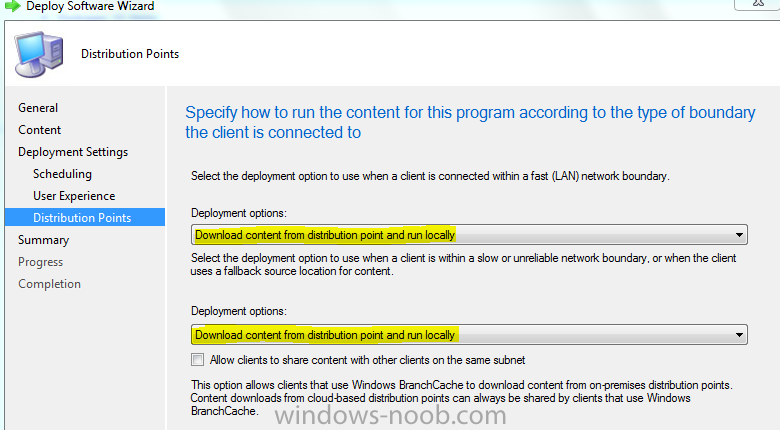
-
Did you install "reporting Service" component in the SQL ?
-
-