anyweb
-
Posts
9288 -
Joined
-
Last visited
-
Days Won
371
Everything posted by anyweb
-
first of all one step at a time during the deployment before it fails if you bring up a command prompt, can you get an ip address ? does it look correct ? if so, can you ping the FQDN of your sccm server ? in the same LAB does nslookup on a workstation report back the correct details for DNS ?
-
how odd, so what user are you logged on with at this point ? or are you using an autologin script ? is there anything weird about your build and capture, are you using an unattend.xml at all ?
-
SCCM 2007 SP2 is REQUIRED for deploying windows 7, the R2 feature pack is only a package that you install on top of SCCM 2007 SP1 or SCCM 2007 SP2 to reveal 'hidden' features. So if you want to deploy Windows 7 with ZTI then use SCCM 2007 SP2, and if you want all the extra features (and you license aggreement allows it) then use SCCM 2007 SP2 R2
-
Brief Description This SuperFlow provides information about operating system deployment using Configuration Manager PXE service points Overview This SuperFlow provides information about operating system deployment using preboot execution environment (PXE) service points. The SuperFlow provides step-by-step information about how to configure the enterprise network to support Configuration Manager PXE service point deployments. It then describes the steps from creating the deployment package until the operating system deployment task sequence begins to run on the client computer. The SuperFlow interactive content model provides a structured and interactive interface for viewing documentation. This SuperFlow includes comprehensive information about a specific dataflow, workflow, or process. You will find overview information, steps that include detailed information, procedures, sample log entries, best practices, security information, and other information. This SuperFlow also includes links to relevant resources, such as Web sites or local files that are copied to your computer when you install the SuperFlow. System Requirements * Supported Operating Systems: Windows 7; Windows Server 2003; Windows Server 2008; Windows Vista # Microsoft .NET Framework 3.5 Service Pack 1 Download http://www.microsoft.com/downloads/details.aspx?displaylang=en&FamilyID=c6f88b60-5dd0-40d4-a7e4-8234b4066d27
-
hmm, have you tried the advice here to restore the All Systems collection ?
-
 Symptoms: A System Center Configuration Manager 2007 Service Pack 2 (SP2) site server randomly stops processing status messages. Cause: This issue occurs because of a deadlock situation in the SMS Executive (Smsexec.exe) service. For details on the issue and to download a hotfix to resolve it, check out the KB article below: KB982399 A System Center Configuration Manager 2007 SP2 site server randomly stops processing status messages J.C. Hornbeck | System Center Knowledge Engineer http://blogs.technet.com/configurationmgr/archive/2010/05/19/new-hotfix-kb982399-a-system-center-configuration-manager-2007-sp2-site-server-randomly-stops-processing-status-messages.aspx
 -
you can do that and then copy the log onto a usb key and post it here, or let the system boot into windows and find the log in c:\windows\system32\ccm\logs or if it's x64 os then use the syswow64 folder
-
did you try deleting the computer from SCCM and then add it again using computer association
-
what does your SMSTS.log file say ?
-
Microsoft Deployment Toolkit 2010 Update 1
anyweb posted a question in Microsoft Deployment Toolkit (MDT)
Deploy Windows 7 and Office 2010 quickly and reliably—while boosting user satisfaction. If you’re making the move to Windows 7 and Office 2010, you need tools and guidance to help deploy Windows and Office quickly—and do it right the first time. Microsoft Deployment Toolkit (MDT) 2010 Update 1 Beta includes new features like Office 2010 support, the ability for users to initiate and customize their own deployments using Configuration Manager, key enhancements in driver support, and much more. Microsoft Deployment Toolkit 2010 Update 1 Beta – Benefits The MDT 2010 Update 1 Beta provides organizations with the following benefits: · Save time and money deploying Office 2010: Customers can now use MDT 2010’s comprehensive tools and guidance to efficiently manage large-scale deployments of Microsoft Office 2010. · Respond more effectively to user needs: MDT 2010 Update 1 includes a “User-Driven Installation” (UDI) deployment method that leverages Configuration Manager. An easy-to-use UDI Wizard allows users to initiate and customize an OS deployment on their PC that’s tailored to their individual needs. · More reliable driver installation: MDT 2010 Update 1 boosts the reliability of the driver installation process by detecting each driver’s true supported platforms. These features, combined with many bug fixes and other improvements, make MDT 2010 Update 1 more reliable and flexible than ever. Next Steps · Join the MDT Update 1 Beta. (Live ID required.) · Learn more about MDT 2010 by visiting the MDT site on TechNet. · Ask questions, post answers, and share your insights in the MDT Forum. http://blogs.technet.com/msdeployment/archive/2010/05/11/microsoft-deployment-toolkit-2010-update-1-now-in-beta-release.aspx -
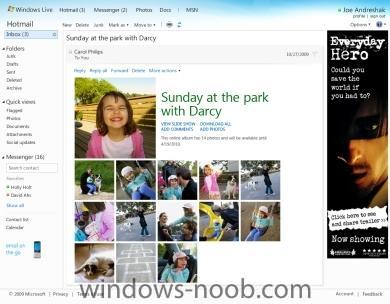
The Windows Live team previewed the next version of Hotmail Monday. This release has a foundation on saving time. Attachments, for example, often take you away from your inbox, they require you to wait for a new application or new window to open, one at a time. Hotmail will allow you to see a Silverlight Gallery of attached images or even linked images from Flickr and SmugMug. They have made it possible to send up to 200 photos @ 50MB each in a single email using Windows Live SkyDrive. Hotmail will open Office attachments using the new Office Web Apps right in your inbox, and even links to Hulu and YouTube will play within the email. Another new feature is the ability to sweep your email removing unwanted mail. This goes beyond spam and into "graymail", which is mail that you requested, but you really don't care about. You can also sweep you Gmail and Yahoo! mail accounts. There are many more features, be sure to check out the Windows Team Blog for more. Our good mate Nic Fillingham will be connecting with the Windows Live team when they get back for a video, so if you have questions please leave them here. http://channel9.msdn.com/posts/LarryLarsen/Hotmail-The-Next-Generation/?utm_source=twitterfeed&utm_medium=twitter
-
Script for clearing last pxe advertisement in SCCM
anyweb replied to wmmayms's question in Troubleshooting, Tools, Hints and Tips
nice script, what does it do exactly ? edit the db directly or ? -
check here on appdeploy.com
-
sounds more like you don't have an ip address instead of missing dns info, without an ip you can't do anything else, so.... are you using an apply drivers step before this happens ? have you added network card support for this computer to the boot image ?
-
have a read of this,
-
of course it's possible, you use the captured image you created from the guide, and create a new task sequence to deploy that to all your hardware, you separate your hardware types using Groups steps in the task sequence, just like this
-
Network Connection Issue (MDT 2008)
anyweb replied to qaisar's question in Microsoft Deployment Toolkit (MDT)
after re-reading your post, you should be using MDT 2010, mdt 2008 doesn't support Windows 7, and that could be the reality of your problems right now, if you want to deploy xp, it's fine, but for windows 7 you must use mdt 2010 -
ok did you see the abortpxe post here ?
-
Network Connection Issue (MDT 2008)
anyweb replied to qaisar's question in Microsoft Deployment Toolkit (MDT)
are you sure its using the 32 bit image ? -
When deploying Windows 7 the Network Location dialog box is sometimes shown even though the machine is joined to a domain. It's only on specific hardware but it's quite common. Microsoft now has a hotfix (KB 2028749) for the network lcoation bug, the hotfix is not yet public, you have to call Microsoft Support to get it. via > http://www.deployvista.com/Blog/tabid/70/EntryID/136/language/en-US/Default.aspx reference > http://social.technet.microsoft.com/Forums/en-US/configmgrosd/thread/57e36e94-5ccb-49c5-973e-04b6f7dd65ec
-
no problem with that
-
it's closed for now, sorry.
-
Restarting after selecting a task sequence
anyweb replied to Rizzo's question in Troubleshooting, Tools, Hints and Tips
are your current task sequences mandatory ? (check the schedule tab of the advertisement) -
i know that where I work we had to set some local policies for IE8 in windows 7 which was done by copying over the files into c:\windows\system32\grouppolicy have you tried that ? remember however that the domain group policy will override local group policy so why not set it there instead
-
ok in task sequences the apply drivers steps refer to applying drivers in the Operating system you are deploying, nothing to do with windows PE at all, the only drivers you should ever add to your WinPe image are nic or storage, nothing more, and they must correspond to the version of pe you are using so if sccm 2007 sp1-use windows vista drivers sccm 2007 sp2-use windows 7 drivers does that help ?