



Welcome to windows-noob.com!
Logging in will allow you to download scripts used in the guides.
If you came here looking for the Endpoint Manager step-by-step guides then please start here.
Register for free and ask your questions in our forums.
- 0 replies
- 3632 views
- Add Reply
- 0 replies
- 3580 views
- Add Reply
- 0 replies
- 4549 views
- Add Reply
- 0 replies
- 1867 views
- Add Reply
- 0 replies
- 2875 views
- Add Reply
- 1 reply
- 2981 views
- Add Reply
- 2 replies
- 6927 views
- Add Reply
- 6 replies
- 19948 views
- Add Reply
VPN Profile - L2TP/IPsec with PSK

By Zuckerfrei,
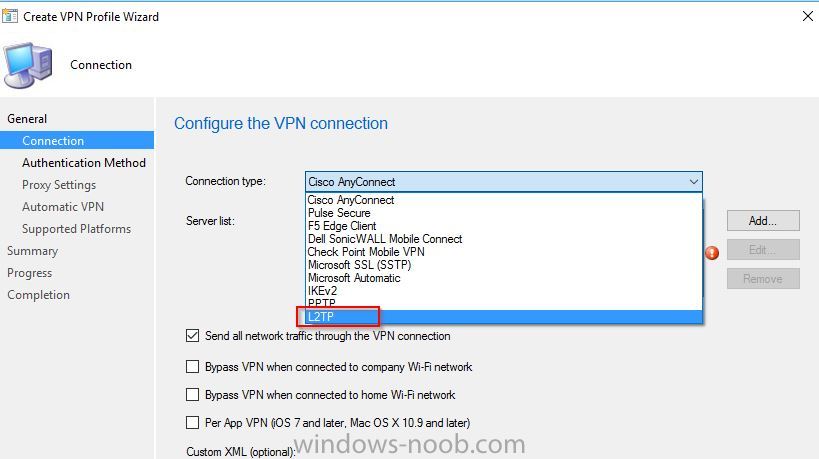
Hi, i try to deploy a Windows VPN Profile to some Windows 10 devices.
When i choose a L2TP Connection Type in the Console the Connection apears as L2TP/IPsec with certificate on the client.
How can i deploy a L2TP/IPsec Profile with PSK?
Console:
Client:
Announcing Windows 10 Insider Preview Build 14926 for PC and Mobile

By anyweb,

Thanks for being patient with us as we upgraded some of our engineering tools last week. Our build monitoring system is purring again and today we are excited to be releasing Windows 10 Insider Preview Build 14926 for PC and Mobile to Windows Insiders in the Fast ring. An important note about build expirationJust as we’ve always done with pre-release versions of Windows, Insider Preview builds have expiration dates. Starting tomorrow September 15th, PCs running really old Insider Preview builds
Installing SCCM 2012 R2 across un-trusted forests

By OsamaAlaydi,
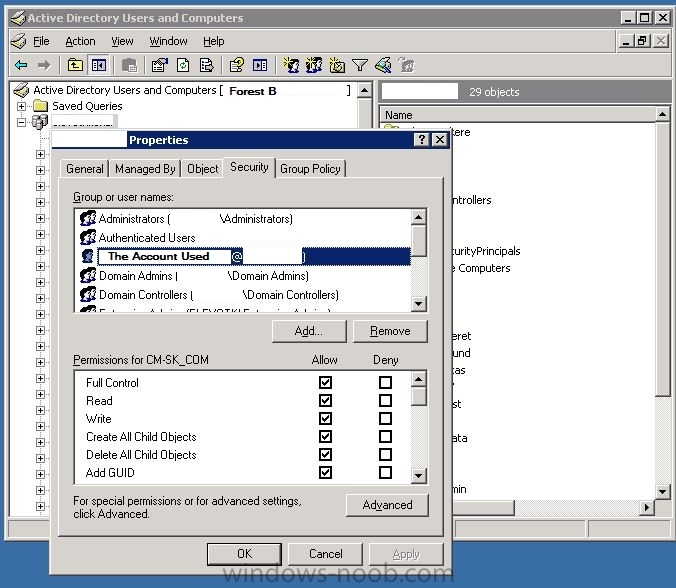
Hi.
I`m working on implementing SCCM 2012 R2.
My goal is to build a System Center environment that is able to do both monitoring, antivirus and deployments . All systems are based on Microsoft technologies.
Our current environment is build up with 2 different forests, and has NO trust between them.
Forest A – has about 100 servers in the same domain.
Forest B – Has about 150 servers in the same domain.
Am deploying a single primary (Forest A) and then site roles in the Fore
Set WinPE resolution without MDT integration

By Siroj,
I know that it's possible to automatically set WinPE resolution by setting the X and YResolution variable when using MDT integration. Using an unsupported (low) value results in automatic detection.
We want to incorporate the same solution, but without MDT integration. I can't find a solution to this, so my question is if this is even possible?
I won't mind adding some custom variables or making other customization's.
SCCM Windows Updates Delayed Install

By gobigblu9,
Guys I am trying to figure out something that has happened in the last week that's never happened before. A bunch of our laptops received windows updates this past Tuesday out of the blue. When I go search in programs and features and look at the updates that were installed I can see these were patches we pushed out months ago. I know for a fact even on my own machine that I had a successful deployment (at least according to deployment monitoring) for the particular software update group. Is it
Prestage Windows 10 upgrade and apply later (@home), possible?
By Siroj,
We would like to create the following situation if possible:
A new Windows 10 build/version is made available and is prepared by our technicians through SCCM. An upgrade TS is created and deployed to specific devices (laptops).
When at work, an employee receives a notification through Software Center that an Upgrade Operating System (TS) is available.
The employee selects the TS in Software Center. In the background all required components are downloaded/prestaged to disk and when ready th
Unable to set MDM Authority

By Leon1983,
I have encountered an issue where we do not appear to be able to specify SCCM as the Mobile Device Management Authority.
After attempting to add the Intune subscription via the SCCM console I receive the error message "An unexpected error has occurred"
I have confirmed that no MDM authority has indeed already been set, and believe that all of the network infrastructure requirements as per https://docs.microsoft.com/en-us/intune/get-started/network-infrastructure-requirements-for-microsoft-i
SCCM Query based on current Windows 10 CU

By nathan_bird,
Hi All,
Apologies if I've missed it elsewhere (Numerous Google searches drew a blank too) but has anybody got a query for the Current CU Level of a Windows 10 build?
The version displayed in "winver"
I know I can do a search on the KB Article via Quick Fix Engineering in WMI but if a machine has multiple CU's installed it shows in more than one collection. I want individual collections based on the CU OS Build Number.
i.e 14393.105 (Windows 10 1607 with KB317493)
Any pointers