



Welcome to windows-noob.com!
Logging in will allow you to download scripts used in the guides.
If you came here looking for the Endpoint Manager step-by-step guides then please start here.
Register for free and ask your questions in our forums.
- 1 reply
- 2525 views
- Add Reply
- 0 replies
- 1928 views
- Add Reply
- 0 replies
- 3799 views
- Add Reply
- 13 replies
- 27040 views
- Add Reply
- 2 replies
- 2477 views
- Add Reply
- 1 reply
- 2307 views
- Add Reply
- 0 replies
- 4062 views
- Add Reply
- 4 replies
- 9093 views
- Add Reply
Problems running MBR2GPT in SCCM OS upgrade task sequence

By chooch77,
I'm attempting to perform an in place upgrade from Windows 7 to Windows 10 1803 using an SCCM OS upgrade task sequence. In the task sequence, after the OS is upgraded to windows 10 , I have a step to convert the disk to GPT, but it fails with the error "cannot find room for the EFI system partition". I have tried to run MBR2GPT in the task sequence from WINPE and full OS, but still get the same error. The odd thing is, if I am logged on to the machine and run MBR2GPT from a command prompt, the c
OSD Task Sequence decides to take a break

By Embalmed,
Hello,
I've been dealing with a problem that I have considerable trouble searching for. My Windows 10 task sequence will just pause, and hang for approximately 50 minutes. It will be during package installations, downloads will be clean, they will start and then go dormant. The time usually is about 50 minutes in duration, and I initially thought it was a specific package. When I moved it to a different position in order, the issue moved to another install.
So far I have only seen this
Introducing Web Authentication in Microsoft Edge

By anyweb,

Microsoft has introduced support for the Web Authentication specification in Microsoft Edge, enabling better, more secure user experiences and a passwordless experience on the web.
With Web Authentication, Microsoft Edge users can sign in with their face, fingerprint, PIN, or portable FIDO2 devices, leveraging strong public-key credentials instead of passwords.
A web without passwords
Staying secure on the web is more important than ever. We trust web sites to process credit card
OSD Task Sequence fails to complete, but does not report an error

By nandystam,
Hi all
The problem I am facing with OSD is basically a carbon copy of this.
The OSD task begins, downloads and applies the Windows 7 Pro SP1 OS image, downloads and installs some drivers (as per the task sequence), but when it goes to the task to Setup Windows and ConfigMgr, it never completes the install of the SCCM client. It reboots, configures some drivers and then goes to the usual CTRL-ALT-DEL login prompt, and is joined to the domain. Any tasks after Setup Windows and ConfigMgr
Problem booting from W7 into WinPE with TS

By Sven van Rijen,
Hi!
Hi! When try to boot from Windows 7 to WinPE, I run into an error:
Failed to open Z:\boot\Resources\bootres.dll for backup. Permissions on the requested may be configured incorrectly."
The full smstslog.log is attached.
Do you have any clue? Thnx in advance!
Sven
smsts.log
Device Collection with computers that have not run Windows Updates in more than 2 months

By Didier Caamano,
Hello everyone,
I recently started to manage a SCCM environment and I am implementing Windows Updates using SCCM. We do not have all server at the same patch level. I currently have the following device collection to apply monthly updates on devices that are up to date:
Windows Servers – Update Manual
Windows Servers – Update Monthly
Windows Servers – Update Test
The aforementioned collections are for devices that are up to date. As I said at the beginning, not all m
Updates not installing - laptop reports as compliant

By Thomas Capacci,
I have Automatic Deployment rules for Patch Tuesday, SUG are created and deployed to a test (collection my laptop is member of it).
I have set a maintenance window on the collection and even disabled business hours from the Software Center.
UpdatesDeployment logs:
The deadline is already reached but nothing happens
Message received: '<?xml version='1.0' ?> <CIAssignmentMessage MessageType='EnforcementDeadline'> <AssignmentID>{a3beb978-eacf-4b44-a237-db63be768fcc}
.NET Framework 3.5 - SCCM/MDT Not installing?

By xerxes2985,
Morning all,
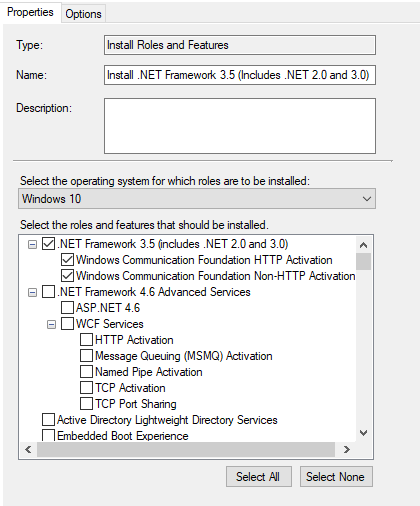
I'm running into an odd problem with my SCCM OSD TS. I am using MDT integration and have selected the steps Install Roles and Features to install the .NET Framework 3.5. I have this step right after the Setup Windows and Configuration Manager step. However, upon OSD completion, the process is not complete.
Here is the excerpt of the step from SMSTS.log, it doesn't show any failures
Adding begin group instruction at 38 TSManager 7/16/2018 2:13:53 PM 1620 (0x0654)