



Welcome to windows-noob.com!
Logging in will allow you to download scripts used in the guides.
If you came here looking for the Endpoint Manager step-by-step guides then please start here.
Register for free and ask your questions in our forums.
- 3 replies
- 3808 views
- Add Reply
- 1 reply
- 1860 views
- Add Reply
- 2 replies
- 2790 views
- Add Reply
- 2 replies
- 4387 views
- Add Reply
- 0 replies
- 4527 views
- Add Reply
- 0 replies
- 1627 views
- Add Reply
- 2 replies
- 2725 views
- Add Reply
Download security updates from Microsoft instead of the MP

By Arti,
how direct access users can download updates from microsoft instead of MP?
when you deploy the software update group, it downloads the updates to the MP. Therefor "If software updates are not available on preferred distribution point or remote distribution point, download content from Microsoft Updates" will always be available and will never download from Microsoft Updates. Correct?
SCCM Network Information Report RDL?

By Darryl,
I am looking to acquire a report that will contain basic network information by collection e.g. IP, DNS, WINS, etc. I have been learning how to use report builder but have been failing when it comes to creating this specific report, just curious if anyone has something like this that they would be willing to share or point me in the direction on where to obtain a decent rdl.
Thanks.
Problem Unwanted folders In the wrong place


Windows Update/Defender Update Button Functionality

By jfdensmore,
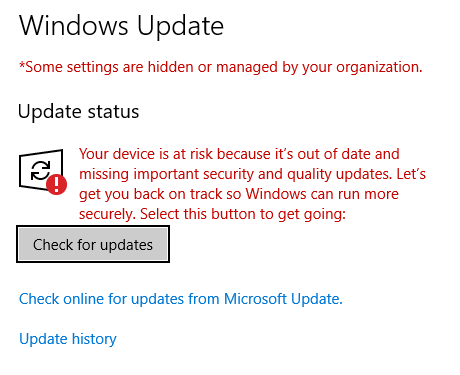
Hello everyone. I have a question about the functionality of these buttons. So I want SCCM to handle all Windows and Defender Updates and I have SCCM CB 1802 distributing Windows and Defender updates. But when i click the Check for updates button in either locations on a windows 10 client all i ever see is either the image below, or an "Updates are up to date".
My question is.... are these buttons useless while using Sccm now? Also how can i confirm my devices are actually pulling End point
Usmt capture user status failed 0x00004005 ,usmt捕获用户状态失败

By radish,
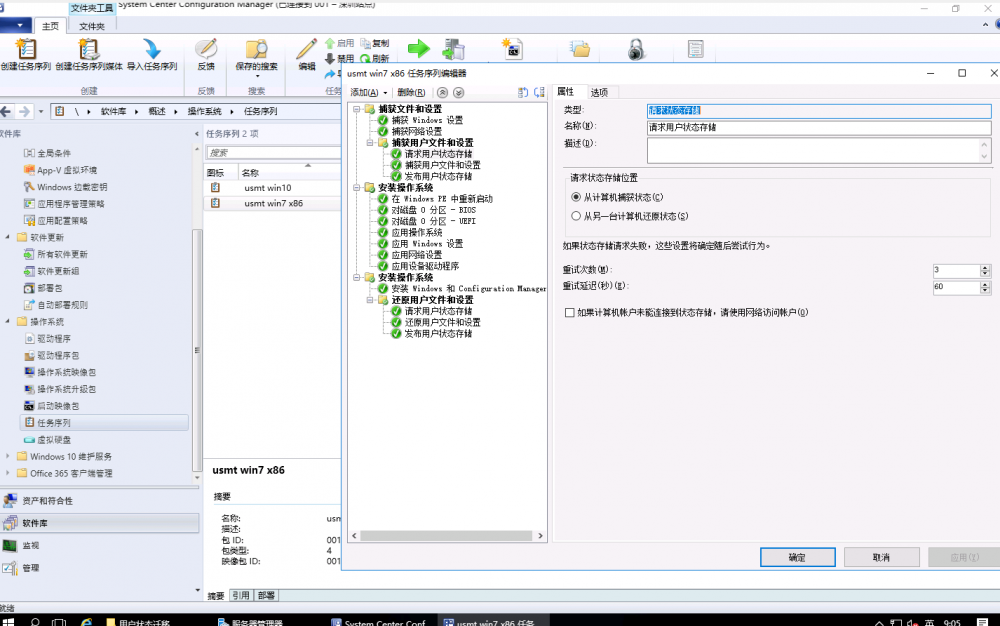
测试环境,测试环境
Win2016
SCCM1706
ADK1709
测试客户端系统,测试客户端系统
Win10和Win7的
Usmt捕获用户状态失败0x00004005,请解决,谢谢
出现捕获用户状态失败 这怎么一回事?
无法捕获用户状态,因此无法捕获用户状态 ,发生了什么?
smsts.log
已解决,通过网络保存用户状态迁移,不能用中文文件夹,改成英文 就可以正常通过网络捕获状态转移了。
Has been resolved, through the network to save the user state migration, can not use the Chinese folder, change to English can be normally transferred through the network capture state.
Value for OSDCOMPUTERNAME is already set to MININT-B2711HQ so database value of MDT-Test-VM will be ignored

By robp2175,
I have my MDT Database and configured to name my machines automatically. However, they wre still using MININT as there computer name and this was in the ZTIGather log
Value for OSDCOMPUTERNAME is already set to MININT-B2711HQ so database value of MDT-Test-VM will be ignored. ZTIGather 5/19/2018 11:44:30 AM 0 (0x0000)
I was able to "fix" this by editing ZTIGather.xml and changing
<property id="OSDComputerName" type="string" overwrite="false" description="The new computer na
Distribution Point Not Installing

By Adminagator,
Hello,
I have a strange issue, as I'm sure everyone here would classify their own issues as strange, but here it is: I installed a DP, everything went fine, then the PXE role started having problems, it would not PXE boot, just kept saying 'contacting server' and the smspxe.log says 'looking for boot image', so I decided to remove PXE, WDS, reinstall, redistribute boot images, etc. Well, I made the changes to the DP, but the DP is not responding, it's as if it is not getting the message fr
NEW SCCM version shows 1802 but it says Downloading in Updates & Servicing? Please help

By RiDER07,

One of my colleagues was trying to upgrade our current SCCM from 1702 to 1710 but it kept failing. So instead he tried upgrading to 1802 and it failed again.
And now, the SCCM is broken, when you click on Devices, nothing shows up. The version of SCCM is reported as 1802 but it hasn't upgraded. And it still says Downloading.
We want to upgrade to 1710. Is there a way to fix this? Please help.