anyweb
-
Posts
9290 -
Joined
-
Last visited
-
Days Won
371
Everything posted by anyweb
-
interesting result and thanks for confirming
-
check in c:\windows\temp
-
post the smsts.log file here and we'll check it
-
try this out http://www.microsoft.com/downloads/details.aspx?FamilyId=B9FB478A-EC98-47F2-B31E-57443A8AE88F&displaylang=en
-
you shouldnt be hard specifying the path to the msi like so try something like this instead msiexec.exe /qn /i "Tools.msi"
-
Microsoft's web browser, Internet Explorer, today celebrates its fifteenth birthday as the Redmond-based giant prepares to unveil the next version, Internet Explorer 9. The web browser, the world's most used (but arguably most hated) according to recent NetApplications figures, was born on the 16th of August, 1995 when version 1.0 was made available to the public. The first version of IE was based off Spyglass's Mosaic application -- which Microsoft originally licensed but was eventually used to form the code basis for future versions of IE. It wasn't until version 3.0, released on August 13, 1996 that Microsoft first began bundling the web browser into Windows, making it the default web browser and exponentially growing the browsers market share, pushing out market leader Netscape Navigator. Since the debut of Mozilla Firefox in 2004, it's been a tough old slog for IE, which is now facing an increasingly competitive browser field with competitors such as Google Chrome, Opera and newer editions of Firefox, that has left the browser facing a slowly eroding market share. And just last year Microsoft was also faced with a European Union decision to force the company to stop making IE the default Windows web browser in Europe last year, with the company now showing users a "browser ballot" when they turn on newly purchased Windows computers for the first time. The future is looking better for IE however, with version 9 of the browser widely expected to be released later this year with a possible beta as soon as September 15. IE 9 is expected to better conform to web industry standards such as CSS, and will reportedly feature a user interface similar to that of Google Chrome alongside for the first time a downloads manager. via > http://www.neowin.net/news/microsoft-celebrate-internet-explorers-15th-birthday
-
i havnt tried it yet, so please tell us how it goes,
-
i wouldn't use an nlite copy for build and capture, can you try doing a b&c on clean content ?
-
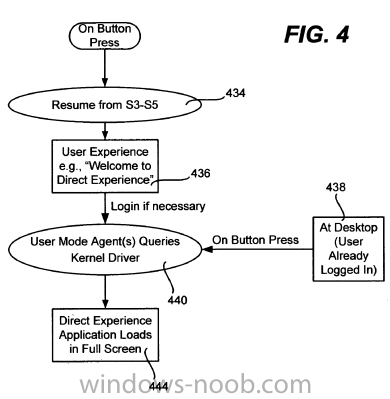
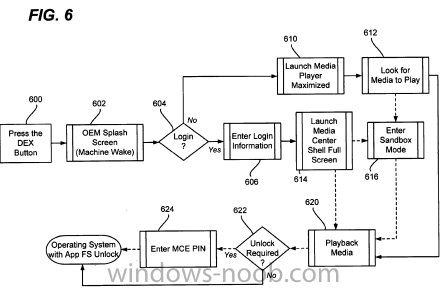
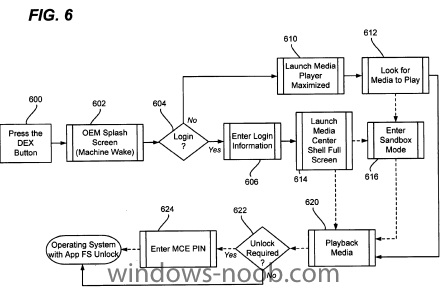
 Ah! Patents, nothing like them to update my blog. That big Windows 8 leak and some patent applications show what Microsoft planned for Windows 8, my recent finding is titled ‘Direct Computing Experience’. The patent goes describes that how sometimes a laptop is used for watching movies on DVD but since the laptop is more than the DVD players available in the market, the experience is different. Microsoft plans to make the computer go into reduced functionality mode or in a sand boxed mode in case you plan to use it for a specific consumer electronic applications, such as the DVD player. Quoting the patent application summary: The idea is that you might not need to login and wait for your entire desktop to load and then start media player and then start the movie. This process can be automated and initiated by a click of the button. The patent images show that you can push a button, the system will look for media to play (possible scenario a movie DVD in the drive) and then start playing without you having to login to the system. Some flowcharts from the patent application explain this better: This sounds like a solution to the battery problems in laptops, reduced functionality mode will definitely improve battery life. This is quite interesting, Device Stage, Sideshow and now Direct Experience. The initialization of the Direct Experience isn’t limited to buttons but can also be done by plugging specific hardware. I assume, plugging a USB stick that has audio files will directly start playback, again without logging in. Saves a lot of time if you ask me! via > http://www.beingmanan.com/wp/2010/08/microsoft-to-introduce-direct-experience-platform-with-windows-8/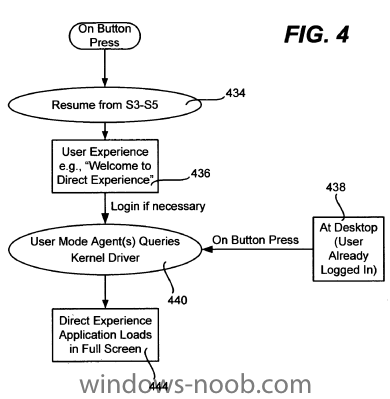
-
Last Feb Brandon posted a piece on Language Pack availability for Windows 7 here. I have had a lot of questions from IT pros in the past few weeks that are deploying Windows on where to find them so we thought we’d resurface this important topic and resources. Windows 7 will continue to enable the widest range of people across the world to use Windows in their own language by providing Language Interface Packs in over 55 languages. LIPs are built using MUI technology and provide translation of the UI (User Interface) most commonly used by Windows users. LIPs do not require a separate software license. They are available to downloaded for free and installed on any edition of a Genuine copy of Windows 7: Starter, Home Basic, Home Premium, Professional, Enterprise, or Ultimate. Because the entire UI is not translated, LIPs require that the base or parent language requirement be present on the machine before installation. After the LIP is installed and selected as the UI display language, the elements of the UI that are not translated into the LIP language will continue to be displayed in the base or parent language. Some LIP languages can be installed over more than one parent language. For example, the Catalan LIP can be installed over the Spanish or French language pack. The parent language requirements are specified on each LIP download center details page, and are also listed on the Windows Languages page here. All together Windows supports close to 100 languages and each language is mapped to either LP or LIP. There is no one language which is available in both technologies. For example, Brazilian Portuguese is available as a LP, while Quechua is available as LIP. Here are some great resources to help you find out more about parent language requirements and language support for Windows 7, plus obtain step-by-step guidance on multilingual deployments: * Download Languages for Windows 7 * Understanding Multilingual Deployments * Planning MUI Deployments for Windows 7 * Windows LIP: Frequently Asked Questions * Microsoft Local Language Program via > http://windowsteamblog.com/windows/b/springboard/archive/2010/08/01/windows-7-language-packs.aspx
-
Microsoft Security Essentials Earns August VB100 certification
anyweb posted a topic in Windows News
By way of introduction, I’m Eric Foster and have recently joined my colleagues on The Windows Blog to write on ‘all things’ security. I thought it only fitting that my first blog be about one of my favorite personal product recommendations, Microsoft Security Essentials. Not sure how many of you know about the VB100 award but it’s a public test conducted by Virus Bulletin, a highly reputable testing organization in the industry, designed to measure the detection effectiveness and quality of antivirus (AV) products. The most important validation of AV quality comes from independent certification organizations like Virus Bulletin. And so it is no surprise that we are very excited to share that Microsoft Security Essentials, our no-cost anti-malware service for consumers, achieved the VB100 award for the August 2010 Edition of Virus Bulletin. There are a number of different methodologies that can be used to test the effectiveness of an anti-virus solution. In order for a product to be awarded the VB100 certification, it needs to detect 100% of the WildList malware samples (a prevalent malware subset contributed by a group of researchers in AV community) and must not have any false positives (FP or incorrect detections) on the Virus Bulletin clean file collection. According to Virus Bulletin, “Detection rates were strong as ever...with no problems in the WildList or clean sets, Microsoft earns another VB100 award with ease.” [Page 50, Virus Bulletin August 2010 Edition] Microsoft products including Microsoft Security Essentials and Forefront Client Security, have received VB100 awards since June 2007, demonstrating Microsoft’s dedication to quality and our commitment to providing effective anti-malware protection to consumers and enterprise customers alike. If you don’t already have an AV solution installed on your PC – and its estimated that over 80% of consumers report having up-to-date AV installed but market data shows that less than 50% of consumers actually do – you can get Microsoft Security Essentials at no cost by visiting the Microsoft Security Essentials website here . via > http://windowsteamblog.com/windows/b/windowssecurity/archive/2010/08/12/microsoft-security-essentials-earns-august-vb100-certification.aspx -
the log you posted looks ok, can you post one with the 80004005 error (driver injection access denied) pls
-
first of all I wouldn't use an nlite version of XP in configmgr, i would add all drivers via the apply drivers package steps and wmi queries, to create the master WIM image (with no drivers in it) i'd build and capture that image on a virtual platform such as vmware or hyperv, that way you are far less likely to see any bsod's when applying it to new models, i'll take a look at your logs and come back soon
-
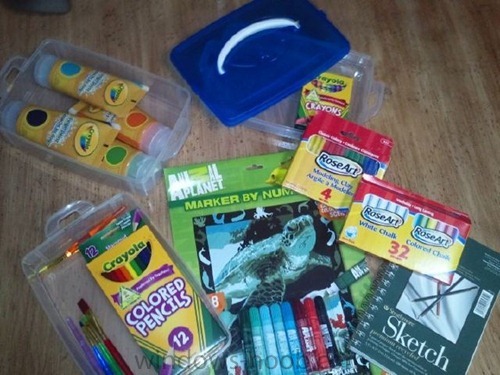
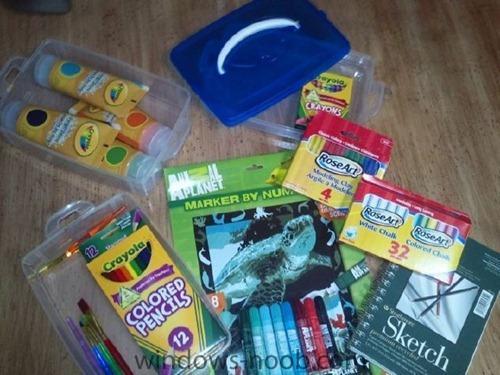
The IE team seems to be gearing up for presenting their next generation web browser and they seem to be doing it in style. Veteran Microsoft observer, Ed Bott shared on twitter that he got a bunch of crayons with some indication that it came from the IE team. A few days back, they sent an IE3 t-shirt to a commenter. They’ve been sporting enough to send flowers for the IE6 funeral as well. Here are the contents of the package sent: In a blog post, the IE team has announced that they will be releasing IE9 beta on the 15th of September at Beauty of the Web event in San Fransico. The event is a closed event for hand picked developers, designers, bloggers and press. According to Ed Bott, Microsoft has registered beautyoftheweb.com which currently shows nothing. A new UI is expected, whether it’ll be Metro inspired or build on the Ribbon interface is anyone’s guess. via > http://thenextweb.com/microsoft/2010/08/12/ie9-beta-coming-on-september-15th/

-
SMS Distribution Manager failed to process package
anyweb replied to Chris Zeigler's question in Deploy software, applications and drivers
hi Chris and welcome once you create a package and distribute it to a distribution point (dp) configmgr will create a 'copy' of that package in it's own special folders such as smspkgd$ and so on (changes name depending on the drive) if it's not even getting that far then nothing else will work so you need to fix it, does your computer account (machine account) have administrative access of your configmgr server ? check this snippet from your posted log try doing that and see do things change -
SCCM setup and configuration questions
anyweb replied to Kevin79's topic in Configuration Manager 2007
assuming the Reporting Role is installed on your site server, go into the Reporting node, click on Reports and locate the following report All advertisements you can run that report by right clicking on it, choose Run, then when the results appear select the advertisement in question and drill further into it -
SCCM setup and configuration questions
anyweb replied to Kevin79's topic in Configuration Manager 2007
have you tried drilling into the reports for the package in question it should reveal the details of why it's waiting dfs shares are not used by configmgr, if you want to replicate data you'll need to use configmgr to do it or manually do it using the preloadpkgonsite.exe program for that particular package. -
thanks for posting the info so others may learn ! cheers niall
-
SCCM Client install error
anyweb replied to André Gomes's question in Troubleshooting, Tools, Hints and Tips
how are you trying to install the client exactly ? and did you create a Package from definition package for that client ? what version of the client is it ? -
how can I DEPLOY an image captured using WDS ?
anyweb replied to anyweb's question in Windows Deployment Services (WDS)
what dvd are you using for the image source ? -
is UAC disabled ? why are you still using SMS 2003 ?
-
so do you want to emulate this only using mdt 2010 update 1 ? if so it shouldnt be that hard to do as the steps are mostly workarounds anyway, have you tried to duplicate it and what problems are you seeing, post log files if necessary
-
I wouldnt advertise to the all systems collection unless you REALLY know what you are doing, there's a great risk of installing your servers with XP or something odd if you make a mistake, so don't do it unless you are absolutely sure of what you are doing. in addition, you can hide advertisements from RAP, simply target them to a different os in your organisation, see the how can I password protect a TS post here and scroll down for details of that
-
you don't need it, it's nothing more than a customised unattend.xml file which you can Deploy 7 without,
-
if you restart the Windows Deployment Services service what happens ?