
GarthMJ
Moderators
-
Joined
-
Last visited
Everything posted by GarthMJ
-
What do you mean productions can't wait for a solution? The only way you are going to get a solution / workaround is to talk to the application owner or to MS. One of them has to fix the problem.
-
Again assume a cumulative update, No as the KB would change each month. Why can't you open a support case with MS or update the software in question?
-
Assuming that this is a cumulative KB, you don't directly. You contact MS to so that the KB can be fixed or you fixed your software that it works with the KB.
-
You will not lose you custom reports. However if you have any doubts, you can always backup your report first. (Which you should be doing anyways.) https://www.enhansoft.com/blog/how-to-backup-sccm-reports
-
-
-
-
-
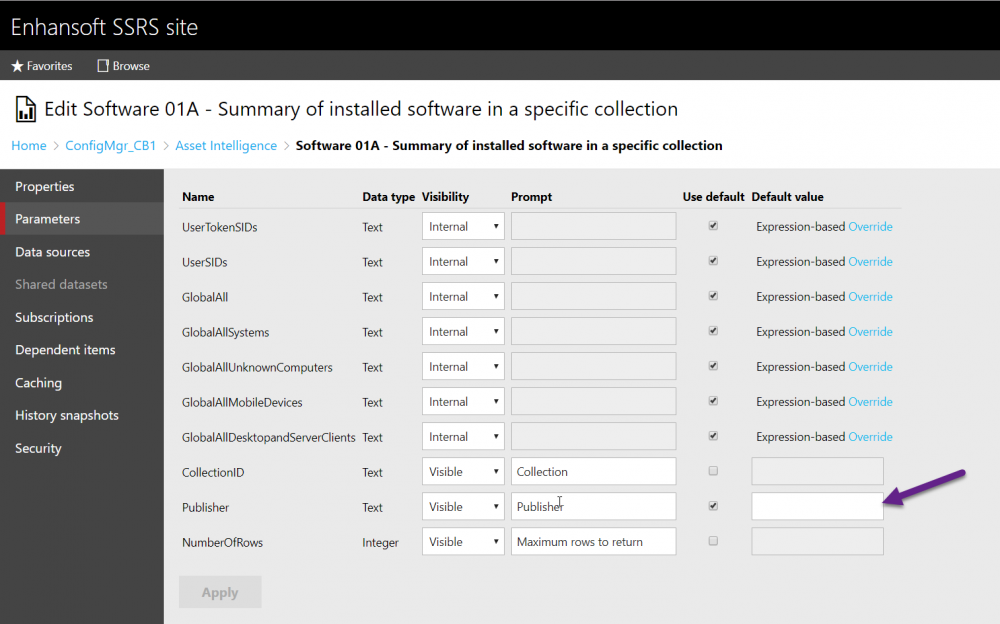
So to be clear, you give it a Null value like this?
-
if you look at the RDL you will see that it is a Null to get the (All) for the prompt.
-
Start by looking at the built-in report. Which one get you the closest to what you need.
-
Each Month Enhansoft gives away a free SCCM dashboard / report. November's Free Report is... Total Usage Trend Analysis for Collections! This software metering dashboard gives you results for all applications and will display these details for up to four collections. The results are grouped by month and will go back as far as what is stored in your SCCM environment (usually 9-months to a year). Get your free report today! The Total Usage Trend Analysis for Collections report is only available in November.
-
If you are looking for the SCCM Application install date, then you will to look at third party tools for this. Below is an example of what you will see.

-
Here is a list of all of the log file and what they do. https://docs.microsoft.com/en-us/sccm/core/plan-design/hierarchy/log-files
-
You need to review the log files to determine why, it is not installing.
-
It will depend on how you are deploying reader. Here is the list of log files. https://docs.microsoft.com/en-us/sccm/core/plan-design/hierarchy/log-files
-
What exactly doesn't work? What do the log file say is happening?
-
On you r site server, unselect the Win32_PhysicalMemory under hardware inventory. Does this fix your issue?
-
You will need to use a sub-select query to do the not in stuff. Here is an example. https://www.enhansoft.com/blog/subselect-wql-query-to-find-pcs-that-do-not-have-either-x86-or-x64-versions-of-software-installed
-
You need to export it from the console (client settings) . However I would try Sherry's stuff first, as it is harder to "kill" the sms_def.mof in CMCB.
-
That take care of the one file what about the client setting (sms_def.mof)?
-
Have you reviewed your Client setting (sms_def.mof) and Configuration.mof files
-
-
-
Did you create a SWM rule for spotify? When did you create this rule? Is the Software listed in Installed Programs in resource explorer? Is the SW installed under the user content? if it is installed under the user context then you will need a 3rd party tool to collected this information with SCCM.