Jepeto 46
Established Members
-
Joined
-
Last visited
Everything posted by Jepeto 46
-
Anyone tried to determine hardware UEFI capability with SCCM? I am trying to find out if a machine is UEFI capable, cant fine any way to do it at this point.
-
Solved by scripting, still wondering why $OEM$ is not working
-
Building the reference Image with MDT Looking to permanently customize corp wallpaper and lock screen in the reference image. I found a lot of scripts and methods to do so, however I was hoping that using the MDT $OEM$ folder will do the trick for me but it does not. Any advice on the topic? My $OEM$ folder is set this way: \$OEM$\$1\Windows\web\4K\Wallpaper\Windows all images replace with my company's as well as the Img0
-
Congrats, well deserved
-
-
I do not think you are taking the right options here. what is your SCCM version? and have you tried to take care of it with a task sequence?
-
I prefer the old Niali look LOL. Garth is right, no chance beating Lia, but anyway... Gettin gold but no plans to retire anytime soon due to SCCMiatis AKA SCCM addiction, travel by foot die hard. Will hike and deploy anything I can. Cheers to a great site!!

-
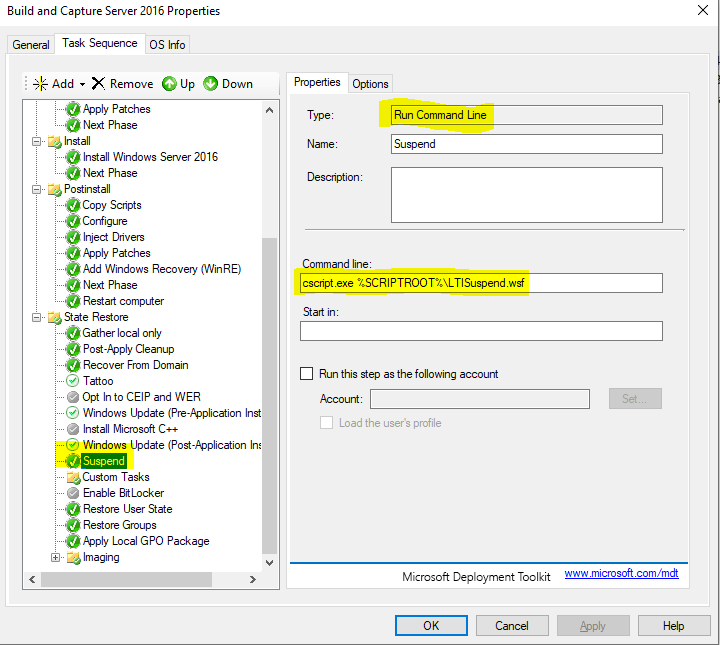
I assume you mean MDT and not MDT integrated into SCCM? would start with adding a line to pause the task sequence. this will allow you to open a command prompt and try run int manually to capture any errors What does your BDD LOG say? any entries in there?
-
see some more help here as well, https://setupconfigmgr.com/
-
Set up an ADR and get different deadlines in the reporting node within the console as well as the SSRS reports. Is this due to the randomizes client deadlins?


-
-
Where do you see reboot enforced on CM client update? Just remember, non rebooted computer is non updated computer, so you can do this with a task sequence or dedicated up and set a reboot per your own schedule. You can also use the startup script By Jason Sandy to make sure your clients are up to date and functioning https://github.com/jason4tw/ConfigMgrScripts/tree/master/Startup
-
Thanks again. I found out that "ignoring" the UI and using PowerShell is a much more clear and efficient option...
-
Have you check the Microsoft docs? https://docs.microsoft.com/en-us/windows/deployment/usmt/usmt-what-does-usmt-migrate IE is a part of the User data (MigUser.xml) so this is where your IE settings would be. Have you tried and something failed?
-
-
thanks, at least I know where to start (i think...) Quite confusing to say the least.
-
How is the deployment itself (user experience)? Is set to hide or show computer restart notifications
-
Just signed up for the MS Action pack (AKA Partner) so I can train myself, and could not be more confused. It takes me from Azure to Intune to Office 365 back and force, and I have no idea where to start. Any suggestions?
-
Just like Garth said, use report. You can download a real good one for free from https://patchmypc.com/free-software-update-compliance-dashboard-reports-for-microsoft-sccm
-
So why are you trying to reboot to WinPE again?
-
Are the first steps running in WinPE? are you booting from USB, PXE or assign the task from GUI?
-
See if this helps, http://tinyurl.com/y7vhpcjo http://tinyurl.com/ycj8kvuf
-
What do you meant by that? Do you have a condition for the WinPE boot under the option tab??
-
What models are you trying to upgrade? Dell? HP? x?
-
You can pre-cache without the feature being enabled. once you have completely finalized the TS, set the the TS to be required and available now and and mandatory deadline deploy even 20 years from now. It will start pre-caching, and you can then deploy the exact same TS on schedule, say a week from today, it will use what's in the cache. Any changes you make will cause it to re-cache.