




anyweb
-
Posts
9271 -
Joined
-
Last visited
-
Days Won
371
Everything posted by anyweb
-
 hi Ben there are issues with this in 1511 but 1602 is out now and hopefully resolves those issues, have you updated yet ?
 -
At the start of this series of step by step guides you installed System Center Configuration Manager (Current Branch), then you configured discovery methods. Next you configured boundaries to get an understanding of how automatic site assignment and content location works. After that you learned how to update ConfigMgr with new features and fixes using a new ability called Updates and Servicing and you learned how to configure ConfigMgr to use Updates and Servicing in one of these two modes: Online mode Offline mode To prepare your environment for Windows 10 servicing (coming in a later guide) you learned how to setup Software Updates using an automated method (via a PowerShell script) or manually using the ConfigMgr console. Next you used a PowerShell script to prepare some device collections, then you configured client settings for your enterprise and finally you'll deployed the ConfigMgr client agent using the software updates method which is the least intensive method of deploying the Configuration Manager client agent. As System Center Configuration Manager (current branch) is being delivered as a service now, version 1602 was made available (March 11th, 2016). This new version (version 1602) will will show up in your console like in the below screenshot. This update includes the following improvements: Client Online Status: You can now view the online status of devices in Assets and Compliance. New icons indicate the status of a device as online or offline. Support for SQL Server AlwaysOn Availability Groups: Configuration Manager now supports using SQL Server AlwaysOn Availability Groups to host the site database. Windows 10 Device Health Attestation Reporting: You can now view the status of Windows 10 Device Health Attestation in the Configuration Manager console to ensure that the client computers have a trustworthy BIOS, TPM, and boot software. Office 365 Update Management: You can now natively manage Office 365 desktop client updates using the Configuration Manager Software Update Management (SUM) workflow. You can manage Office 365 desktop client updates just like you manage any other Microsoft Update. New Antimalware Policy Settings: New antimalware settings that can now be configured include protection against potentially unwanted applications, user control of automatic sample submission, and scanning of network drives during a full scan. This update also includes new features for customers using System Center Configuration Manager integrated with Microsoft Intune. Some of the features that you can expect to see are: Conditional Access for PCs Managed by Configuration Manager: You can now use conditional access capabilities to help secure access to Office 365 and other services on PCs managed with Configuration Manager agent. Conditions that can be used to control access include: Workplace Join, BitLocker, Antimalware, and Software Updates. Windows 10 Conditional Access Enhancements: For Windows 10 devices that are managed through the Intune MDM channel, you can now set and deploy an updated Compliance Policy that includes additional compliance checks and integration with Health Attestation Service. Microsoft Edge Configuration Settings: You can now set and deploy Microsoft Edge settings on Windows 10 devices. Windows 10 Team Support: You can now set and deploy Windows 10 Team configuration settings. Apple Volume Purchase Program (VPP) Support: You can now manage and deploy applications purchased through the Apple Volume Purchase Program for Business portal. iOS App Configuration: You can now create and deploy iOS app configuration policies to dynamically change settings such as server name or port for iOS applications that support these configurations. iOS Activation Lock Management: New capabilities include enabling iOS Activation Lock management, querying for the status, retrieving bypass codes, and performing an Activation Lock bypass on corporate-owned iOS devices. Kiosk Mode for Samsung KNOX Devices: Kiosk mode allows you to lock a managed mobile device to only allow certain apps and features. User Acceptance of Terms and Conditions: You can now see which users have or have not accepted the deployed terms and conditions. And there is more! To view the full list of new features in this update and to learn more about the new functionality, see What’s new in version 1602 of Configuration Manager on TechNet. Note: As the update is rolled out globally in the coming weeks, it will be automatically downloaded and you will be notified when it is ready to install from the “Updates and Servicing” node in your Configuration Manager console. If you can’t wait to try these new features, the attached PowerShell script can be used to ensure that you are in the first wave of customers getting the update. By running this script on your central administration site or standalone primary site, you will see the update available in your console right away. EnableUpdateRing PowerShell Script (Right click and Save As to download. Rename the .txt extension to .ps1 after downloading) After downloading the script start it by specifying the servername of the server you want to upgrade eg: .\EnableUpdateRing.ps1 CM01.windowsnoob.lab.local as shown here: after doing that you may have to restart the SMS Executive service to see the update show up in the console. Once the update shows up and has finished downloading, right click it and choose Install Update Pack or if you want to verify the prerequisites are in place click on Run prerequisite check. When the wizard appears, go ahead and click next and you’ll get a list of available features included in this Update Pack, if you don’t want to enable a specific feature, deselect it, you can always enable it later. Then select your chosen Client Upgrade Options Accept the EULA review the summary and press Next for all the good things to begin installing When the completion screen appears you can close that wizard and open the CMUpdate.log in CMTrace for info on the upgrade. The upgrade will take time, so be patient, it takes time ! How do you get status about the upgrade ?To get status of the upgrade select the Monitoring node and click on Site Servicing Status. To the right you’ll see information about that installation progress. You can then right click on the Update Package Name and choose Show Status to get more info. as you can see below The best method is of course to review the CMUpdate.log file and look for the following line: INFO: Successfully dropped update pack installed notification to HMan CFD box Once it’s installed after you click around in the console you’ll get a popup showing you that a new version of the console is available. Click OK to install it. After it’s installed, start the new console and review the version info, and it isas follows:- Console Version: 5.0.8355.1000 Site Version: 5.00.8355.1000 What about enabling features after the install ?After everything is installed, if you need to enable features that you didn’t enable during the install select the Administration workspace and the Updates and Servicing node, select Features and right click on the feature you didn’t enable, select the feature you want to enable, right click and choose Turn On. You cannot multi select. Review the Feature popup and click Yes. via > https://www.niallbrady.com/2016/03/11/now-available-update-1602-for-system-center-configuration-manager/ Related reading https://blogs.technet.microsoft.com/configurationmgr/2016/05/04/walking-through-an-upgrade-from-microsoft-configmgr-1511-to-configmgr-1602/
-
did you even look ? https://www.windows-noob.com/forums/forum/113-scom-2012/
-
the Surface Pro line of products are UEFI only
-
did you guys update the console when prompted ?
-
and are you sure that the computer is in the collection during deployment ?
-
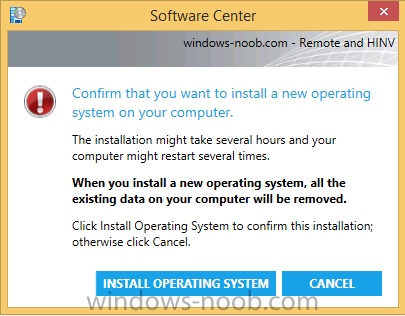
hi folks, for those of you using OSD in System Center Configuration Manager, please take the time to read and then vote for this. I'd be very grateful ! https://configurationmanager.uservoice.com/forums/300492-ideas/suggestions/12874281-allow-us-to-disable-hide-or-edit-the-confirm-tha
-
what collection is this computer in when it's being deployed ?
-
thanks ! this is not the technical preview guide, for that see the guides below: Installation - How can I install System Center Configuration Manager and Endpoint Protection Technical Preview 4 Update 1601 now available in System Center Configuration Manager Technical Preview - https://www.niallbra...hnical-preview/ Spot the difference, maintenance windows versus service windows, Microsoft is listening and fixing ! https://www.niallbrady.com/2016/01/27/spot-the-difference-maintenance-windows-versus-service-windows-microsoft-is-listening-and-fixing/ System Center Configuration Manager Technical Preview 1602 is now available ! https://www.niallbra...-now-available/ but as regards boundaries and discovery please review these posts Configuring Discovery - How can I configure discovery for System Center Configuration Manager (Current Branch) Configuring Boundaries - How can I configure boundaries in System Center Configuration Manager (Current Branch) lastly for an index of System Center Configuration Manager Current Branch guides, see this link
-
did you have cmtrace open with a log file and was cmtrace opened from the source ? if so that's the cause solution, copy cmtrace elsewhere, run it from there and start the upgrade again... if not the above, then please post the file copy errors you are seeing.
-
this one > Note: if you are using a previously captured Windows 8 WIM file which has more than one image index, make sure to select the image index that contains the Operating System otherwise you will not be given any UEFI options in the task sequence. i'll make it more obvious..
-
SCCM Client Not Installing on Windows 10 10240 Build
anyweb replied to michael.lecomber's question in How do I ?
what does the ccmsetup.log file reveal ? -
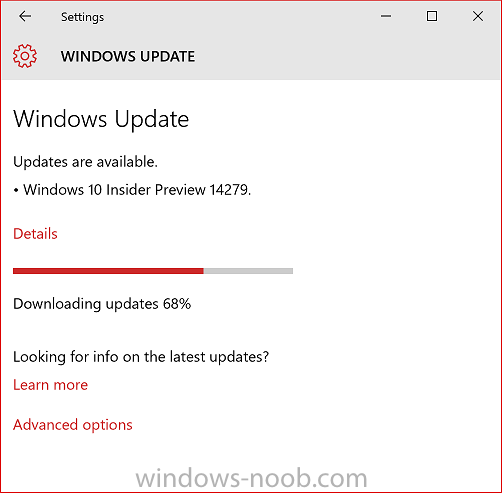
Yet another Windows Insider build has been released, this time it's build 14279. Here’s what’s new in Build 14279Cortana in more languages: With this build, we are enabling Cortana for the Spanish (Mexico), Portuguese (Brazil) or French (Canada) languages! If you’re running the Windows 10 Insider Preview in these languages – give Cortana a try and let us know what you think. For each new market and language, the Cortana Team works to develop a custom experience that is relevant in each individual market and language. For instance, in Brazil – Cortana is fond of pasteis which is a common food found in many regions across Brazil. And in Mexico, we added local flavor to reflect the accent and language of the country. But our work is never complete and a big part of our development process is getting feedback from you. These are early versions that we will continue improve based on your feedback and we look forward to hearing more from you. Cortana remembers things for you: We have all had those moments throughout a busy day where we need to remember something, but don’t have time to stop what we are doing to set a detailed reminder. With Cortana, you can now save useful information like the name of a book you want to read (ex: “remind me to read [insert book name]”), or a to-do item without a due date (ex: “remind me to wash the car”). You have the option to set specific details like location, time, and people at a later time so that Cortana will surface it when its most relevant. You can always view and edit all of these in the same place you see your reminders in Cortana today. In future builds Cortana will be able to retrieve these upon request, just like a real personal assistant would. Updated logon experience: Previously on PC, there were two separate backgrounds for the Lock screen and then the logon screen. We’re merging the experience so there is just a single background – your Lock screen background. This is similar to the behavior seen on mobile. If you have a custom Lock screen background set, you will see your Lock screen background is now used for both the Lock screen and logon screen. If you’re a Windows Spotlight user – hold tight, you’ll see this change soon in a future build. We’re also working on some additional tweaks here to make the transition between the Lock screen and logging in much smoother. Performance and Candidate improvements in Japanese IME: We have improved performance of IME especially on typing response. So your typing experience will be smoother than before. We also extended our prediction content and you can select wider variety of candidates from prediction candidate list. A few other things for you to trySway integration with Photos app: Try out the Sway integration in the Photos app by going to one of your albums in the Photos app and clicking on “Tell your story with Sway” button. Then your album immediately becomes an interactive, web-based experience where you can use Sway to add section headers, text narration, captions, and other details to enhance the flow of your narrative and create your own story. For more on the Sway integration with the Photos app in Windows 10 – read this blog post. March updates for the Xbox app (beta) for Windows 10: A new update to the Xbox app (beta) for Windows 10 will be bringing along some new features including a Gamerscore Leaderboard and an updated ‘Featured’ section. If you’re part of the Xbox One Preview, there are some good updates on the way for you too on the console. Read this blog post from Xbox Wire for all the details. You can download the Xbox app (beta) app for Windows 10 here from the Windows Store. Here’s what’s fixed for PCWe fixed an issue where Microsoft Edge and Cortana were crashing for users with roaming profiles. This will address it for users going forward, however if you’re currently impacted by this issue, please see this forum post. We fixed an issue where Cortana would continue to show reminders that have been completed. We fixed an issue where items copied/moved to the desktop would not display until the desktop is manually refreshed by right-clicking on the desktop and choosing “Refresh” or pressing F5. We fixed an issue where downloading certain drivers from Windows Update was causing some PCs to bluescreen. Known issues for PCWe’re investigating an issue in which some Surface Pro 3, Surface Pro 4, and Surface Book devices experience a freeze or hang and all input such as keyboard/trackpad and touch do not work. The workaround is to hold down the power button to force the device to hard-reboot. We are continuing to track several issues reported by Insiders where some PCs will freeze or bluescreen when resuming from hibernation. Disabling hibernation is a workaround in some cases until this is fixed. If you have Kaspersky Anti-Virus, Internet Security, or the Kaspersky Total Security Suite installed on your PC there is a known driver bug that prevents these programs from working as expected in builds from the Development Branch. We are partnering with Kaspersky to fix this issue for a future release, but at this time there are no known workarounds. While this issue is present, we recommend using Windows Defender or another third party anti-virus product of your choice to remain protected. Turning on the “always show all icons in the notification area” setting disrupts the layout of the notification area (“systray”). Your notification area will look out of alignment. We are seeing reports of crashes with apps such as QQ crashing due to an OS reliability issue we are currently investigating. This bug is also impacting older apps such as Windows Live Mail and Expression Encoder 4. Connectivity to older Wi-Fi networks using the WEP encryption security method may be broken. WEP is an insecure method for protecting your Wi-Fi connection but a small percentage of Windows users still use it. A workaround would be to configure your wireless routers to use WPA or WPA2 or wait for the next Insider flight when this is fixed. more info > https://blogs.windows.com/windowsexperience/2016/03/04/announcing-windows-10-insider-preview-build-14279/
-
i'd recommend you copy the test.hta somewhere like %temp% and access it from there instead of from the package path
-
Task Sequence error code 4005
anyweb replied to truongtr's topic in System Center Configuration Manager (Current Branch)
can you attach the smsts.log file from the machine that is having the problem ? -
well based on this Command line : [X:\WINDOWS\system32\mshta.exe TEST.HTA] InstallSoftware 3/2/2016 1:58:22 PM 1276 I think it's looking in x:\windows\system32 for the TEST.HTA file
-
where is the file test.hta at this point ?
-
hi, see https://blogs.technet.microsoft.com/configurationmgr/2014/04/28/how-to-ensure-that-windows-installs-on-c-during-a-system-center-2012-configuration-manager-osd-task-sequence/
-
1. yes but then they become required (as in not optional), or you can use a script to run the smstsprefferedadvertid variable 2. yes just script it as a step in the ts 3. absolutely, see the cm12 hta, it does that (and lots more)
-
is this running during the windows phase or in winpe ? if you open taskmgr.exe do you see mshta.exe running as a process ?
-
Windows 10 deployment is not installing drivers.
anyweb replied to vincelewin's topic in Configuration Manager 2012
what does the smspxe.log file tell you ? -
SCCM 2012 V. 1511 Bitlocker
anyweb replied to dave828's topic in System Center Configuration Manager (Current Branch)
hi dave, include how you got it resolved for those that stumble across this post. Cheers -
No mouse pointer during Win 10 task sequence
anyweb replied to MadMacs77's topic in Configuration Manager 2012
the mouse is there you just can't see it, try and see.... I'm not sure exactly why the mouse pointer disappears, are you doing this on G2 (UEFI) virtual machines or legacy (BIOS) ? -
No mouse pointer during Win 10 task sequence
anyweb replied to MadMacs77's topic in Configuration Manager 2012
are you building it on hyper v virtual machines or what ? why do you need to see the cmtrace window ?
