anyweb
Root Admin
-
Joined
-
Last visited
Everything posted by anyweb
-
so all your pacakges have been updated to the dps ? how many dp's ?
- 3 replies
-
- kb2817245sp1
- cu1
- pxe
- process
-
Tagged with:
-
-
this matches with what i've already stated here and i quote it doesn't mention Windows 7 Professional there now does it ? I can edit the post to make it clear cheers niall
-
-
so are you saying that you couldnt install language packs offline in Windows 7 Professional ? if so what was the error ?
-
if you are using Configuration Manager 2007 then you should use this HTA for BitLocker, this one is purely for Configuration Manager 2012
-
perhaps your computers need a reboot as part of the process, do your logs reveal anything ?
-
-
and that's because when this guide was written Service Pack 1 was not available, the pre requisites you are mentioning are part of SP1, this is covered in great detail in part 11. Please review the index here. I will add a note to this guide (Part 1) pointing to the prereqs for SP1 however.
-
the computers that you are pxe booting need to be on the same VLAN as the Configuration Manager server hosting the PXE dp
-
Transport error; failed to connect, message: 'The SMS Provider reported an erro did you open the firewall ? disable the firewall as a test does it help ?
-
you need to target your clients with the patch for CU1 (check in packages it's there)
-
it's not broken ! it's a design change, to see how to use the new method read this post, you can always add an operating system installer by editing the task sequence after it's created if you really want to use setup.exe
-
you do the discovery where you have your management points and that is at the primary, the CAS doesn't have a management point or clients connected to it directly so theres nothing to discover there
-
the client needs to be on the same subnet if you want PXE to work, is it ?
-
are you planning on deploying the Configuration Manager client via the SUP or not ? that is why we create the Group Policy
-
cool, are you going to tech-ed europe ? i'll be staffing there again this year
-
what have you tried to fix this ?
-
did the above work for you ?
-
does the above problem happen every day the same way or just this once ? if you reboot the client does it behave any differently ?
-
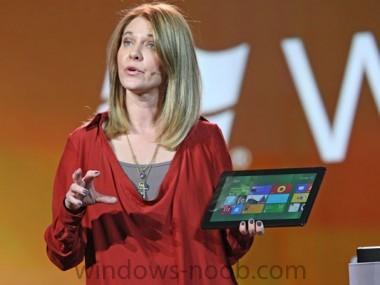
After months of rumors, Microsoft on Monday confirmed it is readying an update to Windows 8 for later this year. Codenamed Windows Blue, the update will enable Windows to run on a wider range of devices (read: smaller-screen tablets). In a blog post, Microsoft says the update will also respond to some criticisms of Windows 8 and Windows RT, but the company didn’t go into specifics. “Windows Blue is a codename for an update that will be available later this year, building on the bold vision set forward with Windows 8 to deliver the next generation of tablets and PCs,” Microsoft’s Tami Reller said in a blog post. “It will deliver the latest new innovations across an increasingly broad array of form factors of all sizes, display, battery life and performance, while creating new opportunities for our ecosystem.” In the blog post, Microsoft also said that it has now sold more than 100 million licenses for Windows 8. And, despite the criticism, Reller said Microsoft remains pleased with the operating system. “Windows 8 is a big, ambitious change,” Reller said. “While we realize that change takes time, we feel good about the progress since launch, including what we’ve been able to accomplish with the ecosystem and customer reaction to the new PCs and tablets that are available now or will soon come to market.” Microsoft billed Windows 8 as a “no compromise” operating system that would pave the way for devices that could offer all the benefits of both a PC and a mobile device. Hybrid designs allow for devices that act as both tablet and laptop, either through a flip of a swivel, a twist of the screen or the addition of a keyboard. However, critics have said that the reality of Windows 8 has fallen short of its goal amid a lack of top-tier apps and devices that often force a choice of either limited battery life or limited compatibility with older Windows software. PC sales have also not seen a hoped-for bump from Windows 8 as electronics buyers continue to spend money in other categories. For her part, Reller noted that the number of apps in the Windows 8 storefront is now six times what it was at launch and rejects the idea that the PC is past its prime. “The PC is very much alive and increasingly mobile,” Reller said. ” The PC is also part of a much broader device market of tablets and PCs. Windows 8 was built to fully participate in this broader and increasingly mobile device market.” via > allthingsd.com
-
great work Peter ! feel free to add a video of it here too
-
download the task sequence in that hta i linked to, and look at how the task sequence checks for variables and runs (or doesnt run) groups/steps based on the results
-
does this help ? http://www.niallbrady.com/2013/03/20/pxe-boot-failure-after-upgrading-to-system-center-2012-configuration-manager-service-pack-1/ if not at which point did your failure occur and did you follow my advice exactly ?
-
if you want to add anything into the task sequence then you can do so by using a combination of Set Task Sequence variable steps and on the options tab of (for example) a Run Command Line, you check for the value of the variable I don't do things the way you are doing it via a customsettings.ini, i usually popup a HTA to 'offer' the choices to the technicians, you can make that as simple or complex as you wish, have you looked at this yet ?