anyweb
-
Posts
9259 -
Joined
-
Last visited
-
Days Won
371
Everything posted by anyweb
-
 overlapping boundaries perhaps ?
 -
Update, update, update! CM2012 SP1 + SQL2012 + client updates
anyweb replied to h4x0r's topic in Configuration Manager 2012
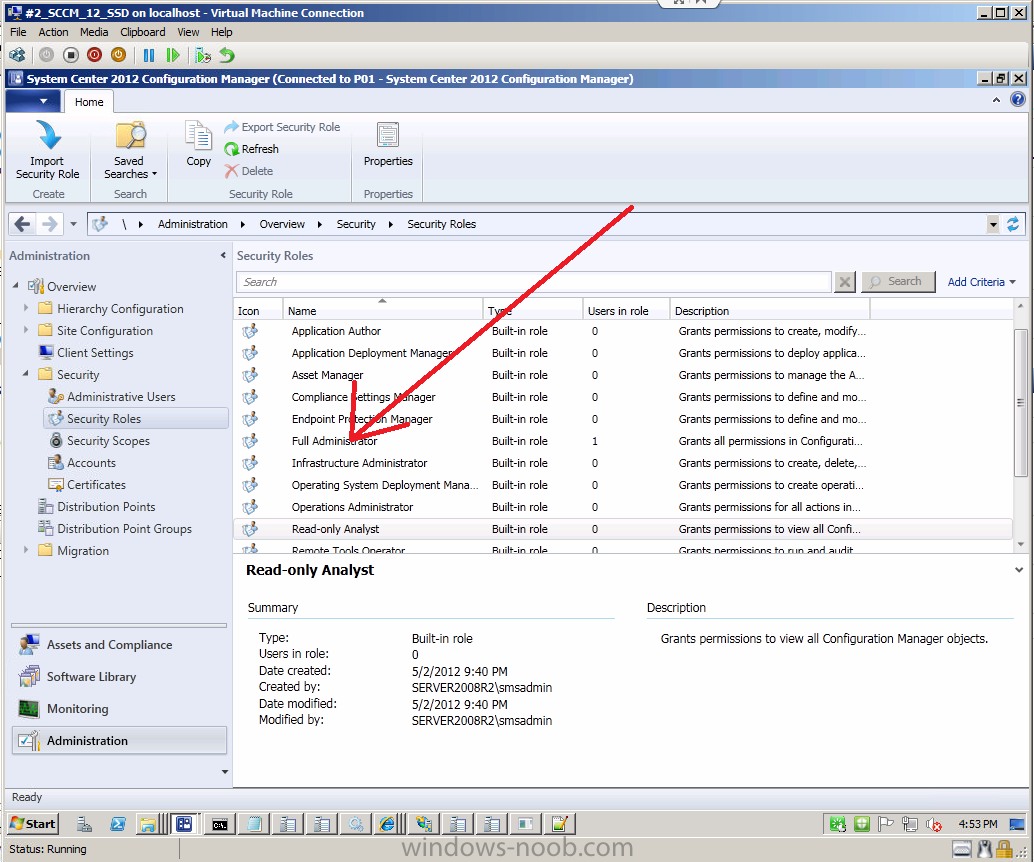
just grant the account that you are logged on with the same rights as the installer account (which is basically a full administrator)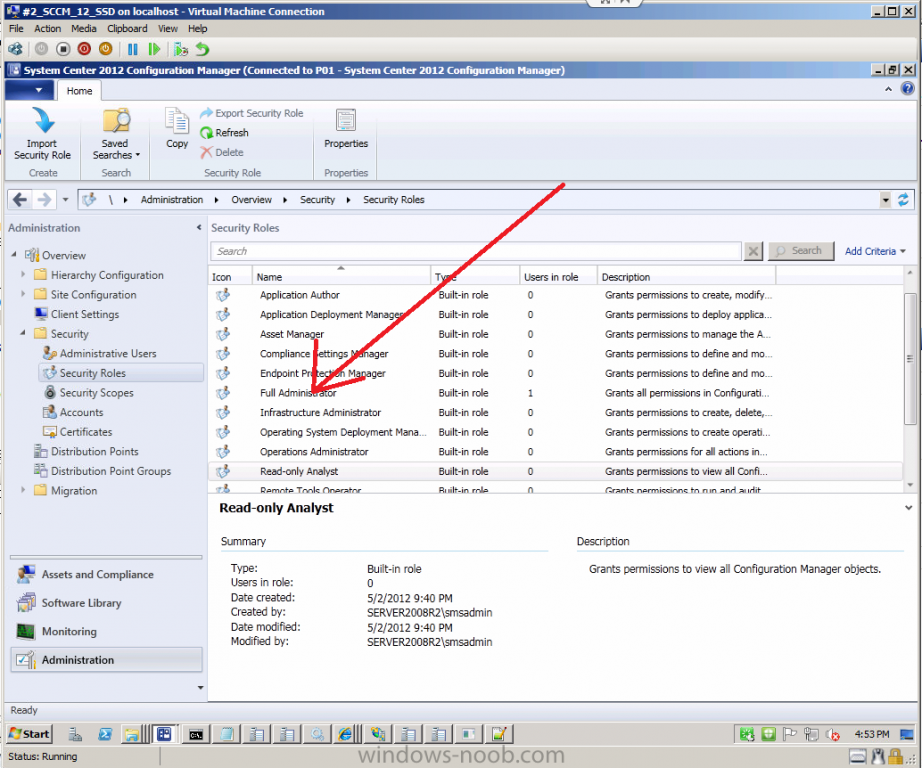
-
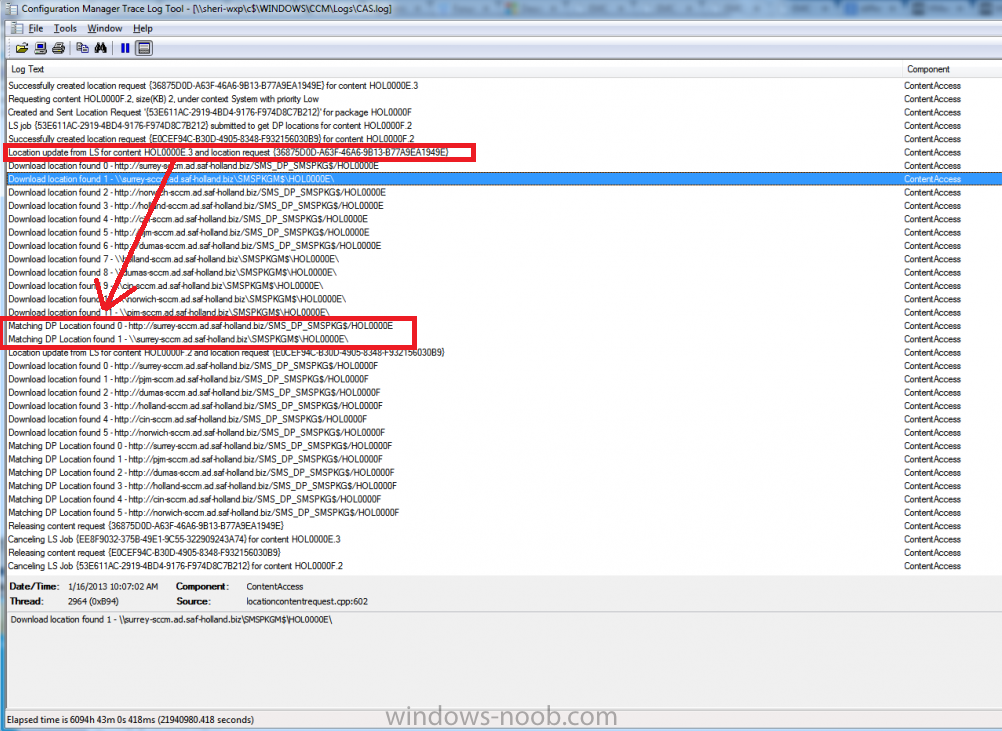
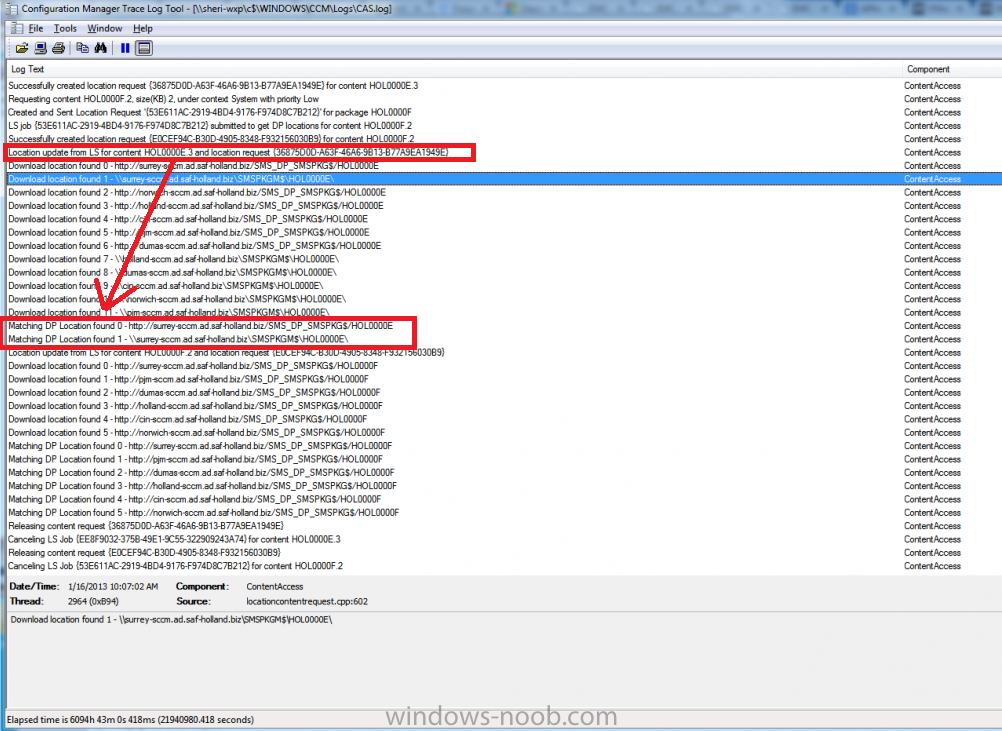
look for Matching DP location found X - in the above it lists two distribution points that match dp 0 and dp 1 (for your first package) and more dp's for your second package
-
have either of you looked at these settings yet ? http://technet.microsoft.com/en-us/library/hh825617.aspx#NewWindowsSettings
-
System Center 2012 Configuration Manager SP1 is released
anyweb replied to anyweb's topic in Configuration Manager 2012
here's a list of fixes in SP1 http://support.microsoft.com/kb/2801420 This article lists System Center Configuration Manager public hotfixes and KB articles that are included in System Center 2012 Configuration Manager Service Pack 1 (SP1). KB article number KB title 2688247 SQL Server cumulative updates must be manually installed on secondary System Center 2012 Configuration Manager sites that use SQL Server Express 2688285 The Apply button is unavailable after clearing the "Enable PXE support for clients" option on a System Center 2012 Configuration Manager Distribution Point 2688288 Changing the SQL Service Broker port while performing a System Center 2012 Configuration Manager site recovery causes the site to remain in Maintenance Mode 2691550 Multiple error messages are logged in the System Center 2012 Configuration Manager Distmgr.log file when you update shared Distribution Points 2691560 The status of a failed upgrade to a shared Distribution Point may be displayed incorrectly as "Failed to upgrade distribution point" in System Center 2012 Configuration Manager 2691875 Different results are displayed for software updates when you use saved searches in non-English versions of System Center 2012 Configuration Manager 2691946 You cannot reinstall a System Center 2012 Configuration Manager SMS Provider on a server had the same provider previously uninstalled 2693122 A System Center 2012 Configuration Manager Distribution Point contains no deployment package after using the Download Software Updates wizard 2693920 An incorrect number of computers is displayed in the Antimalware Activity report in System Center 2012 Endpoint Protection 2693927 You cannot use the "New Account" option to reset the password on the Active Directory forest discovery account in System Center 2012 Configuration Manager 2712387 WDS does not start on a PXE enabled remote Distribution Point in System Center 2012 Configuration Manager 2713465 Changing a property of a deployment appears to not be saved in System Center 2012 Configuration Manager 2713467 A PXE enabled Distribution Point that uses a self-signed certificate will generate many files in System Center 2012 Configuration Manager 2716956 Using the System Center 2012 Configuration Manager CMTrace log viewer to review a log that contains a line exceeding 8000 characters causes the log to be truncated 2716965 Remote Control fails with error C000012 in System Center 2012 Configuration Manager 2756110 Issues with System Center 2012 Configuration Manager Application Evaluation if a third party deployment type is not registered properly on a client 2709082 After moving the System Center 2012 Configuration Manager SQL Site Database to another drive, creating a new Software Update package or a new application fails 2717295 Description of Cumulative Update 1 for System Center 2012 Configuration Manager 2780664 Description of Cumulative Update 2 for System Center 2012 Configuration Manager 2796086 Configuration Manager Management Points collocated with clients fail after installing Windows Management Framework 3.0 and running Client Health Evaluation Resolutions to the following issues are also included in System Center 2012 Configuration Manager SP1. Setting a schedule in the future for a Software Updates deployment is working now as intended fixing an issue where TSInstallSWUpdate would previously stall and time out. The table ClientModeReadiness is now fully replicated. This fixes a previous issue where the report "Count of clients capable of HTTPS communication” would not return data when run on the CAS or would only return data for a particular primary server the report was run from. Installing a remote distribution point and specifying a local site system installation account, as opposed to a domain account, now no longer creates an untrusted login error. File names with a hash mark (#) are now properly encoded during download. Configuration Manager sites can now be used to back up a Remote SQL Server using the UNC path. In System Center 2012 Configuration Manager RTM, large database modifications included in a single transaction sometimes caused the replication system to take a long time to extract the change and send it over to another site. In SP1, large modifications are no longer allowed in single transaction. When using a variable list to dynamically install a list of applications within a task sequence, if one of the applications cannot be installed because the content is unavailable, policy provider no longer blocks and prevents all other applications from being installed. Task Sequences no longer experience significant processing delays or time outs due to large numbers of install software steps within the sequence when clients have slow or poor connections to the management points. -
sure, open a command prompt, type taskmgr, that'll bring up the task manager, you can then kill the current process (cscript ?) and it'll continue on with the next one, however this only works if you have continue on error on that group/step you can always run the USMT loadstate steps manually in the event of a failed migration.
-
have you configured any custom client settings to enable software and hardware inventory? have you followed the guides here ? if you do they'll explain how to get it working
-
are you deploying Windows 8 with the Configuration Manager 2012 SP1 ? the Sms\Mobile Client\Software Distribution registry key are safe to ignore, the failed to find suitable drivers are because you have not supplied driver packages containing drivers for the detected hardware, nothing too serious is the deployment failing ?
-
System Center 2012 Configuration Manager SP1 is released
anyweb replied to anyweb's topic in Configuration Manager 2012
nope, but i can ask, can you elaborate on exactly what you need to know ? -
Back in September, we announced our strategy around unified device management, and how the next releases of Windows Intune and System Center 2012 Configuration Manager will deliver on that vision. As part of today’s update to our Cloud OS vision, we’re pleased to announce that System Center 2012 Configuration Manager and Endpoint Protection Service Pack 1, as well as the latest Windows Intune service, are available today. Together, these releases deliver a unified device management solution for the enterprise, built on a “People-centric” model, where the user is the focus, not the device. IT is able to provide users with access to the corporate resources (applications and data) they need on the devices they choose. Administrators are able to address the unique challenges created by Bring Your Own Device policies by being able to identify and manage endpoint devices, including Windows PCs (physical and virtual), tablets, smartphones, Macs, and embedded devices all through a unified administration console. This blog post highlights new device management capabilities in Windows Intune and System Center 2012 Configuration Manager SP1. For information about new cloud and datacenter capabilities, please read the blog post located here. Windows Intune addresses new challenges IT departments face when managing devices, including: Providing management and software distribution across a range of mobile devices and platforms, including Windows RT, Windows Phone 8, Android, and iOS Through integration with Configuration Manager 2012 SP1, IT administrators will be able to manage both corporate- and personally-owned devices with a single console, making it easier to identify and enforce compliance A self-service portal for selecting and installing company apps With the latest release, the Windows Intune service is now expanded to 45 additional countries taking the total to 87 countries worldwide. Configuration Manager 2012 SP1 contains several enhancements, including: Support for Windows 8 and Windows Server 2012, including delivery of Windows 8 applications, the ability to limit downloads on 3G and 4G network connections to prevent unwanted data charges, and support for Windows To Go Native management of Windows Embedded devices Support for PowerShell for administrative tasks Windows Azure-based Distribution Points Support for Mac OS X devices and Linux and Unix servers Endpoint Protection 2012 SP1 contains enhancements, including: Ability to automatically deploy definition update three times per day Real-time administrative actions to update definitions, scan, and remediate issues quickly Client-side merge of antimalware policies For more information and to sign up for a free 30-day trial subscription to Windows Intune, click here. SP1 can be downloaded by MSDN and TechNet subscribers as well as through the Volume Licensing Software Center. via Technet Blogs > http://blogs.technet.com/b/windowsintune/archive/2013/01/15/delivering-unified-device-management-with-windows-intune-and-system-center-2012-configuration-manager-sp1.aspx
-
you can do it this way or using an Enable Bitlocker script and customize it to suit your encryption needs
-
and what version of the client is installed on that server ?
-
using SCCM 2012 in a LAB - Part 2. Add SUP and WDS
anyweb replied to anyweb's topic in Configuration Manager 2012
actually this post was originally about setting up the SUP (which involves WSUS) and Windows Deployment Services (WDS), so the Title is correct, however this post has since been superseded with this one. -
no, but it takes only a couple of hours, it just has to be a basic CM07 environment and once setup you'll be able to test all the migration abilities, you'll thank yourself later if you do plan on migrating anything if you don't want to migrate anything then don't bother.
-
How can I create a boot image with HTA support using MDT
anyweb replied to anyweb's question in Frontends, HTA's and Web Services
the HTA's which this boot image are created for can be found here -
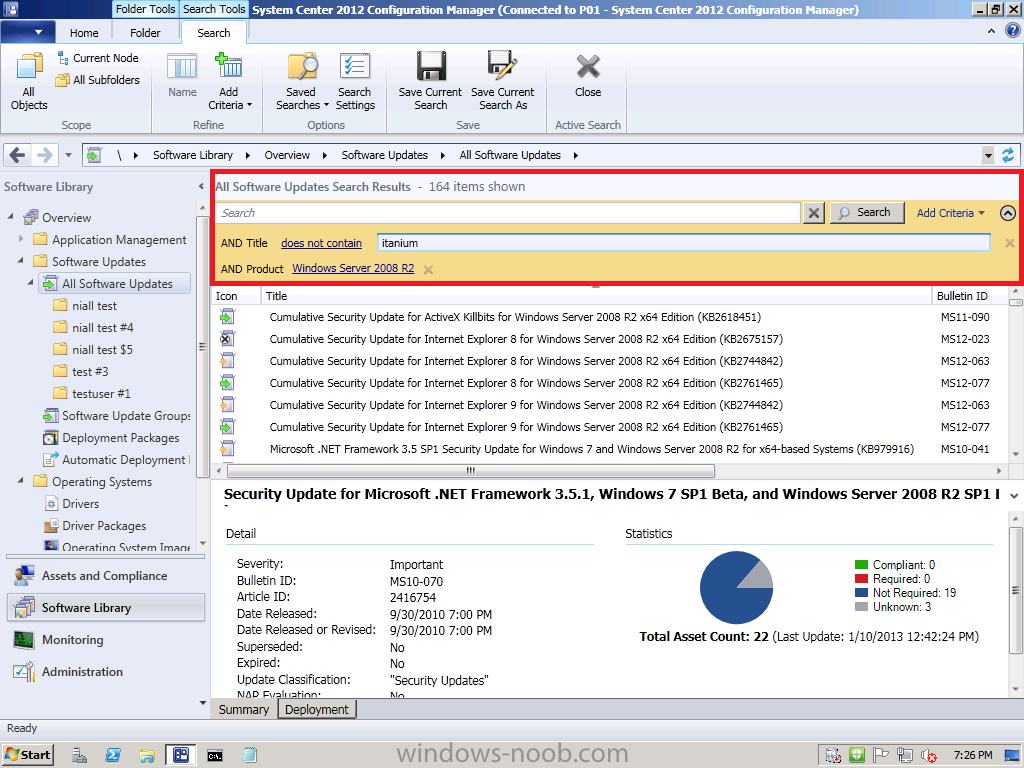
how about like so ?
-
Help! - BIG Issue with Primary DP After Updating to SP1
anyweb replied to BzowK's topic in Configuration Manager 2012
hi Ben did you use media from the VLMS site or from Technet/MSDN ? did you uninstall the WAIK prior to installing the ADK ? did you reboot your server(s) prior to running setup ? did you review this ? -
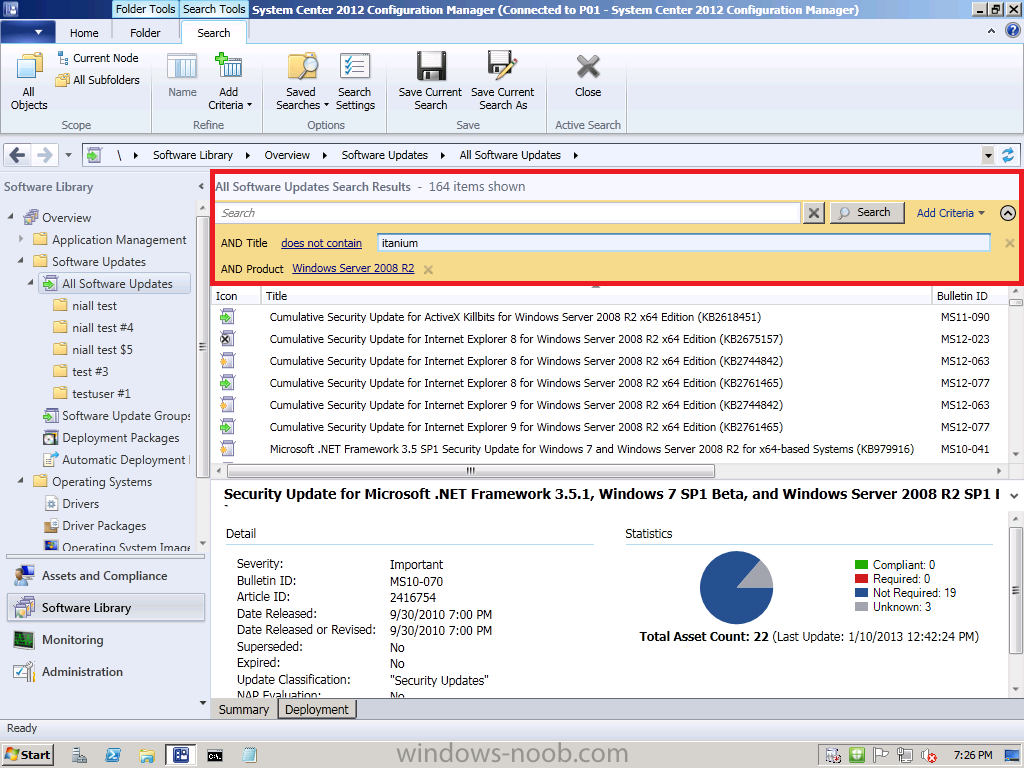
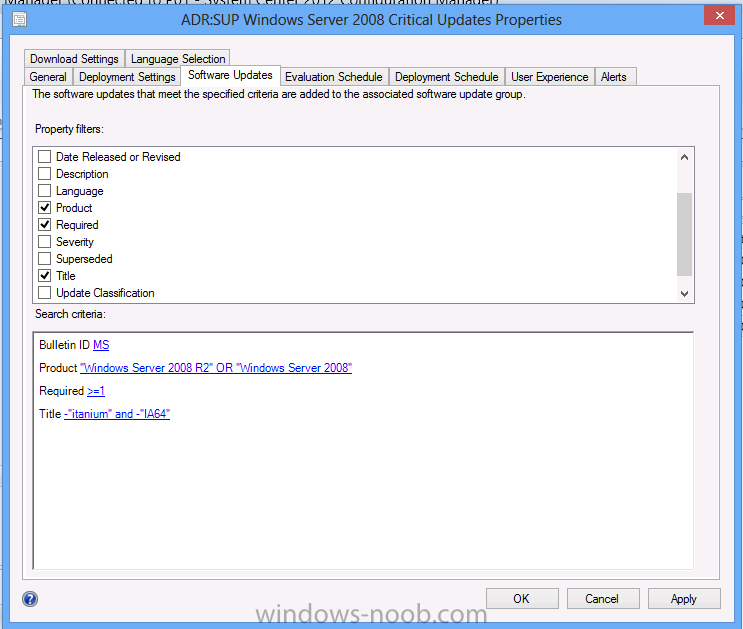
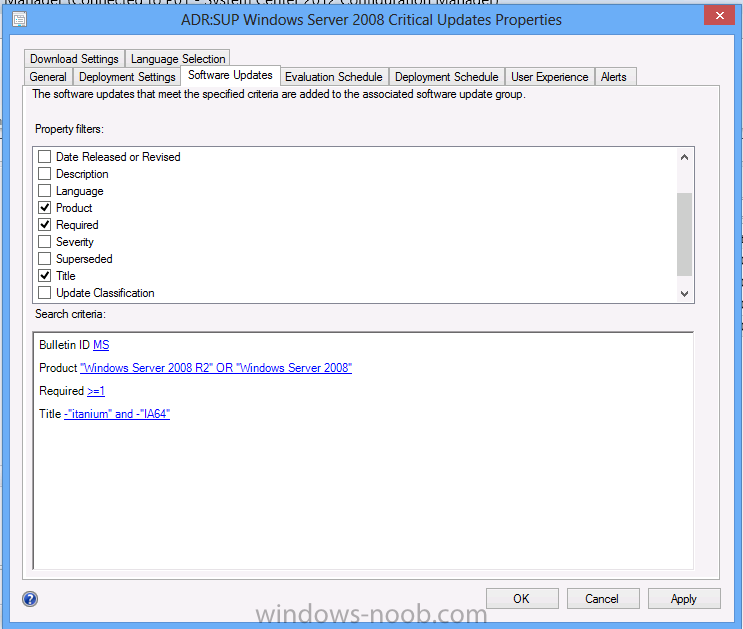
sure try -itanium and -ia64 in the title of your ADR like so
-
so which one has the old version ? your new site ? or your dp ? one of them has a client version install which is the RTM release of Configuration Manager 2012 (5.00.7711.0000), the other has the SP1 version of the client (5.00.7804.1000)
-
Help! - BIG Issue with Primary DP After Updating to SP1
anyweb replied to BzowK's topic in Configuration Manager 2012
hi Ben sorry for the delay in responding, was this server running the RTM release of Configuration Manager 2012 prior to the upgrade, did it have any of the Cumulative Updates (cu1, cu2) installed ? can you (briefly) describe your upgrade process on that site server ? -
Update, update, update! CM2012 SP1 + SQL2012 + client updates
anyweb replied to h4x0r's topic in Configuration Manager 2012
can you show me a screenshot of your site settings for Automatically upgrade clients.... have you configured any Client Deployment methods ? (sup, client push or other ?) -
Issues with Windows 7 OSD after WinPE
anyweb replied to SethCarter's topic in Configuration Manager 2012
you need to get the smsts.log file in order to find out what's gone wrong, enabled F8 command prompt support in your boot images and press F8 before the errror occurs during deployment, then capture the logs from c:\windows\ccm\logs and attach them here. -
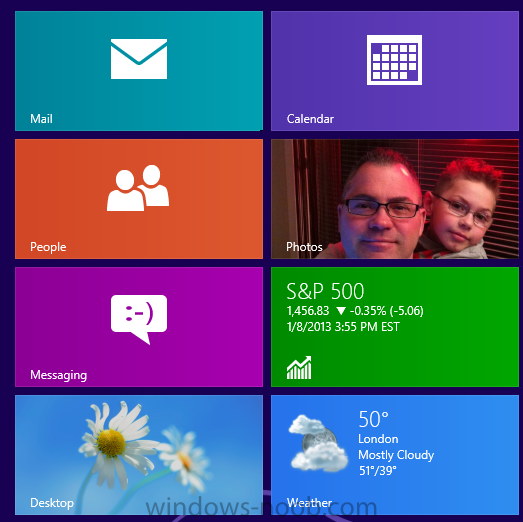
At the 11th Annual J.P. Morgan Tech Forum at CES 2013 today, Windows Chief Marketing Officer and Chief Financial Officer Tami Reller announced that Windows 8 has sold 60 million licenses to date. This represents the cumulative sales of Windows 8 including both upgrades and sales to OEMs for new devices. This is a similar sales trajectory that we saw with Windows 7. We have seen a significant increase in the number of Windows 8 certified systems since general availability at the end of October. There are now more than 1,700 certified systems for Windows 8 and Windows RT. I suggest reading this post from Nick Parker putting the spotlight on several very cool new Windows 8 PCs announced by our OEM partners this week at CES. This week we also highlighted strong growth in developers building for Windows 8. Since the opening of the Windows Store the number of apps has quadrupled and we passed the 100 million app download mark – just two months after general availability. via > http://blogs.windows...indows-noob.com
-
Console refuses to connect after WMF 3.0 update applied
anyweb replied to vremenar's topic in Configuration Manager 2012
glad it's working now -
SP1 console crashes on Windows 8 (.net related)
anyweb replied to Iroqouiz's topic in Configuration Manager 2012
was the console installed on the windows 8 box before the ugrade ? did you try to reinstall the console on the windows 8 box after the upgrade ?