anyweb
-
Posts
9277 -
Joined
-
Last visited
-
Days Won
371
Everything posted by anyweb
-

remove notifications of buisness apps
anyweb replied to sccm_freak's question in Software Update Point
then make the package Mandatory, and in the program options General tab set it to run hidden and on the Advanced tab click on Suppress program notifications -
hi all, I know how hard it is to get grips with SCCM, MDT, WDS, PXE, WAIK so windows-noob.com will start doing some webcasts, so, do any of you have any requests ? let me know cheers niall
-
please attach the SMSTS.log file
-
either you dhcp server is not working or you need network drivers added to windows PE, i'd try testing the first option (easiest)
-
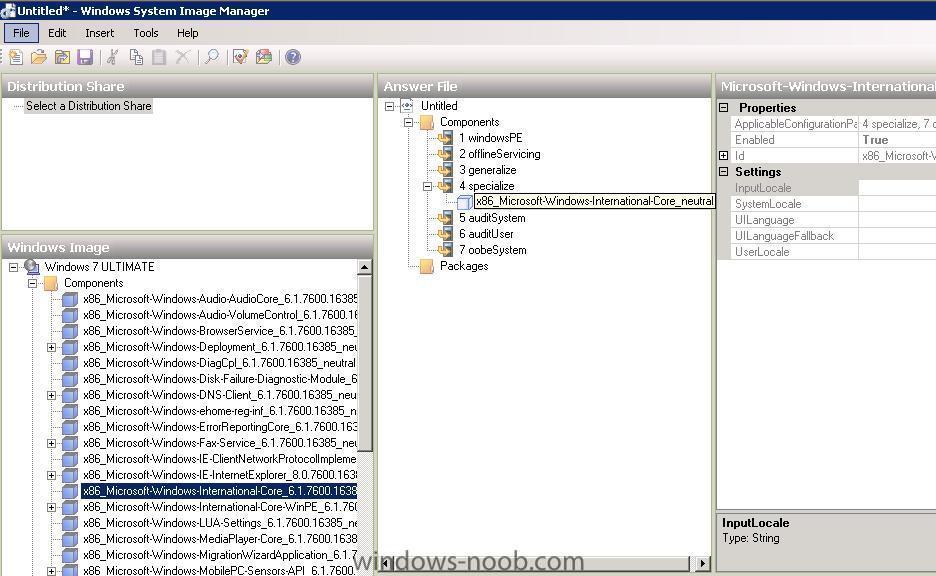
setting values using WSIM
-
are you trying to deploy windows 7 ? did you look at the troubleshooting section here ?
-
WDS Error and DHCP Problem
anyweb replied to Malik4u's question in Windows Deployment Services (WDS)
did you configure a DHCP server ? -
please raise a new post about this, and one problem at a time, that way when its resolved others can find the info easier. I'm closing this thread as people are just replying to it instead of starting new posts explaining what they are trying to do and what the errors are. cheers niall
-
your command line should be something like this otherwise the transforms won't be applied msiexec.exe /q ALLUSERS=2 /m MSIHINKJ /i "Pro11.msi" TRANSFORMS=officepro.mst
-
based on your SCCM version info you are running SCCM 2007 SP1 without the R2 feature pack, so...... consider upgrading to SP2 and then installing R2 then try again.
-
how are you planning on doing this ?
-
good to know Peter, so did webdav require any special config ? any other gotchas that you'd like to share ?
-
2nd Program in Package not Launching
anyweb replied to LB317537's question in Deploy software, applications and drivers
are you launching this in a task sequence or as a package advertised to a collection ? -
did you set any scope options for DHCP ?
-
software updates during OS deployment
anyweb replied to jeaostro's question in Software Update Point
remove the .net and try again, does it work then ? -
yes, but its not too easy, you'll need to install and use System Center Virtual Machine Manager to do the conversion
-
I havnt tried installing SCCM 2007 R2 in Server 2008R2 yet but will do so soon. meanwhile I got this feedback from a user here on the forums about webdav 7.5 to be clear, are you using SCCM 2007 SP2 r2 or SCCM 2007 SP1 r2 ?
-
the SCOM guides will remain private for the time being. sorry.
-
2nd Program in Package not Launching
anyweb replied to LB317537's question in Deploy software, applications and drivers
in the program properties, click on the advanced tab, you have the option there to Run Another Program first, is that selected ? -
this post on Peters blog should give you some ideas. cheers niall
-
software updates during OS deployment
anyweb replied to jeaostro's question in Software Update Point
are any of the updates listed to do with .net ? or expired ? -
have you tried uninstalling wds, removing the psp role and then deleting everything in c:\windows\temp then reboot the server, reinstall WDS, reboot server and reinstall the PSP role ?
-
it's gone, read the README that comes with the download, if you want unknown computer support from SCCM now, you will have to use the R2 feature pack cheers niall
-
sup requires a wsus backend but it must NOT be configured,. read the SUP guides here on the forums http://www.windows-noob.com/forums/index.php?/forum/66-software-update-point/ cheers niall