



Welcome to windows-noob.com!
Logging in will allow you to download scripts used in the guides.
If you came here looking for the Endpoint Manager step-by-step guides then please start here.
Register for free and ask your questions in our forums.
- 0 replies
- 4498 views
- Add Reply
- 2 replies
- 2898 views
- Add Reply
- 0 replies
- 5519 views
- Add Reply
- 2 replies
- 2965 views
- Add Reply
- 1 reply
- 2460 views
- Add Reply
- 9 replies
- 11721 views
- Add Reply
- 1 reply
- 1910 views
- Add Reply
- 1 reply
- 2555 views
- Add Reply
USMT Capture State Fails : "The operating system reported error 2147942436: Too many files opened for sharing."

By jonrowe81,
I am trying to implement USMT into my task sequence, and it's failing on the capture state stage.
My server is running the most recent version of SCCM as well as ADK 10.1.10586.0
It will connect to the state migration point, it creates the 74795756929954750638DAED58C11F01F72E71B19054B42163676F06DB0B31A0 share and then pops up the following error message:
The task sequence execution engine failed executing the action (Capture User Files) in the group (Capture Files and Settings) wit
Client Push Multiple Domains

By syparon,
Gents,
I'm trying to setup the client push in order to push the client in multiple domains (untrusted)
I tried to add the property SMSMP with all the MPs separated with ";" and I also tried to add the parameter SMSLP and I did the same but it did not work at all.
Does somebody have an idea ?
Configuration Manager 1602 Hotfix KB3155482 Issue

By surfincow,
Hello,
Went to install this hotfix earlier today and during the first try I received the following error from the Üpdate Pack Installation Status" window (the window under Monitoring > Site Servicing Status > $Update. it was a separate pop-up message)
Microsoft.ConfigurationManagement.ManagementProvider.WqlQueryEngine.WqlQueryException: The SMS Provider reported an error connecting to the ConfigMgr site database server. Verify that the SQL Server is online and that ConfigMgr site s
Workstation Task Sequence - System Center Configuration manager 1602

By Stnrsn0,
Hi
I want to install several computers that is in a Workgroup task sequence.
The computers will not be managed by Config Mgr. after OS is deployed.
I want to deploy the OS from PXE boot.
My questions:
1. Can this be done?
If this can be done
1. Do I need a "thick OS image" (with all applications installed) or is it possible to add Applications in a Task Sequence?
2. Do I remove the SCCM PC agent in the Task Sequence or do I manually remove it after the OS is deployed?
3. Is it
Deployment Monitoring Broken after upgrade

By whoishomer1,
So I was running a single SCCM 2012R2 server on Windows 2008 R2.
I updated from 2012R2 to Current Branch 1511, then 1602.
After going to 1602 I updated the OS to Windows 2012R2 (first removing WSUS & SUP, then readding along with the hotfix)
All seems good.
I was able to download June's updates and deploy them to my windows 7 machines. I get the popup on my clients indication that software changes are required and all the June updates show up. I've installed them on about 5 or six c
Unable to Install Task Sequences via Software Center

By crmatthews,
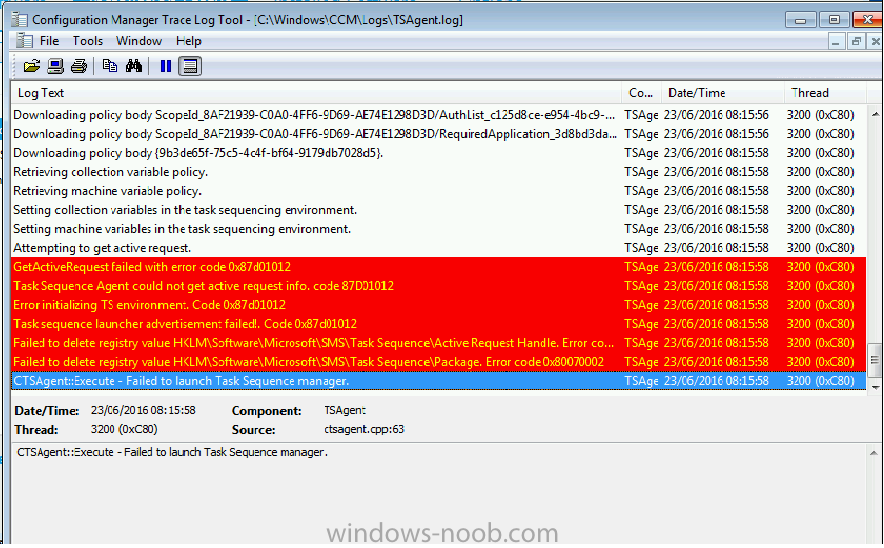
Hi,
So i have recently upgrade to 1511, i believe since then I'm unable to install Task Sequences via Software Center.
When i select a TS, for example the TS used to build the machine Software Center displays Downloading then Installing for about 2 minutes, then installed.
During this process there are no smsts logs created, but the TSAgent log does display this error message at the end.
So far i have created all new TS's, redistributed the Boot image and OS image, checked all
Packages not distributing(OS Boot did)

By Robbie Wallis,

Application Packages appear to have stop distributing to our child site. I know I redistributed OS Boot Images and they went across fine
There are 6 application packages that appear to be stuck. I am trying to debug and have found this. They are reaching despooler then it seems to hit retry time and sends them again? and again? A couple of the packages are just a registry entry so tiny show as 0MB
How can I add dployments types OS requirement to all applications ?

By SebastienSocomec,
Hi Everyone,
I just install the new SCCM 1602 and begin to migrate my applications from SCCM 2012.
We use the OS requirements to only install software on Windows 7, and now we need to add the ability to install applications for Windows 10.
Did you have a script to add the Windows 10 OS requirement on every deployment types in my applications ?
I'm not very confortable with powershell, it's why I'm asking you .
Thank's
Seb